Flashes & lighting
Ricoh Speedlite PX User manual
User manual for Ricoh Speedlite PX. 6 pages in English. Read the original PDF, download or print a copy without registration.
6 pagesEnglish0.1 MB PDF
Loading your manual…Open PDF directly
Document details
- Brand
- Ricoh
- Model / document
- Ricoh Speedlite PX
- Document type
- User manual
- Language
- English
- Pages
- 6
- File size
- 0.1 MB
- Category
- Flashes & lighting
- Document date
- Not specified in catalog
Search available document text
Find a term, then jump to its page in the original PDF. Image-only pages may not be searchable; check the PDF for exact wording and diagrams.
Page 2 · Read text
Attaching the flash unit ............5

Photography mode .................5

Program AE flash photography ...6

Aperture-priority AE flash photography ...6

Shutter bias AE flash photography ...7

Manual flash photography ...7

Flash in daylight ...7

Correct exposure ...8

Detaching the flash unit from the camera ...8

Proper care .....8

Specifications ......9

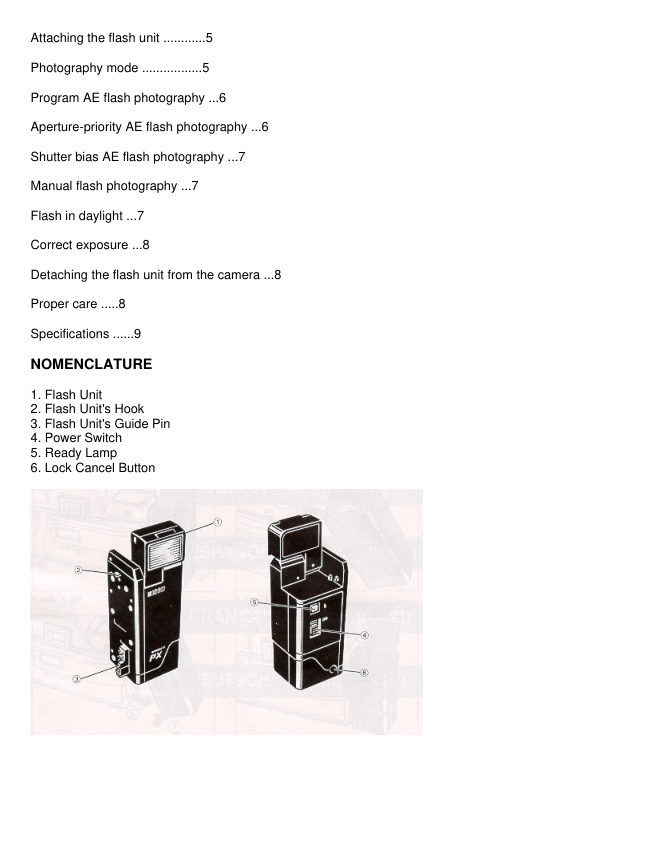
NOMENCLATURE

1. Flash Unit
2. Flash Unit's Hook
3. Flash Unit's Guide Pin
4. Power Switch
5. Ready Lamp
6. Lock Cancel Button
View original page 2
Page 3 · Read text
BATTERY

The flash unit is recharged by batteries installed in the camera.

* When the outer frame of the     symbol blinks in the LCD Panel of camera body, don't use the flash.
After replacing with new batteries, you can use the flash unit.

* Generally, the performance of batteries drop in cold conditions. When the flash unit is used at a
temperature lower than 0° C (32° F), warm the batteries and insert them into the camera just before
shooting.4www.butkus.org

ATTACHING THE FLASH UNIT TO THE CAMERA

Attach by hooking the flash unit's hook onto the camera's holder (1) then by pressing the unit's guide pin
into the camera's guide hole until it clicks into place (2). (Fig. 1)

PHOTOGRAPHY MODE

When the f lash unit is used with the XR-M, XR-X, the shutter speed and f-stop number are
automatically set when the camera is set to program AE photography. Flash photography is by a direct
metering system and light is measuring off the film plane to control the flash duration.

Program AE Finish Photography

· Set the camera to the program AE photography

· Select the program according to the picture-taking conditions, referring to the following table.

            Automatic      Automatic
Program     f-stop           flash           Subject/Situations
              setting        range (m)
                             0.5 - 1.1
PD        F11                     when you want maximum depth of focus.
                             0.5 - 2.2
                                0. 5 - 2.1
P            F5.6                        General snap  shots.4www.butkus.org
                             0.5 - 4.2
                              A distant subject.
                                0.5 - 4.3
PA          F2.8                        Continuous picture-
                                0.5 - 8.6
                                             taking because of shorter recycling time.
                                                           Upper figures for (ISO/ASA 100)
                                                           Lower figures for (ISO/ASA 400)
· Push the Power Switch upwards to turn on. (Fig. 2)

· When the flash is fully charged, the Ready Lamp lights up, and the Flash Ready Indicator     lights up
in the Viewfinder. (Fig. 3) Then take picture.
View original page 3Page 4 · Read text
Aperture-priority AE Flash Photography

With the XR-M, XR-X, the TTL Direct Auto Flash is available with all f-stop numbers for total creative
depth of field control. Use wider lens opening (F2.0, F2.8) to take a distant subject or to reduce f lash
recycling time. Use smaller lens opening (F11, F16) to increase depth of field.

1. Set the desired f-stop number.
2. Set the shutter to "AUTO"

Automatic flash range at each f stop number


f-stop    Automatic flash range
 f1.4      1.0 (3.3~) - 8.5 m (28')
 2        0.7 (2.3' - 6.0 m (19.8')
2.8       0.5 (1.6' - 4.3 m (14.1')
4         0.5 (1.63—3.0 m (9.9')
5.6       0.5 (1.6' - 2.1 m (6.9')
8         0.5 (1.6') - 1.5 m (4.9')
11      0 5 (1.6 '- 1.1 m (3.6')
16      05 (1.6' - 0.8 m (2.6')
22        0.5 (1.6' - 0.6 m (1.9')

 (ISO/ASA 100 film: if you have faster film, multiply the furthest footage by the film speed.
Example ASA 200 [two times faster] at F8 will extend flash ability to 9.8' and ASA 400 at F8 to 19.6')

Shutter Bias AE Flash Photography

1. Set the shutter speed to 1/60 sec. or lower.

2. Set the f-stop Ring to "P"

3. Set the desired program mode.

* If you set the shutter speed to 1/125 sec. through 1/2000 sec., the shutter speed is automatically set to
1/100 sec. It is designed to prevent underexposed pictures.

Manual Flash Photography

1. Set the shutter speed to 1/60 sec. or  lower.4www.butkus.org

2. The pre-set shutter speed is shown by the indicator in the Viewfinder. A second indicator blinks to
indicate a "Suggested" speed at a given f-stop.

3. When the f-stop Ring is tufted and the Shutter Speed Indicator and the blinking indicator showing
correct exposure overlap each other. This indicates that correct exposure is set.

* Depending on the picture-taking conditions, there may be eclipsing (only center image is lit) when the
following lenses are used.
View original page 4
Page 5 · Read text
1) When zoom lenses (except 35—70 mm) are used at a wide angle up to 50 mm.

2) When wide-angle lenses up to 35 mm are used.

FLASH IN DAYLIGHT

The subject is affected by strong background light when taking pictures in back light. Dark pictures (face,

etc.) may be produced. Properly lit pictures can be obtained by using flash even in daylight, this is
known

as Fill-Flash.

1) Set the camera to the program AE flash photography mode.

2) Turn the Power Switch on to pop up flash unit.


3) When the flash is fully charged, the Ready Lamp lights up, and the Flash Ready Indicator     lights up
in the Viewfinder. Then take picture providing that you do not see an overexposure (>) mark.

* For synchronized flash photography in daylight, the daylight fill flash indicator will light.

* At the set photography mode, when there Is sufficient external lighting for a properly-exposed picture,
the intensity of the flash will be 1/4 as compared to when the flash is the only light source

* The photography range of fill flash is about twice the distance displayed when in the program AE flash
photography mode.

CORRECT EXPOSURE

The Flash Ready Indicator blinks in the Viewfinder for about one second when the flash shot is made
with the correct exposure.

DETACHING THE FLASH UNIT FROM THE CAMERA

While pressing the lock cancel button (1), pull the unit in the direction of the arrow (2). (Fig. 4)

PROPER CARE OF YOUR FLASH

* Even if you do not use the flash for an extended period of time, it should be tested from time to time in
order to properly maintain the condenser.

* A high voltage is generated in the circuitry. It is very dangerous to take it apart or to touch the inside of
the flash unit. It should be taken to a camera dealer or a recognized Ricoh service station for all repairs.

* Avoid exposing the flash unit to dust, humidity, rain, seawater, etc.

* Do not leave it in hot or humid condition such as direct sunlight as this will cause malfunction of the
flash unit.
View original page 5
Page 6 · Read text
* Clean the body of the flash unit with a dry soft cloth. Be especially careful not to dirty the contact
points. Never use solvent such as thinner, benzene, etc.

SPECIFICATIONS

Type: Thyristorized TTL direct Automatic flash unit

Guide Number: 12 (ISO 100, m)

Recycling Time: About 3 sec.

Coverage Angle: 45° on vertical and 60° on horizontal 35 mm wide angle lens

Power Source: By batteries installed in the camera       4www.butkus.org

Dimensions: 32 (W) x 73.5 (H) x 31.5 (D) mm

Weight: 70g
View original page 6
Related documents and language editions
From the M. Butkus archive. Original publisher and archive notices are retained.
Check the model and edition against your equipment.
PDF verified 2026-10-10.