Film cameras
Rolleiflex 3.5F - 2.8F User manual
User manual for Rolleiflex 3.5F - 2.8F. 22 pages in English. Read the original PDF, download or print a copy without registration.
22 pagesEnglish1.5 MB PDF
Loading your manual…Open PDF directly
Document details
- Brand
- Rollei
- Model / document
- Rolleiflex 3.5F - 2.8F
- Document type
- User manual
- Language
- English
- Pages
- 22
- File size
- 1.5 MB
- Category
- Film cameras
- Document date
- Not specified in catalog
Search available document text
Find a term, then jump to its page in the original PDF. Image-only pages may not be searchable; check the PDF for exact wording and diagrams.
Page 2 · Read text
Please start with the "Short-cut to the First
Exposure". Only two pages, but they will tell you in
rapid fashion all you need to know.


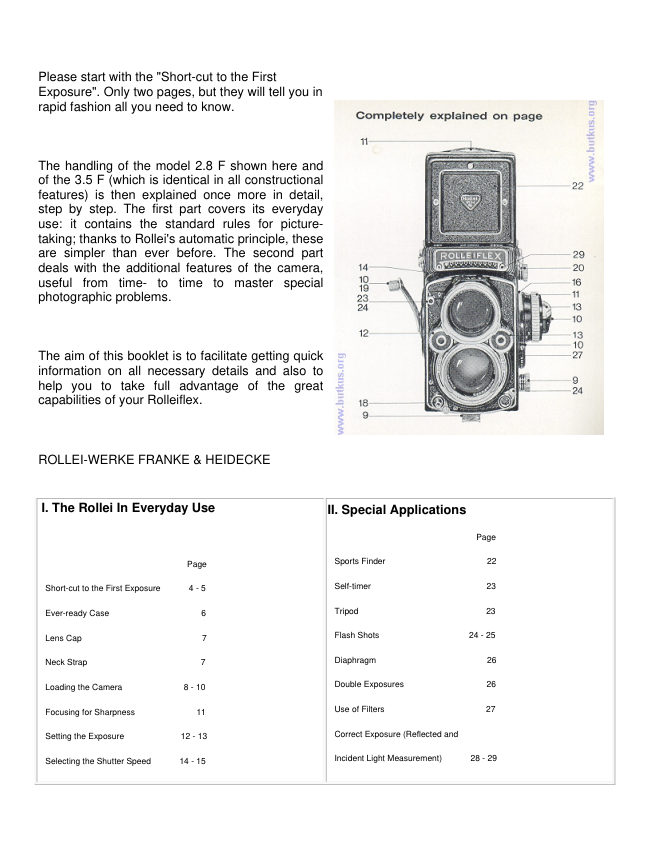
The handling of the model 2.8 F shown here and
of the 3.5 F (which is identical in all constructional
features) is then explained once more in detail,
step by step. The  first part covers  its everyday
use:  it contains the standard rules  for picture-
taking; thanks to Rollei's automatic principle, these
are simpler than ever before. The second part
deals with the additional features of the camera,
useful  from  time-  to  time  to  master  special
photographic problems.


The aim of this booklet is to facilitate getting quick
information on  all necessary details and also to
help you  to  take  full advantage  of  the  great
capabilities of your Rolleiflex.


ROLLEI-WERKE FRANKE & HEIDECKE


 I. The Rollei In Everyday Use                                II. Special Applications


                                                                                        Page

                              Page                               Sports Finder                      22

  Short-cut to the First Exposure      4 - 5                                   Self-timer                         23

  Ever-ready Case                    6                                Tripod                           23

  Lens Cap                          7                               Flash Shots                   24 - 25

 Neck Strap                        7                            Diaphragm                        26

  Loading the Camera             8 - 10                             Double Exposures                  26

  Focusing for Sharpness             11                          Use of Filters                      27

  Setting the Exposure            12 - 13                                Correct Exposure (Reflected and

  Selecting the Shutter Speed      14 - 15                                   Incident Light Measurement)      28 - 29
View original page 2Page 3 · Read text
Depth-of-Field                1 6 - 1 7                                 Adjusting the Exposure Meter         30


  Releasing Shutter                  18                            Exposure Value                    30


  Film Transport                     19                            Changing the Magnifier              31


  Shutter Tensioning                 19                            Changing the Back                 31


  Unloading the Camera              20                                    Rolleikin                          32


  Care of the Camera                 21                                     Rolleiflex Accessories           33 - 34


The designations left, right, forward, back, above, below apply to camera in normal operating position.
Accordingly: left = focusing side, right = crank side, etc.


                                                            Short-cut to the First Exposure


                                                                                      (I) DIN—ASA Setting


                                                       Immediately after loading the camera: gently press knurled
                                                  knob and set to the DIN or ASA value of the film used in
                                                   camera—important for getting correct exposure.

                                                      Set filter scale to zero ( --> page 27).


                                                                  (2) Focusing

                                                     Raise rear edge of focusing  hood.4www.butkus.org


                                                      Composition and sharpness can now be examined on the
                                                          focusing screen;  turn  the focusing knob  until  principal
                                                             object appears with maximum sharpness. For more critical
                                                          observation of the image, raise magnifier by gently pressing
                                                          the direct view finder panel. Direct view finder ~ page 22.


                                                                   (3) Pre-selecting Shutter Speed


                                                     Turn speed selector wheel, using right thumb,  until the
                                                          desired shutter speed (red figures) appears in the center of
                                                          the peep window. Selecting Shutter Speed ~ page 14.
View original page 3Page 4 · Read text
(4) Setting the Exposure


Turn stop  selector wheel, using  left thumb,  until both
pointers of the exposure meter are in line which each other.


Just one more glance—to check framing and focus—and
the Rolleiflex is ready to shoot.


Incidentally, by pre-selecting the diaphragm opening, the
depth-of-field required can be determined first (A page 16).
To  line up the exposure meter pointer, turn the speed
selector wheel: click shutter speed into position and make
final adjustment with diaphragm wheel (A page 14).


(5) To Release Shutter


Swing  the  safety  lever from   If,  (locked)  to  (unlocked)
position; press shutter release.


(6) Film Transport


Swing out crank and turn with one continuous swing —
forward to stop and back again to stop.


This operation cocks the shutter, advances the film to the
next frame and sets the picture counter to the next
exposure. The Rolleiflex is ready for the next picture.

This operation cocks the shutter, advances the film to the
next frame and  sets  the  picture  counter  to  the  next
exposure. The Rolleiflex is ready for the next  picture.4www.butkus.org
View original page 4
Page 5 · Read text
Ever-ready Case


                                            To open:  lift the top from the rear (I) and fold forward and
                                                   down. Before closing the case set camera to (1)


                                             Removing the camera: swing locking levers on either side
                                                                 of strap holder downward (2) — the two sides of the case
                                                  can now be spread apart.  Lift crank outward, spread the
                                                          sides slightly and pull camera forward.—To insert: spread
                                                          the two sides of the case slightly, guide the raised crank
                                                        through opening from the inside and lower the camera
                                                   backwards into the case. Press the sides together and swing
                                                             locking levers upward.


                                                  Detaching the front (if required): press clip downward (3),
                                                 remove the front flap, lifting  it backward.—To attach: insert
                                                          the front flap in hinge and close ever-ready case.


Lens Cap


To remove: lift the lower part by the tab at the lower edge and fold it against the upper part; remove cap from the bayonet
by turning it counterclockwise (4).


To attach: fit the folded cap into the viewing bayonet and fold down after a short turn (5).


Neck Strap

To attach: insert the retaining prongs at the ends of the strap into the strap holders ton camera or ever-ready case) and
they will immediately snap into position.4www.butkus.org
View original page 5Page 6 · Read text
To release: press the retaining prongs together and pull strap (6).


The leather loop and snap buttons on the left side of the ever-ready case serve to hold the protective leather cover for the
light meter in place. It is necessary to un-snap the lower left button before opening the case, when the meter cover is
used.


Loading the Camera


Please do not try to insert your first film until you are fully familiar with the handling of the camera. Otherwise continue on page 11.


The Rolleiflex uses 2 3/4x3 3/2" roll film No. 120 or 220* (B II 8) giving 12 or 24* exposures "2 1/4 x2 1/4''.


The Film Pressure Plate inside the camera back can be adjusted for 120 roll film as well as for 35 mm film (using Rolleikin, ~ page 32): when using roll film, the
inscription 2/ x 21/4" must be visible.


Never change film in direct sunlight! Utilize, at least, the shadow of your own body!
View original page 6
Page 7 · Read text
To open camera: turn the safety back lock clip at the tripod socket (I), lift back lock lever (a) and pull back open.


To adjust film guide plate: press the plate against the back, push it up or down until it stops 0 and let spring forward into the normal  plane.4www.butkus.org


Inserting new film spool: pull out film spool knob of lower spool chamber (4), insert film, right side first, and allow film knob to return to position.


Tear off tape seal.


Thread the beginning of the backing paper C printed side outwards C through the rollers of the film feeler mechanism (5) and push the paper leader into the long
slot of the take-up spool (using the crank for correct positioning) (6). Tighten the backing paper by one half turn of the crank, while braking the full spool with the
thumb (7).


To close camera: press the back with the palm of the hand, fold down the back lock lever and secure (8).


Adjusting to DIN/ASA speed ratings (1): determine the speed of the film used (to be found on the packing or an accompanying instruction sheet),
which will be indicated in DIN or ASA values. Gently press and turn knurled knob until the corresponding speed rating appears above the indicator mark
in the DIN or ASA window. (The dots correspond to intermediate film speeds, ~ page 27.)


This setting has to be adjusted whenever a different speed film is used.


Setting the filter factor (a): Under normal shooting conditions, turn setting button to zero. Set the corresponding filter factors only


when using filters requiring a prolonged exposure (--> page 27).


Setting the film type (as a reminder) (2): Turn the knurled knob at the focusing knob to set the film type—black and white, color artificial light, color
daylight, color negative.


Advancing the film to No. 1: Turn crank continuously until  it stops—past a slight resistance during the last turn, when the counter mechanism
engages—and then in opposite direction until it stops again A). The crank is now locked in its starting position. The film frame counter indicates No. 1,
shutter is cocked—the film is in correct position and ready for the first exposure.
View original page 7
Page 8 · Read text
Focusing for Sharpness


To open the focusing hood:  lift rear edge of hood 0 and raise cover. To
close: fold in both sides A).


To raise magnifier: press direct viewfinder panel inward, following  this
simple method: grip upper edge of hood with two fingers, pushing the panel
gently inward with the fingertip (a). Always hold magnifier close to the
eye.— To close: push magnifier support down Q).


Focusing: Turn the focusing knob until the picture is pin sharp, or until the
two halves of the image meet in the Rangefinder Wedge (Center of the view
finder).4www.butkus.org


Setting for Correct Exposure


                                                                                 If you select the shutter speed first:


                                                         turn the speed selector wheel fright) until the desired instantaneous shutter speed (red figure)
                                                appears In the center of the indicator window, and then adjust the diaphragm opening:


                                                         turn the diaphragm wheel Cleft), until both exposure meter pointers are lined up


                                      —you can always be sure: the exposure will be correct.


                                                    This is an easy rule. All you have to do is to watch two pointers. Thus Rollei clearly signals:


                                          The exposure is correct, when both pointers are aligned.


                                           Any sudden change in light intensity—indicated by the moving meter needle—can be noticed
                                                            instantly and can then be compensated for by the proper pointer adjustment. With the camera
                                                 ready to shoot, correct exposure is kept under constant control, even up to the actual moment of
                                                  exposure.
View original page 8Page 9 · Read text
This automatic exposure control covers an extremely wide measuring range, it is limited only
by the poorest illumination, which will not allow the thin meter needle to leave the area of the
red reference mark.


The exposure meter is directly cross-coupled to the speed and stop settings. Adjustment
according to the meter automatically sets the depth-of-field indicators well. This facilitates
focusing even further. Now you can also pre-select the diaphragm opening, without checking
the diaphragm setting,—depending upon whether you prefer a faster shutter speed (A page
14) or a greater depth-of-field (A page 16). The correct speed/stop relationship is positively
controlled by the two pointers.4www.butkus.org


                                Selecting the Shutter Speed


                                         The red section of the scale denotes instantaneous, shutter timed speeds, in fractions of a
                                            second (500 = 1/500th sec., 1 = 1/1 = 1 sec.). Intermediate values between clicks cannot be used
                                                        therefore: always set shutter so that desired speed figure is in the middle of the indicator window.
                                                  This rule also applies when pre-selecting depth-of-field. Only after clicking the speed into position
                                            can the final adjustment of the exposure meter pointers be made with the diaphragm control
                                                 wheel. The green section of the scale is for time exposures only and indicates the required
                                              exposure time in full seconds. It is used only when unfavorable lighting conditions require greater
                                                 exposure, while at the same time further stopping down in order to gain depth-of-field. After lining
                                           up the exposure meter pointers, the green numbers indicate, in full seconds, the time the shutter
                                            has to be kept open (A time exposures, page 18). Intermediate values can be used in the green
                                                      shutter speed section.
View original page 9Page 10 · Read text
What Shutter Speed?


Selecting a sufficiently short shutter speed is an important factor
in getting a sharp picture.


First rule: in hand-held shots, use fast speeds to avoid camera
movement. The longest permissible shutter speed is 1/30 sec.
                                                  As a guide: sport scenes 1/500, running children 1/250, quick marching pedestriansSafer and most widely used: 1/60 and 1/125 sec.
                                                               1/125, people walking leisurely 1/60 or—from some distance—1/30. To eliminate the
                                                                          possibility of blurred scenes, remember this. general rule: the danger of subject
                                                  movement is greatly reduced by increasing the taking distance and shooting as
                                                                nearly in line with the direction of motion as possible, in other wards, rather from the
                                                                         front than from the  side.4www.butkus.org
Second rule: In scenes involving motion, the faster the objects
move, the shorter the exposure has to be, to prevent a blurred
picture.


                                     What About Depth-of-Field?


                                                   A sharp focusing screen image indicates that the camera  is focused
                                                                                correctly on the main subject.


                                                                   But both before and behind the plane of sharp focus there is always a
                                                                                       sufficiently sharp zone. The range of this "depth-of-field" is shown by a
                                                                         white band on the focusing knob: the length of the white band indicates on
                                                                         the distance scale the depth-of-field available.


                                                           The indicator band changes when the diaphragm selector wheel is turned,
                                                                             permitting a quick and direct coordination of shutter speed and depth of
                                                                                                field. The faster the film, the easier is  it to take care of special needs
                                                                                   calling for short shutter speeds and great depth-of-field.


                                                           The zone of definition does not break off abruptly, but gradually changes to
                                                                   unsharpness. Therefore it is difficult to define the exact limits of the depth-
                                                                                             of-field. Maximum definition always prevails at the focusing distance.4www.butkus.org
View original page 10Page 11 · Read text
When Does One Need Depth -of- Field ?
                                                           Landscapes with foreground: to extend the depth-of-field as  far as
                                                                          possible into the foreground, do not set the camera to 00, but turn the
                                                                         focusing knob until the no mark is opposite the end of the indicator band.


Extended  depth-of-field becomes  very  helpful when  taking  surprise
snapshots sport scenes with constantly changing subject distance and
subjects with extended depth.
                                                                 Subjects with great depth: focus separately on the nearest and farthest
                                                                              point bracketing the subject. Turn the focusing knob so that the white band
                                                                   reaches both distance  figures.  f necessary, extend depth by  turning
                                                                             selecting wheel.

Snapshots with the camera pre-focused to the anticipated distance: work
with extended depth-of-field to compensate for changes in the focusing
distance. (Sports Finder page 22.)
View original page 11Page 12 · Read text
Up to the moment of exposure all camera settings are kept under perfect control: sharpness,
                                                        framing, exposure, shutter speed and depth-of-field. They can be readjusted instantly  if the
                                                        subject so requires.


                                          To unlock shutter release: move release guard from locked Id, to lower unlocked (I) position.


                                                Snapshot Exposure (1/500 - 1 sec.): press shutter release gently, selected speed goes off
                                                          automatically.


                                            Time Exposure (" B", over 1 sec.): press shutter release and hold for required time. Shutter
                                                                         will close when you let go.


                                         Long Time Exposures ("B"): press release and lock with safety guard Terminate exposure by
                                                        releasing lock. (Caution: Do not shake camera! Shield the lens with your hand when opening
                                              and closing the shutter.)


                                               Cable Release: insert in cable release socket with safety guard  locked.4www.butkus.org


Film Transport and Shutter Tensioning


After each shot: swing out crank, turn it forward with one continuous swing, until it stops and
then again to stop.


The shutter is now automatically cocked. The crank will turn only after releasing shutter. Double
exposures or blank frames are positively eliminated.  If the crank can be turned,  it must be
turned—forward and back to lock. Only if it is locked the camera is ready to shoot. (Exception:
double exposures, ~ page 26.)


The crank need not be folded down after each shot when shooting in rapid sequence.


When using the Rolleikin: the film transport for the 35 mm film is accomplished in exactly the
same manner as above.


When using the Plate Adapter: turning the crank by one half turn will suffice to cock the
shutter4www.butkus.org
View original page 12Page 13 · Read text
Unloading the Camera


                                                               After the 12th or 24th* exposure the film is finished: the crank is no longer locked and can be
                                                        turned freely again.


                                           To remove the film: roll up remaining backing paper with three full revolutions. Open back
                                                                    in subdued light. Pull out upper spool knob and remove film from the left. Fold backing paper
                                                                       (for convenient tearing when developing) and fasten down with sticker. Keep the exposed
                                                                    film away from light and return it to original packing.


                                           To transfer the empty spool: pull out lower film spool knob and lift the empty spool out of
                                                         the lower spool chamber. Insert the spool into upper spool chamber, fitting the slotted end
                                                       over the winding key on the right side.


                                                Load the camera with a fresh  roll of film avoiding direct sunlight. Use your own body's
                                              shadow for protection.

                                                          *with 24 exposure set


A Few Words about the Care of Your Camera


Your camera deserves careful handling—dependable performance will be your reward.


Sparkling cleanliness, especially of all the optical parts, is a pre-requisite for maximum sharpness. In cleaning all optical surfaces (lenses, focusing
screen, reflex mirror, magnifiers), use a camel's hair brush to remove dust, then wipe off fingerprints with a soft cloth or doeskin. On the contoured
undersurface of the focusing screen, use a clean soft brush only; avoid touching the screen. To prevent a dust-attracting electrostatic charge, breathe
onto the surfaces before and after cleaning and let moisture evaporate, do not wipe off.—Incidentally, the lenses have abrasion resistant anti-reflection
coatings. The reflex mirror, too, is covered with a special protective layer to withstand scratches and corrosion. However, any cleaning should be done
carefully and only when necessary.4www.butkus.org


Do not forget that moisture, dust, sand, strong sunlight, a hard blow or fall can be harmful to a precision camera. If possible, always use the ever-ready
case, for heavy duty operations the stronger and tightly closing metal ever-ready case. Carry camera around neck and when riding in your car, keep your
camera in a safe spot, well protected against the hot sun and bumpy roads. In a nutshell: be kind to your Rolleiflex!


And please remember: Rollei-Werke Franke & Heidecke always maintain their interest in the welfare of your camera. The international Rollei Service will
always gladly take care of any special technical problems that might come up during your photographic practice.
View original page 13Page 14 · Read text
Using the Sports Finder


                                                                       Sport scenes and fast moving objects can be framed more conveniently
                                                                      through the direct view finder. Only a slight raising or lowering of the camera
                                                                                              is needed to alternate between observing the center portion of the focusing
                                                                    screen (to control sharpness) and the full open view in the direct finder.


                                                       To open sports tinder: press panel inward all the way (1). To close: tap
                                                                      both sides of the hood gently (2) Always use the direct view finder close to
                                                                         the eye, looking directly at the subject without tilting the camera.


Exposures with Self-timer


If you photograph a group of people or take a remembrance snapshot and
you also want to appear in the picture, cock the self-timer before releasing
the shutter. When pressing the shutter release, the shutter will open for the
previously  selected exposure  time  after a delay  of  approximately 10
seconds.


 The self-timer can be used with all instantaneous speeds ]/500 - 1 sec. (red
section of speed scale) and also for flash shots with the ,l contact setting. It
operates only when the shutter is cocked.


 To operate self-timer: cock shutter (film transport), move self-timer
tensioning lever 0 in the direction of the arrow until it stops. Release shutter
as usual.


 Shutter and self-timer may be left tensioned even when camera is not in
use—spring strength will not deteriorate.4www.butkus.org

Tripod Pictures


Length of tripod's screw must not exceed the normal 3/16" (4.5 mm)—if
necessary, use a spacer  of proper  thickness. A reducing bushing  is
available for use with English thread (1/4"). More practical: the "Rolleifix" for
instant mounting of camera to tripod.
View original page 14Page 15 · Read text
Flash Shots


Modern flash technique permits taking snapshots even under lighting conditions which do not
allow instantaneous exposures with a hand-held camera.


The Synchro-Compur shutter is fully synchronized.  It fires high-speed electronic flashes as
well as the slower flash bulbs at exactly the right moment to permit the fastest shutter speeds
in both cases with the appropriate synchronizing setting.


Connecting the flash cord: insert the plug into the flash connector socket on the camera. —
When disconnecting flash cord: swing locking lever at the socket downward and pull out plug.


Setting the contact to       (X-contact) or (M-contact): pull out the small knurled knob and
swing synchro lever of the desired position.


The X-setting (for normal use) utilizes the full light output of the flash with the prescribed
shutter speed and can also be used for shots with the self-timer. The M-setting is for flash
bulbs only and synchronizes the fastest speeds, up to the top speed.


 The correct exposure depends on the light output of the flash and the distance between flash
 and subject. Therefore, it cannot be determined with an exposure meter. Exact data
 regarding choice of proper contact, exposure time and diaphragm may be gathered from the
  instructions furnished by the lamp manufacturers.4www.butkus.org


 Adjusting the exposure (as per instructions supplied by the flash manufacturer): Using peep
 window, select shutter speed first, then set diaphragm opening (A page 26). The exposure
 meter pointers are disregarded completely.
View original page 15
Page 16 · Read text
Diaphragm


In practical use, observation of the diaphragm is necessary only when shooting without measuring the
exposure (flash shots, dim light, night exposures).


Higher number diaphragm figures indicate smaller openings and increased depth-of field (A page 16),
but closing down to each succeeding stop cuts the light passing through exactly in half, requiring double
the exposure of the preceding stop.


The correct diaphragm opening is indicated in the center of the peep window. Intermediate values can
be used (f/3.5 is a midpoint stop between f/2.8 and f/4 in the international diaphragm scale).


To permit the use of the entire diaphragm range when taking manually controlled time exposures (over
1 sec.), keep the shutter speed scale set to the value "2" of the green section of the scale.


Double Exposures at Will


For intentional multiple or trick exposures the double exposure prevention mechanism can be switched off (possible only with roll-film loaded camera):
after exposure move release ring at base of crank in direction of arrow and then turn crank through one complete backward revolution until it stops. This
operation cocks the shutter for a second exposure without advancing the film. After releasing the shutter, repeated tensioning in the described manner
for multiple exposures is possible. An absolutely firm tripod is a pre-requisite for this kind of work.


Use of Filters


Filters absorb light and therefore usually require a prolonged exposure. The necessary correction for
each filter is indicated by the filter compensating number (A page 33) and is automatically taken care of
when measuring the exposure by means of the filter compensating scale.


Adjusting the filter scale: turn the indicator knob until the corresponding compensating number of the filter
used is opposite the reference mark. Adjust the exposure meter pointers as usual.


When removing the filter: return filter scale to zero!


In special cases (flash, high filter compensating numbers over—3) the filter is compensated for by
decreasing the film speed by 3 DIN for each full  value.4www.butkus.org
View original page 16
Page 17 · Read text
Three Ways to Correct Exposure


                                                 With the Rolleiflex, even difficult light conditions are no problem as long as you keep the following
                                                               in mind:


                                                               Is there a great contrast in illumination between the main subject and the rest of the picture area?
                                           The choice of the proper measuring method depends on the correct answer to this question.4www.butkus.org


                                           Normal object measurement


                                                  covers the average case: this is an evenly illuminated subject, with front lighting or the light
                                                                partially from the side, well balanced differences in light and shade and no heavy shadows.
                                          (When shooting color, only front lighting will produce the most saturated colors.)


 Detail measurement of the object

 becomes very helpful in special cases: when either very light or dark areas prevail and there is a great illumination contrast between main subject and
background. Example: a sun-tanned face in front of bright clouds— what is wanted is correct exposure for the head, but as camera position
measurement


also includes the sky, an average reading, resulting in under-exposure of the face, would be obtained.


 For proper measurement of detail in such cases, move the Rollei towards object until only the main part of subject appears in the focusing screen. Set
camera to the reading now obtained and return to original camera position.
View original page 17Page 18 · Read text
Incident light measurement (with diffuser)


This method gives a correct reading in those special cases of high-contrast
subjects, where  detail measurement cannot be achieved. Main uses:
against-the-sun  shots,  objects  with  brilliant background  (snow,  water,
beach) and close-ups of small objects with contrasty background. To get
correct  reading,  point camera  in  opposite  direction  to measure  the
illumination received by the subject. Place diffuser in position over holding
knobs on the photo cell and aim towards the light falling on the subject from
the direction of the intended camera position


Incident  light measurements are taken at the subject or at a position
identically illuminated. The reading corresponds  to an average subject
brightness. According to whether the important part of the scene is darker or
brighter than the average, the diaphragm should be opened or closed by 1/2
stop.


A general rule in strong sunlight:


 Give preference to whichever measuring method that does not expose photo cell to direct rays of the  sun.4www.butkus.org


 When not in use, the photo cell need not be covered. The diffuser is kept in the front flap of the ever-ready case. A protective cover can be placed over
the focusing knob. The shockproof exposure meter is ruggedly built; duration and intensity of the light falling on the cells will not effect its accuracy.


                     Re-adjusting the Exposure Meter


                           When the photo cell is completely covered, the indicator needle should be in zero position, pointing to the red
                                      reference line (a). If  it is off this position, perhaps due to prolonged and heavy shaking, the meter can be re-
                                     adjusted as follows:


                                Loosen both screws on the front of the meter (I), until it can be removed from the focusing knob.


                                  Turn adjusting screw on back of instrument (a) until meter needle points to the red reference mark 0.


                             IMPORTANT: Before re-inserting instrument: first set camera to DIN/ASA value 12, filter factor 0, shutter speed
                                     1/500th sec. and diaphragm f:22, then insert exposure meter and tighten screws.

                     Table of Exposure Values


                                          In case you are interested in knowing which exposure value corresponds to a given speed/stop combination, the
                                         table on the camera back provides this information: determine diaphragm and shutter speed the camera is set to
                                and the exposure value will be found where the respective diaphragm and speed columns cross; for example: for
                                                               f :5.6 and 1/30th sec. the exposure value  10.4www.butkus.org
View original page 18Page 19 · Read text
Changing Magnifier to correct for Faulty Vision


For critical focusing without glasses, interchangeable magnifiers within the range from + 3 to—3 diopters are
available. (Specify prescription for glasses.) If you want to change the magnifiers yourself:


Upper Magnifier: with the direct view finder open, grasp lens from above and below, pull it back and then lift
it up and out (a). To insert: push magnifier forward against retaining spring and let snap into place. For
convenient cleaning: fold down magnifier with the direct view finder open.


Rear Magnifiers: remove and open focusing hood (A page 32). Use both thumbs to grasp, from the inside of
the rear wall, the two retaining clips on either side of the rear peep window and pull back retaining lever 0.
After changing magnifier, push retaining spring forward until it snaps into place Clean magnifier with soft cloth.


Exchanging the Back


(to use the plate adapter)


To exchange camera back: open back fully, turn the safety latch below the right back hinge in the same
direction 6) and remove back. To attach: with the safety latch in upper position, insert back first into the left,
then into the right back hinge and close.
View original page 19
Page 20 · Read text
Using the Rolleikin


                                    Inserting the Rolleikin Focusing Screen Mask:


                             To remove the hood: press the spring catches on either side of the hood and slide hood towards rear (1).—To
                                       replace: press hood down on track and slide forward until it locks.


                             To lift the focusing screen: take hold of the two sides of the frame, pull backwards slightly and lift (2) Close by
                                  pushing downward.


                                        Inserting the focusing screen mask: drop into place so that the notch and punched holes  fit over the studs
                                    provided (3). The Rolleikin mask is now coupled to the automatic parallax correction of the camera.


                                 Adjusting the film pressure plate ( --> page 9): slide plate downward until inscription 1 x 1 1/2" (24 x 36 mm) is
                                             visible.


                                 Adjusting the ever-ready case to the larger diameter of the Rolleikin counter knob: remove leather insert at the
                                                   left side after bending the metal retaining clips upward.


                                  For more detailed information, please refer to the Rolleikin instruction  sheet.4www.butkus.org


                         The Practical Accessories"


Protecting the Camera


Ever-ready
Case Protective Cap for exposure meter (leather), for attaching to ever-ready case
Neck Strap
Shoulder Pad for neck strap
Lens Cap
Metal Ever-ready Case
View original page 20Page 21 · Read text
The Optical Accessories


For Rolleiflex 3.5 F: bayonet size II
for Rolleiflex 2.8 F: bayonet size III


Lens Hood


Supplementary Lens Sets for Close-ups

Rolleinars1 for close-ups from 39 1/2 to17 3/4~

Rolleinars 2 for close-ups f ram 19 3/4 to 12 1/8

Rolleinars 3 for close-ups from 12 1/2 to 9 1/2


Rollel Filters Filter Compensating
For black-and-white films
(pan emulsions)  Number


   Light yellow     —1


 Medium yellow    —1.5


  Light green     —1


  Green           —1.5


  Orange          —1,5 to—3


  Light red       —2 to—3.5


  Light blue       —0~5


  Ultra violet             - 0.5

 For Color Films

Color Conversion Filter R 1,5 0

For General Use

Rolleipol, Polarizing Screen —1.5

For Infrared Emulsions

Infrared Filter

Diffusion Discs
View original page 21
Related documents and language editions
From the M. Butkus archive. Original publisher and archive notices are retained.
Check the model and edition against your equipment.
PDF verified 2026-10-10.