Lenses & filters
Argus C-44 Interchangeable Lenses User manual
User manual for Argus C-44 Interchangeable Lenses. 13 pages in English. Read the original PDF, download or print a copy without registration.
13 pagesEnglish1.5 MB PDF
Loading your manual…Open PDF directly
Document details
- Brand
- Argus
- Model / document
- Argus C-44 Interchangeable Lenses
- Document type
- User manual
- Language
- English
- Pages
- 13
- File size
- 1.5 MB
- Category
- Lenses & filters
- Document date
- Not specified in catalog
Search available document text
Find a term, then jump to its page in the original PDF. Image-only pages may not be searchable; check the PDF for exact wording and diagrams.
Page 3 · Read text
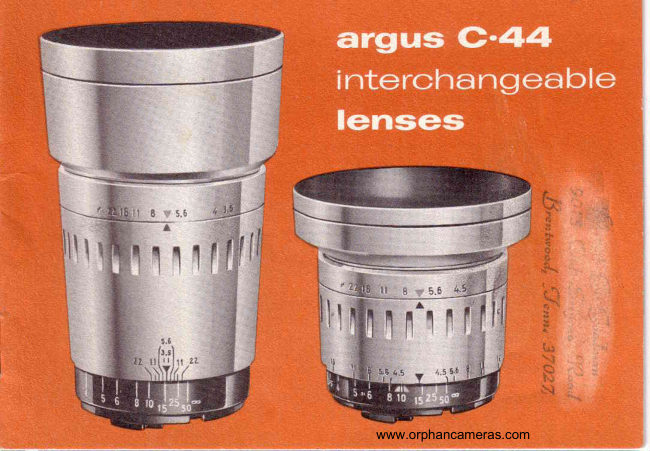
argus  c^44  interchanEea   ble
 lenses   provide   the   right   focal
 length   for  every   picture

 rnstantly    interchangeable   Argus  Cintagon   Lenses  let
 you  take   full  advantage    of  the  versatility     built,  into
 your  C44 Camera.
The  Argus  C44 35mm  Wide  Angle  and  100mm
 Telephoto   lenses feature  rigid,  bayonet-type   mounts
 like  those on the  world's  most  expensive  cameras.
You  may  interchange   them  quickly  and  easily.
Hard-coated   and color-corrected,   they  also boast
easy-to-read  depth  of field  scales, "click  stop,,
aperture   settings,  and  the Argus  Color-matic
system  of "universal"    settings   for  simplified   picture
taking.   Built-in   lens hoods keep the  direct  rays  of
the sun from  striking   the  lens, and  also serve as
retaining   rings  for  fi-lters and supplementary    lenses.
Because  Argus  products   are constantly   being
improved,   minor  changes  in appearance   of the product
may  not  be included   in  this  instruction   book.

                                               www.orphancameras.com
View original page 3Page 4 · Read text
35mm Wide Angle  Lens-Very   useful  for candid work
because of  its extremely  great depth  of  field,  this  f:4.5
Cintagon  lens covers 87 % more area than  the standard
lens.  It  lets you include more scenery in your  vacation
slides and  is just  the thing where there  is little  room  to
step back from  your subject.


SOmm Stondord  lens-This    fast, four-element Cintagon
lens is capable of handling a wide variety  of picture-taking
situations.   Its  large maximum  aperture  of  f:2.8  allows
you to take pictures even under very low light  conditions
                   "high. . . with modern       speed" films, indoor photography
by existing  light  is a snap!


 I OOmm Telephoto Lens-This   f:3.5 Cintagon lens reaches
out  . . . bringing  your  subject  twice as close. Its 100mm
focal length makes candid shots easier and permits  "close-
ups" without  standing close! ISecauseit provides enlarged
pictures  of  distant  subjects,  you'll  use  it  to shoot  far-
away  wildlife  and sports events.
               www.orphancameras.com
View original page 4Page 5 · Read text
installation
               an<l  rernoval
    t$rs11000

  TPENTUNERIIIG

TPTRTURIIIIDETP|IIIIT

     tilts BmRtt

DEPII|0f flEtDS0lLt

Drsliltct HDil mlil

  0rsTilrEscru

   BtY0iltTiloultl


             www.orphancameras.com
View original page 5Page 6 · Read text
The ease with which lenses      RE|[oYAt.l.ulJild:..
of the Argus C44 are inter-
changed will amaze you! A
push  of a  bulton  and  a
twist  of the wrisl. removes
the lens.  . . a simple align-
ment  of red dots, insertion
of lens, and another  twisl
of the wrist  locks the lens
securely  in  place,  auto-
matically  coupled  to  the
rangefinder.

You can change to the ap-
propriate  lens in seconds-

 To   protect   the   delicate
mechanism of the shutter,          Turn  rangefinder  dial so that THE  DISTANCE
NEVER  LEAVE  CAM-       SCALE IS SET AT INFINITY    (e).  Hold camera
ERA WITHOUT  A LENS             in  left  hand' so that rangefinder dial and body lens
ON  IT. Also avoid chang-         mount are free to turn during  utrcoupling operation.
 ing lenses in  brighl, sun-         Hold  lens  barrel  with   right  hand.  While   right
 light. When lenses are not         thumb  is pushing up on lens lock release, give lens
 in  use,  they  should  be           barrel a quarter-turn  to the left (counter-clockwise)
 sLored in  their  leather         and  lift  lens out.
 carryrng cases.
                                              www.orphancameras.com
View original page 6Page 7 · Read text
K

m s I A U _ A I t 0 l l


   To  prepare  the body  lens mount  to receive any                                                   )
    of the lenses, turn  the rangefinder  dial to bring the
    red dots in the mount  opposite each other.
                                                                                                                                  ]   To  prepare any  of the three lenses for  insertion,
    Iine up  the red dots on the lens bayonet  mount
    by turning  the black distance scale to infinity   ( o  ) .
                                               www.orphancameras.com
View original page 7Page 8 · Read text
Insert lens carefully into
'1,   the  body  lens mount,
                              in                            the              the notcht       fitting                         over                       ring      black  outer
      the square projection  in
      the  body  lens mount.I      (See ilIustration.)  When
      lens is fully  seated, turn
            it  to  the  right   (clock-
      wise) as far as it  will go
       (about a quarter-turn),
      allowing  .rangefinder
      d i a l  a n d  b o d y     l e n s
      mount   to  turn   freelY.
       That's   all  there  is  to
            it!  The  lens  is locked
       securely in place, and is
i,'      automatically   couPled            t o   t h e   r a n g e f i n d e r .
;      Aperture  seltings and
t      depth of field scale will
      always be easy to read,
       centered on toP  of the
       lens barrel.
                                                   www.orphancameras.com
View original page 8Page 9 · Read text
Both  the Wide  Angle  and  Telephoto  accessory      co!or-rnatic
lenses feature ARGUS COLOR-MATIC    aperture
settings  that may be used with  average subjects                                   settingsin bright  sunlight.  The Wide Angle lens also has a            C
Color-matic   distance  setting   for  universal  sharp      a n d
focus.  (The  Telephoto   lens  should  be  focused
sharply  for each picture.)  Use yellow  markings       depth-of-field
with  Kodachrome  Daylight   film,  red  markings
with  Ektachrome  or Anscoehrome Daylight  color       s c a l e -
films and with  Plus-X, Supreme or similar  black-
and-white  films (ASA 32-80).


Like  your standard  Cintagon  lens, both accessory
lenses have  a DEPTH   OF  FIELD   SCALE
engraved on the lens barrel, showing  at a glance
the range  of sharp  focus  in  your  pictures.  This
range  of sharp focus in  front  of and beyond  your
principal  subject increases as you get farther  from
your  subject or use a smaller aperture.   It  is also
greater  in  wide  angle  lenses than   in  normal   . or
telephoto  lenses, because depth  of  field  increases
as focal  length  decreases.

                                              www.orphancameras.com
View original page 9Page 10 · Read text
Leather cases designed especially  for your valu-
                                able C44 accessory lenses will protect them from
                                    fingerprints   and   scratches.  Should  a  lens
                                require cleaning, blow  off the dust  (or use soft
                             brush with  light touch), breathe on lens surface,
                            and wipe gently  with  soft  lens tissue.


                           To insert  filter, grasp aperture ring and unscrew
                                 lens hood;  place  filter   in  front   of  lens, and   r'.t
  3,.1                         screw lens hood on again. Both accessory lenses
r i l l                           accept Series Vl  (L%'  diameter)   filters and
                              supplementary  lenses. The  built-in  lens hoods
                                help to keep direct rays of the sun from  striking
                                your  lenses.

                                 www.orphancameras.com
View original page 10Page 11 · Read text
The  completely  new  Argus  Variable  Power
argus                                          Viewfinder,  featuring a unique precision optical
                                                system, gives you a choice of three magnifica-
variable  power                         tions  in  field  of  view,  corresponding   to  the                                                       "seen"                                               areas                                                          by your 35mm Wide Angle, 50mm
viewfinder                              Standard  and  1o0mm  Telephoto   lenses. A
                                                              built-in   parallax  adjustment  compensates  for
                                                    differences that would otherwise occur between
                                                   the  fields  of view  of  the lenses and the view
                                                       finder          .  it   tilts  the lens system  within  the
                                                   viewfinder  so that  you can see precisely what
                                                   the  lens sees at every  distance.  The  Argus
                                                  Variable  Power  Viewfinder  may  be mounted.
                                          on any camera equipped with an Argus Acces-
                                                sory Shoe on top.
                                             Simply  set'one  dial  for the focal length  of the
                                                   lens you are using. (A system  of lenses rotates
                                                    within   the  viewfinder,   providing   the  right
                                                     magnification.)  Set another dial for the distance
                                            you are from  your  subject.  (This  is the "paral-
                                                     Iax"  adjustment.)  Then compose your  picture
                                                through  the  Variable  Power  Viewfinder.  The
                                                            field of view is not masked down, but magnified
                                                        to the full proportions  of the viewfinder.

                                              www.orphancameras.com
View original page 11Page 12 · Read text
flash
extension
trracket


                                                                   -^.
To  take  flash  pictures  when  the  Variable     screw. Slide camera back down  onto  screw,
Power  Viewfinder   is used, mount  your C44    and  tighten.  Mount   flash  unit  on bracket  in
flash  unit  on the new C44 Flash  Extension     the same way that you mount   it on the camera,
Bracket.  This  metal  bracket  is held  in place    and plug cord into  socket  in Variable  Power
by the C44 case safety screw or by a tripod     Viewfinder.   To  use  the  Flash  Extension
screw. To  attach  bracket,  loosen screw on    Bracket  on  your  C44  without   using  the
bottom  of leather case and slide camera part-     leather  case, the case safety  screw may  be
way out. Slip bracket  into  slot in end of case,   removed  from  the  case to  hold  bracket  on
and place hole  in bracket  over end of safety    camera, as illustrated.

                                               www.orphancameras.com
View original page 12Page 13 · Read text
s P E C t F t C A I r 0  i  l S         qtrimelunrnntee
wr0t tltGtt ctilTr80il
lens: 35mm, color-corrected,hard-
coated      anastigmat;helical-focusing,3         Your Argus Accessory Lens u)as m&nufqctargd,  ,ft. to infinity
f:stops:Clickstop settingsat f :4.5,5.6,         inspected anq tusted by skilled craftsrnen.  It  is
6.3;8, ll,16,22.
                                  guaranteed to be free of defects in workrnanshipHyperlocallllstancs:17 feet 7 inchesat
f :4.5                                  or rnaterial during  its lifetime.  If any
            640                  30'tull Flcld         lngle:                                     ,                              ")                   seruicing is necessafy,because of imperfections               (1%tilter                 Vl     Slze:         Series
Carying Casa: Available as accessory          in materials or worhrygr?ship, your lens wilt
in genuineleather.                       biefactory seruicei wi,thowt charge
TEttPil||Tt|ctilTr8l|il                     Argus equipment wh;iek has been damaged,
              color-corrected,                            hard-lens: l00mm,
                  helical-focusing,coated      anastigmat;                              3         mishandled or worn frorn extensiue use will be
ft. to infinity.                             factory seraiced at established rates. Used or
            stop        Clickl:stops:                 settingsat  f :3.5,4,           rebuilt equiprnent is not couered by this gu&ra,ntee.        8, 11,            16,22.5.6,6.3,
HnoilocalDlstancs:184feet 6 inchesat
f :3.5                   AR0[|SCt|Y|[RAS,Aill{ARB0n,MlCl|l0A}lFull FieldAngle:25"
FfftorSlze:SeriesVl (l%'l                             Diaision   of Sglaania   Electric  Produets   Inc.
CarryingCase:Availableas accessoryingenuineleather.                  An0|Jscfililtnls0F cA]ll0l,LTD.,T0R0llT0,0lllAnl0

                                                     P A R T  N O . 2 1 3 9 0 - 5 7 5 www.orphancameras.comL r r H o      r N  u .   s .    r
View original page 13Related documents and language editions

From the M. Butkus archive. Original publisher and archive notices are retained.
Check the model and edition against your equipment.
PDF verified 2026-10-10.