Film cameras
VIVITAR 35 EF User manual
User manual for VIVITAR 35 EF. 15 pages in German. Read the original PDF, download or print a copy without registration.
15 pagesGerman1.4 MB PDF

Loading your manual…Open PDF directly
Document details
- Brand
- Vivitar
- Model / document
- VIVITAR 35 EF
- Document type
- User manual
- Language
- German
- Pages
- 15
- File size
- 1.4 MB
- Category
- Film cameras
- Document date
- Not specified in catalog
Search available document text
Find a term, then jump to its page in the original PDF. Image-only pages may not be searchable; check the PDF for exact wording and diagrams.
Page 2 · Read text
Vivitar 35EF

Owner's Manual
Gebrauchsanleitung
Manuel du proprietaire
Manual del propietario
View original page 2
Page 5 · Read text
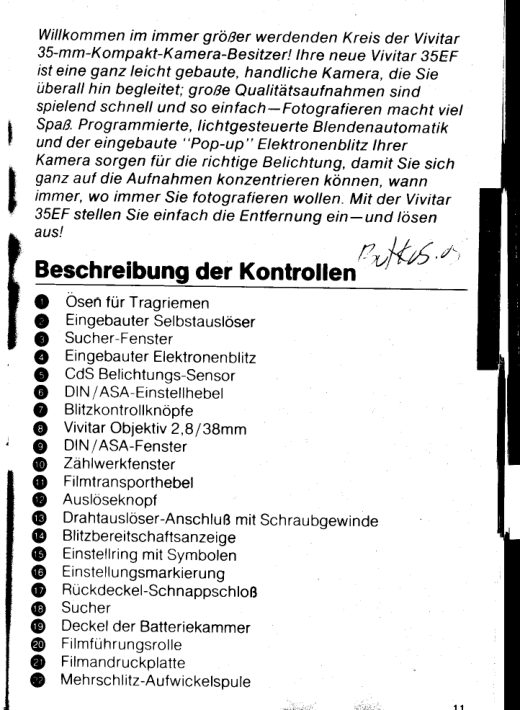
Welcome to the world of Vivitar compact 3Smm
 photography! Your new vivitar ssEF is a lightweight,
 take-anywhere camera that makes it f ast, f un and easy f or
 you to make big, quality photographs  your camera's
 programmed, Automatic Exposure system and buitt-in.
 "pop-up" Electronic Flash assure correct exposures,
 letting you concentrate on the photographs you want,
 when you want them The vivitar 3sEF Just set fhe focus
 and shoot/
Descriptionof Controls
 O  StrapLugs
@ Self-Timer
 O  ViewfinderWindows
 O  Built-inElectronicFtash
 O CdSExposureSensor
 O  DIN/ASASettingLever
O  FlashControlButtons
@  Vivitar38mm12 8lens
O  DIN/ASAWindow
@ ExposureCounterWindow
O  FilmAdvanceLever
@ ShutterReleaseButton
@ ThreadedCableReleaseSocket
@ FlashReadyLight
@ FocusingRingwith ZoneSymbots
@ FocusingIndexLine
O  BackOpenLatch
@ Viewfinder
@  BatteryCompartmentCover
@ FilmGuideRoller
@  FilmPressurePlate
@  Multi-SlottedTake-UpSpool
@ Take-UpSprockets
@  FilmAperture
@ RewindSpindle

                          www.butkus.us
View original page 5Page 6 · Read text
@ FilmChamber
@ CameraSerialNumberPlate
@ FlashBatteryCompartmentCover
@  FilmRewindCrank
@  FilmRewindKnob
O  FilmRewindButton
@  TripodSocket
@  DistanceScales
@  DistanceScaleIndexLine

Getting acquainted with your new
Vivitar35EF
Beforeyou shootthat first,importantroll of film, carefulyread
the followinginstructions.Fold out both setsof cover flapsfor
easyreference.Get acquaintedwith all controlsand
operatingprocedures.Takea few minutesto practiceholding,
settingfocusand operatingthe built-in,"pop-up" electronic
flashwith your Vivitar35EFbeforeyou actuallyload film in
your camera.The few minutesyou spend learningto operate
your camerawill be invafuablefor preparingyou to shoot that
"once in a lifetime"photograph!

1I
Attach Camera Wrist Strap
Beforeyou begin usingyour new camera,attachthe Camera
WristStrapfor safe,secureand comfortablehandlingor
transporting.
                     'rOrr(A) Springone end of    Ringopen and slip over and into
eitherof the two StrapLugs O on your camera.
(B) Rotate"O" Ringuntilit snapsback to its closedposition,
firmlysecuringthe WristStrapto your camera.(See
photo"A" )
View original page 6Page 7 · Read text
^z
Holding your Camera
Yourcameramust be held correctlyto assuregetting
consistentlygood, sharp photographs.lt shouldbe held
steadilyand comfortablywhile you are takingphotographs.
Photos"8,' & "C" illustratethe correctways to hold your
camerain both the verticaland horizontalpositions.When
usingthe built-in,"pop-up" electronicflash in the vertical
position,hold your Vivitar35EFwith the flash at top (see       r'B'r)photo     of cameraand be carefulnot to block the flash
with your fingers.

v?
How to Focus your Camera
Now that you are becomingacquaintedwith your camera,
practicesettingthe focus before you composeand take a
photograph.After readingthe followinginstructions,practice
settingthe focus on peopleand objectsaroundyou untilyou
can easilyand comfortably"set focus and shoot" without
hesitation.
(A) Look at your subjectthroughthe Viewfinder@. Set the
Zone FocusSymbol@ which most closelyapproximates
your subjectsizeas seenfrom your positionby aligningthe
Zone FocusSymbolwith the FocusingIndexLine @ .
                                                                                                              I(B) Composeyour subjectwithinthe Viewfinder'sBright
FrameLines,wind the FilmAdvanceLever @ and pressthe          (
ShutterReleaseButton @ to practice"taking" your                 C
photograph                                                                                                                                           (i                                                            i                                                N(C) As an added reference,the DistanceScales@ on the
FocusingRinggive the camerato subjectdistancein both                   tr
feet(whitenumbers)and meters(greennumbers)as aligned        (
withthe white.DistanceScaleIndexLine@.                               S(
2                           www.butkus.us
View original page 7Page 8 · Read text
Operatingyour Gamera
4
Install the Batteries
Automatic Exposure System Battery
The Vivitar35EF'sAutomaticExposureSystemis poweredby
a single,1 35 volt mercurybattery(MalloryPX 675, Eveready
675. HS-C/H-Cor equivalent).To installthe battery:
(A) UnscrewBatteryCompartmentCover@ usinga coin.
 (B) Insertbatterywith POSITIVE( + ) sidefacingyou (see
photo"D"). The insideof the BatteryCompartmentCoveris
coded(+)asareminder.
(C) Replacethe BatteryCompartmentCover.Checkto be
surethat the batteryhas been insertedcorrectlyand that the
meteringsystemis operating.Pointyour cameraat a brighily
 lit subject lf the needlein the Viewfinderdoes not move,open
the BatteryCompartmentand recheckto see that the ( + )
markedon the batteryis facingyou.
Replacethe batteryonce ayear or when the meterneedle
appears"sluggish"or remainsat the lowerrightcornerof the
viewfinder.
Built-ln ElectronicFlash Batteries
The Vivitar35 EF'sBuilt-lnElectronicFlashis poweredby
two. 1 5 volt "AA" alkalinebatteries(MalloryMN1500,
EvereadyE91, AM3 or equivalent).To installbatteries:
(A) OpenBatteryCompartmentCover@ by pushingin
directionof arrowand liftingslightly.
(B) Insertbatterieswith the correctPOSITIVE( + ) or
NEGATIVE( -  ) polarity,followingthe printeddiagramson the
insideof the batterycompartment.(Seephoto "E")
(C) Pushdown on BatteryCompartmentCoverto close
securely
View original page 8
Page 9 · Read text
5
Set the Film Speed
Forproperlyexposedphotographs,yourVivitar35EF's
AutomaticExposureSystemmustbe set for the correctDIN
(lnternational)or ASA(USA)ratingfor the film you are using
To setthe f ilm speed:
(A) Movethe DIN/ASA SettingLever@ untilthe correct
numberappearsin the DIN/ASAWindow@ (DlN ratingsare
markedin orange,ASA ratingsare markedin silver)
(B)ThechartbelowshowsDINand ASAequrvalentratings:
D I N      1 5 1 6  1 7  1 8  1 9 2 0  2 1   2 2   2 3   2 4   2 6   2 7   2 8
ASA     25  32  40  50  64  80  100 125 160 200 320 400  s00
(C) Onceyou'veset the filmspeed,your camerais
programmedfor automaticoperation.
6
Load your Film
(A) Press Shutter ReleaseButton. releasingfilm advance
mechanism
(B) Push the Back Open Latch @  in direction of arrow and,
swing the camera back to the right
(C) Push down on Rewind Spindle @ with f rngertipto clear
the Film Chamber @
(D)lnsert the film cassettein the Film Chamber Push in the
Film Rewind Knob @ and turn slightlyto lock the cassettein
place
(E)tnsert film leader into one of the slots in the Film Take-Up
Spool @  Advance film slightlyto see that film is secured on
Film Take-UpSpool and properly aligned with the Take-Up
Sprockets @  Turn Rewind Crank @ slightlyin directionof
arrow to remove any slack in the film cassette Recheck to see
 that film remains properly secured to the Take-UpSpool
 4                          www.butkus.us
View original page 9
Page 10 · Read text
(F) Close the camera back until you hear a click indicating
that the back is securely latched Advance film by alternately
windingthe Film Advance Lever and pressing the Shutter
ReleaseButton until the number "1" appears in the Exposure
CounterWindow @ As the Film Advance Lever is wound, the
Film Rewind Knob should rotate, indicatingthat the film is
advancingproperly
The Automatic ExposureSystem
Your Vivitar35EF features an Automatic Exposure System
which is programmed to select the correct aperture/shutter
speed combination automatically,as long as lighting
conditionsare within the DIN /ASA range of the f ilm you are
using The program extends from 1/60 second at f2 8 to
1 /350 second alt22 As long as the needle is in the yellow,
"allowable exposure" zone. all you need to do is set focus
and shoot!
Viewlinder

  P a r a l l a x                 F lash ReadY Light                                           ,/Co rrectio n
                                                            l . - r    M a r k


                                       Meter Needle

                               U n de rex posu re
                               U s e F l a s h
                        W a r n i n g Z o n eB r r g h tF r a m e
        L i n e s

Underexposure/ Use Flash Warning Zone
 lf the meter needle moves into the Underexposure/Use Flash
WarningZone, your camera is "telling you" to use the Built-ln
ElectronicFlash(see "Flash Photography" section)
View original page 10Page 11 · Read text
Parallax Correction
At distances of 5 feet (1 5 meters) or less, compose your
 subject usrng the Parallax Correction Mark to prevent
 accidentally"cutting off " a portion of your sublect

7I
You're Ready!
Once you've checked to be sure the meter needle is within
the auto exposure syslem program, just recheck the camera
focus, press the Shutter ReleaseButton, and start capturing
the world around you on film

Flash Photography
Your Vivitar35EF is equipped with a Built-ln Electronic Flash,
which is coupled to an automatic, "Flashmatrc" system For
flash photography:
(A) nOvance film in camera to next frame
(B) Push in the white Flash Control Button @ to "pop-up"
the flash
(C) Turn flash system on by pushing the orange Flash Control
Button @
(D) Wait for the Flash Ready Light @ to glow (visibleboth in
the Viewfinderand on the top surface of the camera)
(E) Compose your photograph, set the Zone Focus and
shootl
(F) nOvance film for your next exposure The Rqady Light will
glow within 5 to 9 seconds, depending upon battery
condition
(G)  f tash Photography can be used at the distances indicated
in the followingchart:
6                          www.butkus.us
View original page 11
Page 12 · Read text
Frtm Speed
  D I N         1 5  1 6  1 7     r 8  1 9    20  2 1  22  23  24   26   27   28
  ASA        25  32       50  64    80  1 0 0  125 160 200 320  400  500
  DrSlanCe
                                 I m-3m              I m-4m        'lm-4 8m                  l m - 6  6 m       1 5m-10 6m
                3 3',-r0'   3 3',-125     3 3 ', - 1 6 '.     3 3'-22'            5',-35',

 Self-Timer
 The Self-TimerLever @ oetays the tripping of the shutter
 mechanismfor approximately 10 seconds. allowing you to
 include yourself in the photograph rhe camera musl be
 tripod-mountedor placed on a sorid support when this
 feature is used
 (A) Compose the photograph in the Viewfinder
 (B) Advance the film
 (C) Push the Self-TimerLever alt the way down
 (D) Press Shutter ReteaseButton
 (E) Positionyourself in photograph area within 10 seconds
Removingthe Film
when you've finishedshootingthe last frame of your roll of
 film ( 12 20 and 36-exposure settingsare coded red on the
Exposurecounter) rewind the f ilm and remove the cassette
for processingas follows:
(A) Push in Fitm Rewind Button Gj
(B) Fold out Film Rewind crank and turn in directionof arrow
(c) wrren Film Rewind crank turns freely (withouttensionor
"drag")  pull up on crank to rereasecassette open camera
back rhe Exposure counter will automaticallyreturn to zero
(D) Remove the exposed f irm cassetteand replace with fresh
f i l m
View original page 12Page 13 · Read text
Cable Release
 Your camera is equipped with a Threaded cable Rerease
Socket @  allowing you to attach an accessory cable
 releaseto the camera A cable releaseis normaily used for
movement-free maximum sharpnessphotographywhen the
camera is f irmly mounted on a tripod

Caringfor your Camera
 CAUTI)N. The Built-ln ElectronicFlash carries a sizeable
 electricalcharge In the event the outer case is accidentally
cracked, there is the possibilityof an electricalshock DO
NOT USE THE CAMERA OR ATTEMPTTO REPAIRIT
YOURSELF Any repairs or adjustmentsshould be made by
an authorized Vivitar Service Center
1-NEVER FORCEANY CAMERA oPERATtoN consurt this
Owner's Manual if any questions occur
2 _REMOVE ALL BATTERIESWHEN STORINGCAMERA
Batteriescan leak as they age, causing damage to your
camera Always inspect batteriesfor leakage before installing
 in camera or flash compartment
3_KEEP LENS CAP ON WHEN NOT TAKING                                                                                  I
PHoToGRAPHS rhe cap protects the front tens element
from dust and dirt particles                                                                                I
4-CLEAN YOUR LENS PROPERLYRemove dust with an air               t
blower when necessary. use lens cleaner and tissue to gentty      s
clean lens and viewfinder
5-CLEAN YouR cAMERA's INTERIoR Periodicailyremove      E
any dust or film particlesfrom the film chamber, rear lens
element.take-up spool area or f ilm pressure plate with an air        F
blower InspectFilm Guide Roller @ and Film PressurePlate             Vt
@ for accumulated deposits f rom f ilm emulsion or
backing-clean with lens cleaner and tissueif required
R                             www.butkus.us
View original page 13
Page 14 · Read text
6 -KEEP YOURCAMERAAND FILMAWAYFROMDIRECT
 SUNLIGHTAND HEAT Neverstoreyour cameraor filmon the
 rearwindowdeck,glovecompartmentor other hot areasin
 yourcar
 7 -PRloR To sroRtNG youR CAMERAReteasethe shutter
 to removeall springtension
 8 -PROTECTYOURCAMERAFROMMOISTUREDO NOT
 storeyour camerain a moisture-retainingenclosureor
 environmentIn areasof high humidity,cire shouldbe taken
 to ensurethat your camerais kept in a comparalivelycool,
 dry location
9 -KEEP YOURCAMERAIN ITSPROTECTIVECASE.
 whenevercamerais carried,storedor otherwisenot in use,
 keepit in its protectivecaseto protectagainstdust,shockor
damageto its f inish.

Specifications
 carneraType:35mm fuil framecamerawith fully programmed
  EESystemand Built-lnElectronicFtash
FilmFormat:24mm x 36mm
Lens.'Vivitar38mmtZ.B,4 elementsin 3 groups
Accessory Size:46mm
FocusingRange.'1m (3 3 ft.) to infinity
ExposureMeter:SingleCdS cell abovef ront lenselement
shutterlf-stopcombinations:1/60 sec altz.gto 1/3s0 sec.
   al t22
EV   lange. EV 9 (j lGOsec.at f2.8)to EV tT (1/350 sec at
  t22)withASA 100(DtN21) fitm
Fitmspeed Range:ASA25 (DtN 1s) to ASA 500 (DtN 28)
viewfinderlnformation:FlashReadyLight,ApertureScale,
  BrightFrameLine,Underexposure/UseFlashwarning,
  ParallaxCorrectionMark
View original page 14
Page 15 · Read text
Focusing System Zone Focus System plus Distance Scale
Flash Syslem: Built-ln Electronic Flashmatic System
FtashRange' 1m (3 3 ft) to 4 B m ( 16 ft) with ASA 100 (DlN
  2 1 ) f i l m
Number of Flashes. Approximately 250 (with fresh batteries)
FlashBattery:Two, 1 5 volt "AA" alkaline batteries (Mallory
 MN 1500. Eveready E91, AM3 or equivalent)
Camera Battery:Single, 1.35 volt mercury battery (Mallory PX
  675. Eveready EPX 675, HS-C lH-C or equivalent)
Film Loading: Easy-load, multi-slotted take-up spool
Se/f-Timer:Approximately 10 second delay mechanism
Dimens,onsj135 mm x 54.5 mm x77 mm (5 4" x2.2" x 3 1")
V1/eight:380g (13 4 oz.) without batteries


Specrfrcatronssub;ect to change wtlhoul noltce
1 0                          www.butkus.us
View original page 15
Related documents and language editions
From the M. Butkus archive. Original publisher and archive notices are retained.
Check the model and edition against your equipment.
PDF verified 2026-10-10.