Film cameras
Yashica FR 1 User manual
User manual for Yashica FR 1. 36 pages in French. Read the original PDF, download or print a copy without registration.
36 pagesFrench1.8 MB PDF
Loading your manual…Open PDF directly
Document details
- Brand
- Yashica
- Model / document
- Yashica FR 1
- Document type
- User manual
- Language
- French
- Pages
- 36
- File size
- 1.8 MB
- Category
- Film cameras
- Document date
- Not specified in catalog
Search available document text
Find a term, then jump to its page in the original PDF. Image-only pages may not be searchable; check the PDF for exact wording and diagrams.
Page 2 · Read text
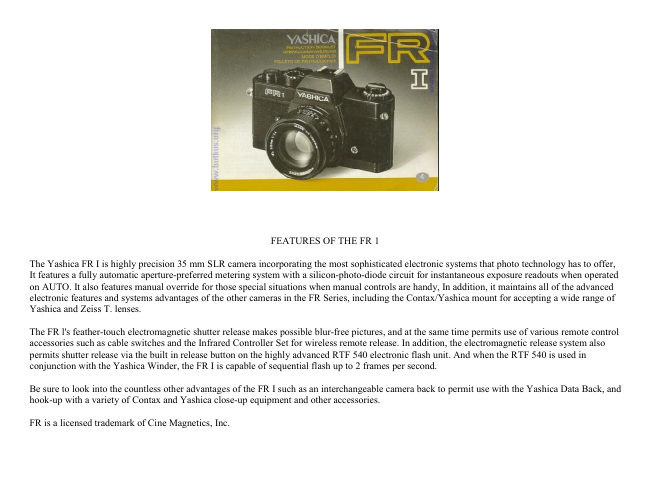
FEATURES OF THE FR 1

The Yashica FR I is highly precision 35 mm SLR camera incorporating the most sophisticated electronic systems that photo technology has to offer,
It features a fully automatic aperture-preferred metering system with a silicon-photo-diode circuit for instantaneous exposure readouts when operated
on AUTO. It also features manual override for those special situations when manual controls are handy, In addition, it maintains all of the advanced
electronic features and systems advantages of the other cameras in the FR Series, including the Contax/Yashica mount for accepting a wide range of
Yashica and Zeiss T. lenses.

The FR l's feather-touch electromagnetic shutter release makes possible blur-free pictures, and at the same time permits use of various remote control
accessories such as cable switches and the Infrared Controller Set for wireless remote release. In addition, the electromagnetic release system also
permits shutter release via the built in release button on the highly advanced RTF 540 electronic flash unit. And when the RTF 540 is used in
conjunction with the Yashica Winder, the FR I is capable of sequential flash up to 2 frames per second.

Be sure to look into the countless other advantages of the FR I such as an interchangeable camera back to permit use with the Yashica Data Back, and
hook-up with a variety of Contax and Yashica close-up equipment and other accessories.

FR is a licensed trademark of Cine Magnetics, Inc.
View original page 2
Page 3 · Read text
www.butkus.us

CONTENTS


                                                 Automatic Exposure     44

                                                Exposure Compensation    52
Specifications  6

                                             Manual Operation     58
Description of Parts ............... 10

                                                    Self-Timer    60How to Mount and Remove the Lens  14

                                                    Flash Exposure    64Battery Installation ,  16

                                                          Intentional Multiple Exposure    68Battery Checking  18

                                                        Infrared Photography .,    70Film Loading  20

                                              "B" (Bulb) Exposure/Release Socket    72Film Rewind  28

                                                       Depth-of-field Preview/InterchangingShutter Control Dial     30
                                             Camera Backs  74

Viewfinder     32
                                              Depth of Field,    76

Focusing      40
                                              Ambient Temperature     78

Shooting Posture     42
                                            Camera Care    80

                                                      Precautions    82


SPECIFICATIONS

Type: TTL metering fully automatic exposure 35 mm SLR camera.

Standard Lenses: Yashica lens DSB 50 mm f/1.9, Yashica Lens ML 50 mm f/1.7, Yashica Lens ML 50 mm f/1.4, Yashica Lens ML 55 mm f/1.2
(each with automatic diaphragm).

Lens Mount: Contax/Yashica mount
View original page 3Page 4 · Read text
Negative Size: 24 x 36 mm

Shutter: Electronically controlled horizontal run focal plane shutter. Shutter speeds automatically varied between 4 sec. and 1/1000 sec. at AUTO
setting; 1 - 1/1000 sec. manual shutter speed settings. Also bulb setting (B) and flash synchronization setting (^t) Direct X hot shoe and X sync
terminal on camera body.

Self Timer: Built-in lever type; releases in approx. 7 sec.

Shutter Release: Feather-touch electromagnetic release; release socket on camera body for auxiliary shutter release.

Exposure Meter: TTL aperture-preferred fully automatic exposure control with manual override. Center weighted full aperture light metering via
SPA cell.

Exposure Check Button: Push button type with slide lock. Lock releases on film advance lever return.

Exposure Range: Between EV 1 - 18 with f/1.4 standard lens using ASA 100 film.

Exposure Compensation: +2 EV

ASA Film Speed Settings: ASA 12 - 3200

Power Source: 6 V silver oxide battery (Eveready 544, Ucar 544, Mallory PX-28 or equivalent).

Viewfinder: Through-the-lens reflex viewfinder; shows a field of approx. 92% of the actual picture area with an image magnification of
0.87X. Aperture and shutter speeds visible in the viewfinder; pointer exposure indicators, manual control indicator.

Focusing Screen: Diagonal split-image center spot with microprism collar.

Film Advance: 140° single-stroke or multiples stroke film advance lever advances exposure frame, sets exposure counter, charges the electronic
shutter and unlocks the exposure check button. Sequential film advance up to 2 fps with optional Yashica Winder unit.

Film Rewind: Via film rewind crank.

Back Cover: Standard back opens via film rewind crank; interchangeability with Data Back.

Other Features: Battery confirmation lamp illuminates exposure counter for viewing in the dark, lens release button, depth-of-field preview button,
memo holder, multiple exposure capability.

Size and Weight: 142.5 x 87 x 50 mm 660 grams (body only)
View original page 4
Page 7 · Read text
www.butkus.us


23. Sprocket Wheel                                  30) Motor Drive Coupling Terminal

24. Exposure Check Button                           31) Tripod Socket

25. Film Take-Up Spool                              32) Film Drive Coupling

26, Release Socket                                   33) Film Rewind Release Button
View original page 7
Page 8 · Read text
27. Camera Back Release Lug                        34) Battery Compartment Cover

28) Camera Back                                    35) Memo Holder

29) Film Pressure Plate


HOW TO MOUNT AND REMOVE THE LENS


                                  How to Mount the Lens
                                                      After removing the camera body cap, set the lens in the mount by matching
                                                        the red dot on the lens barrel with that on the camera body. Then, while
                                                     gripping the lens barrel firmly, give it a right turn until it self-locks with a
                                                              click.

                                            The method of mounting is the same with all lenses. Improper mounting will
                                                             result in poor focus and/or exposure.

                                  How to Remove the Lens
                                              While keeping the lens release button depressed, turn the lens barrel all the
                                        way to the left and lift the lens straight out of the lens mount.

                                             Avoid touching the linkage systems on the camera body and the lens.

                                             Avoid direct sunlight when interchanging lenses.

                                         To remove or reset the lens cap, press the knobs on both sides of the cap. The
                                                        lens cap can be set even when a filter is in use.
View original page 8Page 9 · Read text
www.butkus.us

BATTERY INSTALLATION


Make sure the battery is installed properly. Without the battery, the
shutter system and the exposure control of Your Yashica FR I will not
function.

1 Open the battery compartment cover on the camera base by turning it in the
direction of the arrow with the edge of a coin.

2 Install the battery properly by matching its polarity with the diagram.

3 After ascertaining that the battery is installed properly, tighten the battery
compartment cover securely.

Always use a 6 V silver oxide (Eveready 544, Ucar 544, Mallory PX-28 or
equivalent) or 6 V alkaline (Eveready 537, Ucar 537 or equivalent) battery.
View original page 9
Page 10 · Read text
BATTERY CHECKING


                                         The shutter will not function when batteries are low. To prevent this,
                                              check the battery on the following occasions.

                                             * When inserting a new battery

                                             * When the camera has been left unused for some length of time.

                                             * When otherwise necessary.

                                       To Check: Press the battery checker button. If the battery confirmation lamp
                                                        illuminates the exposure counter window on the top right-hand side of the
                                                   camera, battery power is sufficient.
                                                                     If the lamp fails to light, replace the battery.

                                          (When using a new battery, check first to see that it has been inserted
                                                     properly before replacing.)

                                            The battery conformation lamp also functions to illuminate the exposure
                                                     counter in poor lighting conditions.
View original page 10Page 11 · Read text
www.butkus.us


FILM LOADING


Avoid direct sunlight when loading film. Always use a standard 135 film
cassette (12, 20, 24 or 36 exposure load),

[1] Open the camera back by pulling the film rewind knob all the way out. As soon
as the camera back is opened, the exposure counter will reset to 'S' (start) position.

[2] Install the cassette in the film chamber and push the film rewind knob back in.
If it fails to return to its original position immediately, twist back and forth in
either direction while pushing until it slips in place.

[3] Insert the tip of the film into one of the slots of the take up spool as illustrated.
Avoid inserting the film too far.
View original page 11
Page 12 · Read text
[4] Slide the film advance lever out past the ridge of the camera with your thumb
and advance the film slightly until I the sprocket teeth properly catch the
perforations on the edges of the film.

Close the camera back and press until it locks in place.


[5] Fold the film rewind crank out and turn gently in the direction of the arrow to
take up film slack.

Before advancing the film, set the shutter control dial either to the "B" or to the
flash synch (of) setting. Film wind-on may also be performed on AUTO provided
it is done in bright light with the lens cap removed. Otherwise attempts to
advance the film on AUTO for film wind-on will be hindered be excessively long
exposure.
View original page 12
Page 13 · Read text
www.butkus.us


[6] Wind the film advance lever and trip the shutter alternately until the
exposure counter reaches '1' (The film rewind knob will rotate counterclockwise
when turning the film advance lever if the film is advancing properly.)

* Film may be advanced either by winding the film advance lever with one full
turn or several short strokes. The electromagnetic release will not function,
however, until the lever is completely wound.

* The film may also be wound on automatically by using the Yashica Winder
unit which is sold as an optional accessory. Detailed instructions for use of the
winder are given in the winder instruction booklet.

Exposure Counter
The exposure counter registers the number of exposed frames and is calibrated
from 1 to 36 for frame indication, with the numbers 12, 20, 24 and 36 in red to
indicate the last frame or respective film rolls. Counter automatically resets to S
(start) when the camera back is opened.
View original page 13
Page 14 · Read text
Memo Holder
The memo holder on the rear of the back cover is handy for exposure information.
Insert the end of the film box to remind yourself what type of film you are using and
how many exposures are on the roll.

Setting the film Speed
The ASA film speed rating denotes the degree of sensitivity of the film to light.
After loading the camera, always make it a point to set the ASA film speed to assure
proper exposure.

To Set: Lift the ASA film speed ring (surrounding the exposure compensation dial)
and turn it until the figure corresponding with the speed rating of the film in use
aligns with the orange index. Various ASA film speeds ratings are as follows.
View original page 14
Page 15 · Read text
www.butkus.us

FILM REWIND


When the exposure counter registers the number equivalent to the exposure
load of the film in use, avoid advancing the film forcibly. If the perforations of
the film tear or the film pulls away from the cassette, it will become
impossible to rewind the film.

[1] Push in the film rewind release button on the camera base. It is unnecessary to
keep this button depressed all the while during film rewind.

[2] Fold out the film rewind crank-handle and turn it in the direction of the arrow.
When the crank-handle is turned, the take-up spool will rotate with an audible
signal, indicating that the film is being rewound properly. The crank-handle will
rotate freely when the film is rewound completely into its cassette.

* When the film fails to advance, push the film rewind release button and rewind.

* Make sure the exposed film is rewound into the film cassette before opening the
camera back.
View original page 15
Page 16 · Read text
SHUTTER CONTROL DIALS


                                                   For normal shooting purposes, shutter speeds are automatically controlled
                                                     with the FR I when the shutter control dial set to AUTO. Including AUTO,
                                                          the dial has the following settings.

                                               Auto For automatic shutter speed control. Autoexposure control with the
                                       FR I is aperture-preferred: when you preset the f-number, the camera
                                                         automatically selects the correct shutter speed. The speed selected by the
                                                 camera is indicated in the viewfinder by pointer index.1-1/1000 .

                                                          Shutter speed settings for manual control. "M" (manual) indicator will
                                                      appear in viewfinder when the dial is set to the manual shutter speeds
                                                              (lighting bolt) flash synchronization . . . Set the dial to this setting to
                                                      synchronize the camera for use in conjunction with an electronic flash
                                                                  unit. (See page 64.)(B) ....
                                              The "B" (bulb) setting is used for exposures in excess of 1 sec. (See page
                                                            72.)
View original page 16Page 17 · Read text
www.butkus.us

VIEWFINDER


1. Microprism Collar

2. Split-image

3. Aperture Scale

4. Aperture Pointer

5. Shutter Speed Pointer

6. Shutter Speed Scale

7. Overexposure Zone

8. Long Exposure Zone

9. Manual Indicator


The viewfinder of your Yashica FR I always gives readings at full aperture for bright and easy focusing. It also gives all of the necessary
exposure information.


Viewfinder Field
The viewfinder shows approximately 92% of the actual picture area in its field. Whatever you see through the finder will be reproduced on the film
without fear of head cropping, regardless of which lens you use.

Split-image Microprism
This camera features a dual focusing spot for easy focusing which consist of a diagonal split-image center with a microprism collar. (See page 40 for
focusing details.)
View original page 17
Page 18 · Read text
Aperture Scale
The figures along the top edge of the viewfinder constitute the aperture scale. When the aperture ring is rotated, the pointer moves to indicate the
indexed f-number.· With lenses slower than f/5.6, and when accessories are employed which do not feature automatic diaphragm functions, the
aperture pointer does not function and remains stationary at f/1.4. This does not interfere with the camera's automatic exposure controls, however,
and shutter speed readings are given as normal.

Shutter Speed Pointer
When the exposure check button is depressed, the pointer at the right of the viewfinder will indicate the shutter speed automatically set by the camera
when operated on AUTO. When using manual settings, it gives the recommended shutter speed. (See page 46.)

Overexposure Zone
When the shutter speed pointer climbs to this zone, the picture will be over-exposed. For adjustment, refer to page 46.Long Exposure Zone When the
shutter speed pointer is in this zone, light will be sufficient for up to a 4 sec. exposure. (See page 46.)

Manual Indicator
The "M" (manual) indicator appears in the viewfinder when the shutter control dial is set off of AUTO.


FOCUSING


                               Turn the focusing ring while observing the subject in the split-image center spot,
                                  microprism collar or matte area of the viewfinder.

                                       Split-image Center Spot Precise focus is secured when the images in the diagonal split-
                                   image center spot are brought into alignment.

                                  Microprism Collar and Matte Area When the multiple glitter disappears in the
                                     microprism collar or when the image appears clear and sharp in the matte area, precise
                                        focus is secured.
                                  * The method of focusing remains the same regardless of whatever lens or accessory is in
                                           use.

                                     Eyesight Adjustment To permit adjustment of the viewfinder to the eyesight of the
                                            individual, eight types of diopter lenses (-5 to +3 diopters) are available.
View original page 18Page 19 · Read text
www.butkus.us


SHOOTING PICTURES


To obtain good results, it is important that the camera be held steady. Erratic
movement of the camera at the critical moment of exposure constitutes the most
common cause of poor (blurred) photographic results. Before attempting to take
your first series of photographs, familiarize yourself with all functional controls.
As illustrated, the camera can be held in either horizontal or vertical posture,
depending on your photographic requirement. In either case, support your
camera firmly with your left hand, with your left elbow held close against your
body. Avoid gripping the camera body too firmly with your right hand and press
the magnetic release button gently.

* For extra steady support, the trunk of a tree or wall of a building or other
structure can be used most effectively.

* When using a telephoto lens or when making exposure at a slow shutter speed,
the use of a tripod is recommended.
View original page 19
Page 20 · Read text
AUTOMATIC EXPOSURE


                                          Your Yashica FR I features fully automatic through-the-lens electronic exposure
                                                        control. By simply presetting the film speed and lens aperture, its exposure
                                                     control system varies the shutter speed continuously according to subject
                                                     brightness to assure correct exposure under any light conditions.

                                                       [1] Turn the shutter control dial to AUTO, and set the exposure compensation
                                                          dial to 1X.

                                                       [2] Preselect the lens aperture by setting the required f-number to correspond
                                                with the index. The following table serves as a guide for selecting the
                                               approximate f-number under different lighting conditions when using ASA 100
                                                        film.


                     Light Condition                                                  F-stop

               Outdoors under bright sunlight                                               16, 11, 8

                    Outdoors (overcast)                                                         5.6, 4, 2.8

                 Indoors or night photography                                                       2, 1.4
View original page 20Page 21 · Read text
www.butkus.us


[3] While sighting through the viewfinder, press the exposure check button. If
exposure is adequate--between the 1/1000 and 1 sec. shutter speeds--focus, compose
the picture and release the shutter.

* For shutter speeds below 1/30 sec. pictures will blur unless utmost precaution is
taken to prevent camera shake. This can be avoided by resetting the aperture ring to a
wider lens opening which will give a faster shutter speed.

* When shooting at a slow shutter speed is necessary, brace the camera firmly or use
a tripod.

* When the pointer is in the overexposure zone, correction can be made by stopping
the lens aperture down to give less exposure (i.e., f/8 to f/11 or f/16, etc.). A neutral
density filter may also be employed for exposure adjustment.

* When the pointer is in the long exposure zone, unless extend exposure is desired,
open the lens aperture (f/8 to f/5.6 or f/2.8, etc.) to obtain a faster shutter speed. Long
exposures (up to 4 seconds) may be made in this zone if a tripod is used.
View original page 21
Page 22 · Read text
As the FR I uses an aperture-preferred automatic exposure control system,
                                                 shutter speeds may be varied by adjusting the aperture ring.
                                            Check, beforehand, that the shutter control dial is set to AUTO and the
                                             exposure compensation dial to 1X.

                                                       [1] Depress the exposure check button and check the shutter speed in the
                                                    viewfinder.

                                                       [2] With the exposure check button engaged, turn the aperture ring until the
                                                     pointer aligns with the desired shutter speed.


The following table serves as a guide for preselecting shutter speeds:


                         Subject                                                  Shutter Speed

                    Fast-moving objects                                       1 /1000, 1/500 sec.

                  Landscape and general
                                                                               1/250 1/125 or 1/60 sec
                    outdoor photography

                 Indoor or night photography                                        1/30 sec. or slower
View original page 22Page 23 · Read text
www.butkus.us


Exposure Check Button

n addition to providing instantaneous exposure readings, the exposure check button
may also be locked to give longer readings. To lock the check button, pull the film
advance lever out past the edge of the camera to the point where it catches (see
illustration) and slide the check button all the way to the right until it locks. To
unlock the button, push the film advance lever all the way in toward the shutter
control dial.


* Once the button has been locked, the film may be wound without disengaging the
lock mechanism.

* Always make it a point to unlock the button after setting exposure to avoid
excessive battery drain.
View original page 23
Related documents and language editions
From the M. Butkus archive. Original publisher and archive notices are retained.
Check the model and edition against your equipment.
PDF verified 2026-10-10.