Film cameras
Yashica MAT EM User manual
User manual for Yashica MAT EM. 29 pages in English. Read the original PDF, download or print a copy without registration.
29 pagesEnglish8.1 MB PDF
Loading your manual…Open PDF directly
Document details
- Brand
- Yashica
- Model / document
- Yashica MAT EM
- Document type
- User manual
- Language
- English
- Pages
- 29
- File size
- 8.1 MB
- Category
- Film cameras
- Document date
- Not specified in catalog
Search available document text
Find a term, then jump to its page in the original PDF. Image-only pages may not be searchable; check the PDF for exact wording and diagrams.
Page 1 · Read text
\\            www.butkus.us

YN$HIIN MAT
      INSTRUCTION BOOKLNT
             Fo//ero o'e inslrucciones
                I\tlode d'Emploi
            Gebrquchsonweisung
View original page 1Page 5 · Read text
TOADING FILM


il)  To unlock the bcick cover, turn the tripod socket
     in the direction morked 'O.'  Then open the Bock
    Cover by swinging ii  out.
lil   Remove the Tcrke-up Spool in the Lower Film Chomber
    by pulling oui Lower Spool Locking Spring.
     Ploce the Toke-up Spool in the Upper Filra Chomber
    by pulling out the Upper Spool Locl.ing S':ring.
{3)   Place o new roll of size 120 film in the Lower Film
    Chomber.
View original page 5Page 6 · Read text
www.butkus.us


(41 Flip  ,.r1,' tne Film Tronsport Cronk ond slowly wind  it
     clockwise so thot the wider slot of the Toke-up Spool
     in the upper Film Chomber foces upwrod. Then genily
    drow out the film leoder ond threod it firmly ond
     evenly inio the slot.
(5) Gently wind the Cronk clockwise.
(6) Advonce the film by slowly winding the Cronk until
     lhe orrow on the film points to ihe triongles on either
     sile of the comero body.
17l Close the comero bock cover ond lock it by turning
     the Tripod-Socket in the direction morked 'C'.  The
     letter 'S' will oppeor in the Film Counter Window.
View original page 6Page 7 · Read text
CRANK OPERATION


                                                     (l ) Wind the cronk clockwise until  it
                           comes to o stop. The letter 'S'  will
                             hove disoppeored ond No.l will oppeor
                                 in the Film Counter Window.
                                  (2) Then wind the cronk counter-clock-
                             wise until  ii siops. You ore reody to
                             snop your first picture.
                                  For subsequent exposures o smooih pen-
                               dulum swing,  firsi downword  to stop ond
                              then upword to stop, odvonces the {llm
                          ond cocks the shutter simultoneously.
                               (A) The downword wind odvonces the
                                     fllm ond moves up ihe number of  the
                               next fllm in the Film Counter Window.
                                   (B) The upword wind cocks the shutter.
                             (C) The posiiion of the cronk when
                                           ;t is flipped bock into its rest ofter
                            your piciures hove been token.
                         The shutter should not be kept cocked
                        when not in use becouse it weokens ihe
                                 shutter spring ond there is the possi-
                                         bility you moy unknowingly press the
                                 shuiter bution ond woste o film.
View original page 7Page 8 · Read text
ASA-DIN                      www.butkus.us                      LENS OPENING AND
CONVERSION SCALE        SHUTTER SPEED

When using film roted in      (A) l-he orrow points to ihe Lens Open-
DIN index, move conversion       ing ond Shutter Speed Scole Window.
                          The letter  'f' on the left of the windowscole so thot DIN number of                                  indicotes lens opening ond'sec'  in-
the film oppeors in  the     dicotes shuiier speed.
window. ASA number of      (B) The shutter speed is sei by turning
ihe film, ot the some time,    the Control Wheel with your right-
                         hond thumb either up or down os in-oppeors in ihe window ot the
                                dicoted by ihe orrow. The red shutier
opposite side of the scsle.    speed figures should be set so ihoi
Set the ASA number in to     the block triongles on the window run
the ASA Indicotor Window.    exoctly through the center of  the
                                                     fig ures.
                              (C) The lens opening is set by turning
                                  the Control Wheel with your left-hond
                            thumb either up or down os indicoted
                          by the orrow. The block lens opening
                                figures should be set so thot block
                                   triongles on the window run exoctly
                              through ihe center of the figures.
View original page 8Page 10 · Read text
www.butkus.usSIGHTING THE SUBJECT AND FOCUSING         TIAGNIFYING GLASS


                                                                For crilicol focusing
             (11  Open the focusing hood by lifting  it oi the          (A) Roise the Mognifying Gloss by
            bock, ond now point your Yoshico ot the          pressing ihe front of the Focusing
                 subiect.                                Hood Cover !nword. holding the
              t2l   Rotote the Focusing Knob until your subiect          Focusing Hood so thot it does not
           on the ground gloss screen becomes shorp.            close.
           The bright circle in the center of the ground       When using the Mognifying Gloss,
             gloss viewing screen enobles you to obtoin        ploce your eye os close to  the
         o shorp focus ond should be ihe center of         Mognifying Gloss os possible.
              lhe picture you ore composing on the screen.          (B) Alwoys moke sure thot you hove
          The red lines on the screen help you io             first lowered the Mognifying Gloss
             ludge proporiion ond compose your piciure.           before closing the Focusing Hood.
           Compose your subiect on ihe ground gloss
            os you would like to see it in ihe finol picture.
View original page 10Page 12 · Read text
www.butkus.us
    TAKING FLASH PICTURES


                                    Your comero cjeoler will be glod to supply the proper flosh      FLASH PICTURES
                                          oitochment for your comero.
Correct exposures for flosh pictures    As you become more proficient ot toking pictures, you willwill be obtoined eosily ond correctly                                  wont to ocquire occessories thot increose the versotility olby  consulting the guide  numbers                                     your Yoshico. One of the first occessories you will wont willprinied on the pockoge of the flosh
bulbs.                             be o flosh unit.
When toking color flosh pictures you      Synchronizotion for flosh is built-in. A stondord PC connector
moy need filters or hove to  use      plugs into the flosh terminol.
proper bulbs occording to ihe type    The bottery cose is ottoched to the comero by on orm thot
of films (Doy-light or Tungsten) you     screws into the tripod sockei.
ore using.
                  m                                    x                     I                              ls.t..rorPositionl                                                            ]
                                                                                                 Electronic  Flosh                              I t'o                                                                                                                                                                                                                                                                                                                          I                 '*o   l rrl'"                  Ilir'a
                                                                 Any Speed                                     ] snrt", Speed  I    tr*o  I tl.r;                                               ^"r                lWhen using\                                                                                \Self-timer  I                   lilsrower
View original page 12Page 13 · Read text
SELF.TIMER                          UNTOADING FIIM

For toking self-portroiis or group pictures, you hove
obout 8 seconds to get into the picture. Therefore your       After oll l2 pictures hove been token, wind
comero must be mounted on o tripod or broce to pre-      the Film Tronsport Cronk obout 6 times to
vent o blurred picture.                                                       toke up the remoining film ond open theCoulion ! Be sure to move the synchro selector to the                                                     comero ond remove lhe film.


                 CABTE RELEASE
                 A stondord, overlop-type Coble
                           Releose con be fitted to your
                        Yoshico. Simply unscrew the
                             Shuiter Releose Ring ond Screw
                            in the Coble Releose. Your
                        comero deoler will supply the
                            proper coble releose for your
                        comero. See left picuire.
View original page 13Page 14 · Read text
www.butkus.us
                      THE LENS OPENING


  Fc
  ol          The lens opening controls the omouni of liqht thot will  poss  through the lens onto
  c(              light-sensitive fllm.  Your  Yoshico MAT-Elv1 wiih its Yoshinon  lens offers openings  f i
  v(            4,5.6,8,  I l,  I 6, ond 22.
 c
 X
   rlti               96 96
                        f 3.5       t4              f 5.6             f 8               tll                f 16      122 oc  s
             Notice thot the lower the number. the lorger the opening. F 3.5 is the lorgest opening'
                         f 22 the smollest.
I          To set the lens opening, move the Aperture Control Wheel to the desired nurnber on the
t&I             Aperture Scole.        SHUTTER SPEED
                The Shuiter Speed confrol3 the durotion of the exporure. Shutter sPeeds onrem
                     this comero with ifs fine Copol Shufter ore l, 1/2,1/4,1/8,1/15,1/3O, 1/60,

                                                                                                                    B.ilflw               wiihl/125,on1/25O,expo3urel/5OOlongerof o thqnsecondI second.<rnd B.  TheUse 'B'o Tripodsettingoris Brqcefor fokingwhen usingpiclures
ffi           When you press the Shutter Releose Button on the 'B'  setting the shutter stoys
                          It  it odvicqble to 3ei the shutler 3peed before you cock the shutter oll times.Eqsffi!,*.\r{sji{ls             open until you reteo3e Pre3sure on the butlon.
ffiiN ttu
N)iiKs
$.\.ffi'-NXt({f$Wt      rg
u
View original page 14Page 15 · Read text
DEPTI{-OF-FIEtD

When you focus the comero on o subiect there is o certoin distonce in froni
of ond bock of the subiect within which other obiects will olso oppeor shorp.
This is known os the " Depth-of-Field," ond it vories wiih the lens operture'
The smoller the operture, the greoter the Depth-of-Field.

lf the comero is focused ot  I 0 meters ond
the lens operture is  f / 1 5, the Depth-of-
Field (oreo in which oll obiects ore shorp)
is from obout 5 meters to infinity"


    Notice!
    Be sure to reploce the lens Cop when your comero is nof in use.
    Keep your comero owoy from dust ond moisture. For cleoning the
     lens surfqce to remove dust or dirt, olwoys wipe very lightly by
     using cleon gouze or lens cleoning cloth. Do not wipe the lens
     with o dirty hondkerchief. When you ore not using your comero         )
     for o long period do not leove lhe shutter set.                                             i
View original page 15Page 16 · Read text
dCT MAT-EM DESCR'PC'ON DE I.A         DESCRIPTION DU www.butkus.usERKLARUNG  YASHICA MAT-EM         YASHICA N{AT.EM


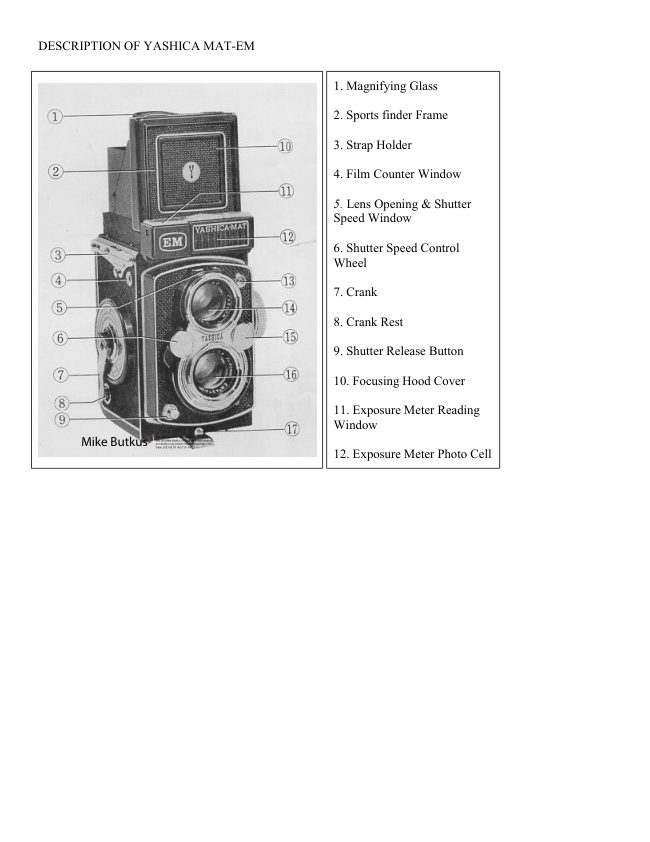
                                                                                            Be run gslupe  t.  lenle de oumenlo                    1.  Loupe cle grossissement        l.  Verg  rii
 2.  Morco del visor deporlivo           ,.   Viseur sportif                   2.  Sporlsucherro hmen
 3.  Engonche de lo correo            o.  Oeillet d'attache de la       3.  6se fijr Trogriemen
 4.  Venlonillo de/ conlodor de         courroie                             4.   Filmztih lwerkf enster
       ,orn c 5                   Voyant du  compteur       5.   Sichtfenster  fiir Blenden-
 5.  Ventonillo de oberluro Y        d'images                     und VerschluBeinslellung
     velocidod del ob,urodor        Voyant indicateur du       6.  Einstcllrod  fiir   Versch-
 6. Disco regurodor de  lo         diaphragrire et du temps          luBgeschwin digkeit
     velocidod de/ ob,urodor            d'obturation.                    7,   Filmtrons port-Kurbel
 7,  Monivelo de ovonce           Bouton de rdglage de        8.   Kurbelbett
 8.  Soporle de Io monivelo             I'obturateur                       9.  Aus l6ser
 9.  Disporodor                      n   Manivelle                        t0.   Sucherschocht
                                                                                                                  Belich-10. Topo del copvch6n de en-      8.  Logement de la mani-         I l.  Anzeigefensler des
     foque                                 velle                                       tun gsmessers
I t.   V entonillo del exposimelro       9.  D6clencheur de I'obtura-     12.  Foloze lle des Belichtun gs'
t2.   Folocri/ulo del exposimelro          teur                               messers
t3.  Conlocto poro sincro de     10.  Capuchon de mise-au-    13. BlitzlichtkontoktniPPel
       flosh                              point                   14, Sucherobiektiv
14.  Objelivo del visor $'          11.  Voyant de lecture du    15. Blendeneinstellrod
r5.  Disco regurodor de  Iq        posemctre               16. Aufnohmeobiektiv
     oberluro del obielivo           12.  Cellule photo-6lectrique    17. Riegel zum Offnen der
,6.   Objelivo de lomo            du posemdtre.                     Riickwond
t7.   Cierre de Io topo lrosero      13.  Prise de flash
                                  L4.  Objectif de vis6e
                                       15.  Bouton cle r6glage du
                                    cliaphragme
                                     r6.   Ol;jectif de prise-de-vue
                                    17.  Verrou cle fermeture du
                                           boitier
View original page 16Page 17 · Read text
Seguro del correle         18. Ressort de retenue de    18. Filmspulenorretierung
     Escolo de profundidod del         la bobine                 19. Tiefensch6rfenskolo
     compo                  19. Ecl-relle de profondeur    20. Anzeigeskolo  fijr  Belich-
     Esco/o indicodoro de ex-       de champ                              lun g sein sle  I lun g
      posici5n                20. Echelle de lecture du    21.  Entfernungseinstellknopf
21.  Mondo de enfoque                r6glage de I'exposition     22.  MX-Synchro-Wiihler
22.   Seleclor de sincro MX       21. Bor.rton de r6glage de    23,  Filmspulenorretierung
23.  Seguro del correle                 la rnise-au-point           24.  Selbstousl6ser
24.   Aulo-disporodor           22, Levier cle synchronisa-    25.  Stotivsockel
25.  Rosco poro el tripode             tion MX                 26.  Filmo n druckp lotte
26.   Ploco de presi6n          23. Ressort de retenue de la    27, Rote Dreiecksmorkierung
27.  Morcq poro oiuslor lo peli-        bobine                                          fijr Filmeinzug
      cu/o                   24. D6clencheur d retarcle-    28.  Umstelldorn fiir Zdhlwerk
    Crucelo pora invertir lo          meltt                     29,  Filmsponnfeder
      pelicula                25. Ecrou de pied
29.  fensor de lo peliculo       26. Voler presselrr du film
                         27. Point de repdre clu film
                         28. Bras de retolrr du film
                         29. Ressort de tension du
                                    film.

                                                                                                                                                                                                                                                                                                                                                                                                                                                                       r'.                                                           ;,&.             ,diffi
View original page 17Page 23 · Read text
MODO DE EMPLEO DEL     MODE D'EMPLOI DU         DAS EINSTELLEN
       S'SIEMA DE I.ECIURA      SYSTEME DE LECTURE         DER BELICHTUNG
        DF EXPOS/C/ON         DU POSEMETRE
                                   D6placer le bouton de  O  Den Einslellknopf  fiir die  o      Mueva el bol6n de oiusle  o       de ASA hoslo que el nlmero         r6glage ASA jusqu'd ce        ASA-Leitzohl so drehen,
         correspondienle o lo peliculo        que I'indice ASA du film      doB  die   ASA-Leitzohl
      corgodo oporezco en  lo          utilis6 apparaisse grossi        des eingelegten Films im
        ventonillo pequefio.            dans le Voyant Indi.       ASA - Leitzohl-Anzeigefen-Forv   Gire el mondo de oi uste del        cateur ASA.                      sler erscheini.
       indicodor de   exposici6n       16\\i/   Tourner le bouton de  @  Dos Einstellriidchen der
       hoslo que se coincidon /o        169lage de I'indicateur         Belichtungsonzeige wird
       flecho indicodoro verde y         d'exposition pour aligner         so gedrehl, doB die griine
        lo ogvjo rojo.                   le point de repdre vert        Teilmorkierung und  dic
  @  leo /o combinoci6n de ex-        sur I'aiguille rouge.             rote Nodel genou
        posici5n exoclo que sefro/o  @  Lire sur le voyant i'expo-         gege n - ijberslehen.
        el indicodor de exposici5n.         sition appropri6e rdpr6-  @  Die richtige Belichtungs.
  @  Gire /os discos de regulaci6n          sent6e.                      kombinolion im  Belich-
        de /o ve/ocidod de/ obturodor  @  Tourner le bouton de           tun gs-An zeigef ensle r
        y regvlaci6n de /o oberruro      commande de I'obtura-            o b lesen.
       del objelivo hosto que lo       teur et celui du  dia-  @  Dos Einstellrod  f iir Versch-
       ve/ocidod y  lo  oberrurq       phragme pour aligner le        luBgeschwindigkeit und
         /eidos oporezconen  lo venlo.       temps dbbturation etl'ou-       dos   Blendeneinstellrod
          nillo del obielivo de/ visor.         verture de diaphragme       werden so gedreht, doB
                                   indiqu6s au centre du        die richtige   VerschluB -
                                     voyant situ6 sur I'objectif         geschwindigkeit sowie die
                               de vis6e.                            richtige Blende im Sicht.
                                                                            fenster  f iir Blenden- und
                                                                        VerschluBeinsiellung on-
                                                                        gezeigt werden.


                                              'ru&u.                                   ,,;fu*.            ..*jc.*.i                            I -"-,
View original page 23Page 26 · Read text
AUTO-D'SPARADOR         DECLENCHEUR www.butkus.usA          DER SELBSTAUSLoSER
                        RETARDEMENT

Cuondo usq el oufo-disporodor,    Lorsqu'on emploie le d6clen-    FUr Selbstportriits oder Grup-
pongo siempre el  seleclor de    cheur d retardement pour des   penoufnohmen ltiBt lhnen der
rincro en lo posici6n X.           photos de personne ensemble,   eingeboute Selbstqusl6ser 8
                          ou de portrait, vous avez  d.   Sekunden Zeit, mit ins Bild zu
                              regler le levier de synchro-   kommen. Dozu muB ober die
                                 nisation sur X pour se servir   Komero ouf einem Stotiv be-
     CAEtE-D'SPARADOR      '& du d6clencheur d retardement.     festigt werden oder eine feste
Puede usor un cob/e-disporodor                                       Stijtze hoben, domit keine                     DECLENCHEUR A CABLE    verwockelten Bilder entstehen.tipo slondord. Desotorni//e  el
onil/o del disporodor y otornille  Un d6clencheur d cAble sur   Achtung: Bei Verwendung des
el coble-disporodor.               boitier standard peut €tre             Selbstousl6ser Syn-
                       mont6 sur le Yashica en             chrowdhlerouf "X"
                                d6vissant la couronne du d6-                   ste llen.
                              clencheur de l'obturateur  et
 DESCARGA DE LA PELICULA    en vissant le ddclencheur i       DER DRAHTAUSLI'SER
Despu6s de hober tomodo los 12    cAble d sa place.           An lhrer YASHICA konn ouch                                                    ein  Drohtousliiser  befestigtfotos, d6 unos vueltos o  lo                        RETRAIT DU FILM      werden. Schrouben Sie dozumonivelo de ovqnce y obro lq                                                   den Ausl6serring ob und denclmarq poro sqcor Io pelicvlo,    Aprds avoir pris les 12 poses,
                                 faire fonctionner environ 6    Drohtousliiser  ouf. Verwenden                                                               Sie dobei einen Drohtsusliiser                                     fois la manivelle d'avance du
                              film pour I'embobiner sur    mit Leicogewinde.
                              toute sa longueur et ouvrir
                                    l'appareil pour en retirer le   DAS ENTLADEN DER KAMERA
                                       film.                    Wenn Sie 12 Aufnohmen ge-
                                                               mocht hoben, Filmtronsportkurbel
                                                etwq sechsmo I  weilerdrehen,
                                         um ouch den Restfilm oufzu.
                                                                      spulen. Die Komero iiffnen und
                                                   den Film herousnehmen.                                                                    12
View original page 26Related documents and language editions
From the M. Butkus archive. Original publisher and archive notices are retained.
Check the model and edition against your equipment.
PDF verified 2026-10-10.