Film cameras
Yashica Mat EM User manual
User manual for Yashica Mat EM. 13 pages in English. Read the original PDF, download or print a copy without registration.
13 pagesEnglish1.5 MB PDF
Loading your manual…Open PDF directly
Document details
- Brand
- Yashica
- Model / document
- Yashica Mat EM
- Document type
- User manual
- Language
- English
- Pages
- 13
- File size
- 1.5 MB
- Category
- Film cameras
- Document date
- Not specified in catalog
Search available document text
Find a term, then jump to its page in the original PDF. Image-only pages may not be searchable; check the PDF for exact wording and diagrams.
Page 3 · Read text
www.butkus.us


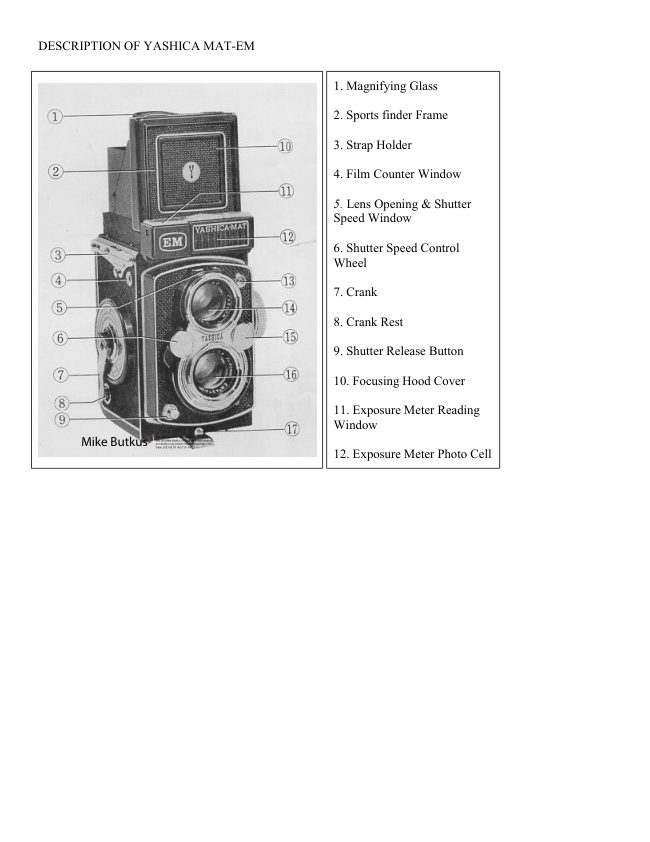
13. Flash Synchronization Terminal

14. Viewing Lens

15. Lens Aperture Control Wheel

16. Taking Lens

17. Back Cover Locking Lever

18. Spool Locking Spring

19. Depth-of-Field Scale

20. Exposure Setting Reading Scale

21. Focusing Knob

22. MX Synchro-selector


                                                23. Spool Locking Spring

                                                24. Self-timer

                                                25. Tripod Socket

                                                26. Film Pressure Plate

                                                27. Film Setting Mark

                                                28. Film Reverse Arm

                                                29. Film Tension Spring
View original page 3Page 4 · Read text
LOADING FILM


(1 ) To unlock the back cover turn the tripod socket in the direction marked 'O.'
Then open the Back Cover by swinging it out.

(2) Remove the Take-up Spool in the Lower Film Chamber by pulling out Lower Spool
Locking Spring.

Place the Take-up Spool in the Upper File, Chamber by pulling out the Upper Spool
Locking Spring.

(3) Place a new roll of size 120 film in the Lower Film Chamber.


(4) Flip up, the Film Transport Crank and slowly
wind it clockwise so that the wider slot of the
Take-up Spool in the upper Film Chamber faces
upward. Then gently draw out the film leader and
thread it firmly and evenly into the slot.

(5) Gently wind the Crank clockwise.

(6) Advance the film by slowly winding the
Crank until the arrow on the film points to the
triangles on either side of the camera body.

(7) Close the camera back cover and lock it by
turning the Tripod-Socket in the direction marked
'C'. The letter 'S' will appear in the Film Counter
Window.
View original page 4
Page 5 · Read text
www.butkus.us


CRANK OPERATION


                                  (1 ) Wind the crank clockwise until ill comes to a
                                     stop. The letter 'S' will hove disappeared and No. l
                                     will appear in the Film Counter Window.

                                     (2) Then wind the crank counter-clockwise until it
                                     stops. You are ready to snap your first picture.


                            For subsequent exposures a smooth pendulum swing,
                                        first downward to stop and then upward to stop,
                            advances the film and winds the shutter simultaneously.
View original page 5Page 6 · Read text
(A) The downward wind advances the film and moves
                          up the number of the next film in the Film Counter
                        Window.

                             (B) The upward wind winds the shutter.

                             (C) The position of the crank when it is flipped back into
                                         its rest after your pictures have been taken.

                         The shutter should not be kept wound when not in use
                             because it weakens the shutter spring and there is the
                                  possibility you may unknowingly press the shutter
                              button and waste a film.


ASA-DIN CONVERSION SCALE


                   When using film rated in DIN index, move conversion scale
                         so that DIN number of the film appears in the window. ASA
                      number of the film, at the same time, appears in the window
                               at the opposite side of the scale. Set the ASA number in to
                            the ASA Indicator Window.
View original page 6Page 7 · Read text
www.butkus.us


                 LENS OPENING AND SHUTTER SPEED

                        (A) The arrow points to the Lens Opening and Shutter Speed
                          Scale Window. The letter "f" on the left of the window
                            indicates lens opening and 'sec' indicates shutter speed.

                         (B) The shutter speed is set by turning the Control Wheel
                         with your right hand thumb either up or down as indicted by
                           the arrow. The red shutter speed figures should be set so that
                           the black triangles on the window run exactly through the
                            center of the figures.

                         (C) The lens opening is set by turning the Control Wheel
                         with your left-hand thumb either up or down as indicated by
                           the arrow. The black lens opening figures should be set so
                              that black triangles on the window run exactly through the
                            center of the figures.


HOW TO USE EXPOSURE READING SYSTEM
View original page 7Page 8 · Read text
(1) Move ASA Setting Knob so that ASA number of the film in use appears in ASA Indicator Window.

(2) Turn Exposure Indicator Adjusting Knob to match the 'Green Index Arrow' to the red needle.

(3) Read correct exposure combination indicated in Exposure Indicator Window. They are the proper exposure
combination of lens aperture and shutter speed to be set on your camera

(4) Turn Shutter Speed Control Wheel and Lens Opening Control Wheel to bring the pertinent shutter speed and
lens opening in to the center of the window located on the top of viewing lens.


SIGHTING THE SUBJECT AND FOCUSING


(1 ) Open the focusing hood by lifting it
at the back, and now point your
Yashica at the subject,

(2) Rotate the Focusing Knob until
your subject on the ground glass screen
becomes sharp. The bright circle in the
center of the ground glass viewing
screen enables you to obtain a sharp
focus and should be the center of the
picture you are composing on the
screen. The red lines on the screen help
you to judge proportion and compose
your picture.

Compose your subject on the ground
glass as you would like to see it in the
final picture.
View original page 8
Page 9 · Read text
www.butkus.us


MAGNIFYING GLASS


                                      For critical focusing

                          (A) Raise the Magnifying Glass by pressing the front of
                              the Focusing Hood Cover inward, holding the Focusing
                      Hood so that it does not close.
                    When using the Magnifying Glass, place your eye as close
                               to the Magnifying Glass as possible.

                           (B) Always make sure that you have first lowered the
                          Magnifying Glass before closing the Focusing Hood.


SPORTS FINDER


                           Sight your subject through the Sports Finder Window.

                        (A) Depress the Focusing Hood Cover until il clicks into
                             place. Lift the Yoshica to your eye level.

                          (B) Push the Release Button to close the hood cover.
View original page 9Page 10 · Read text
TAKING FLASH PICTURES


FLASH PICTURES

Correct exposures for flash pictures will be
obtained easily and correctly by consulting the
guide numbers printed on the package of the flash
bulbs.

When taking color flash pictures you may need
filters or have to use proper bulbs according to the
type of films (Day-light or Tungsten) you are
using.

Your camera dealer will be glad to supply the
proper flash attachment for your camera.
View original page 10
Page 11 · Read text
www.butkus.us

As you become more proficient at taking pictures, you will want to acquire accessories that increase the
versatility of your Yashica.

One of the first accessories you will want will b? a flash unit.
Synchronization for flash is built-in. A standard PC connector plugs into the flash terminal.

The battery case is attached to the camera by an arm that screws into the tripod socket.


 Selector Position      M            X            X

    Bulb used      M type            F type           Electronic Flash

                                                   Any Speed
   Shutter Speed       Any Speed         1/60 or slower     (When using Self-
                                                                  Timer)


SELF-TIMER


                                   For taking self-portraits or group pictures, you
                                   have about 8 seconds to get into the picture.
                                     Therefore your camera must be mounted on a
                                         tripod or brace to pre. vent o blurred picture.

                                     Caution! Be sure to move the synchro selector
                                          to the X position when using Self-timer.


UNLOADING FILM


After all 12 pictures have been taken, wind
the Film Transport Crank about 6 times to
take up the remaining film and open the
camera and remove the film.
View original page 11Page 12 · Read text
CABLE RELEASE


                A standard. overlap-type Cable Release can be fitted to
                          your Yashica. Simply unscrew the Shutter Release Ring
                         and Screw in the Cable Release. Your camera dealer will
                           supply the proper cable release for your camera. See left
                               picture.


THE LENS OPENING

The lens opening controls the amount of light that will pass through the lens onto the light-sensitive film.
Your Yashica MAT-EM with its Yashinon lens offers openings f / 3 5, 4,56,8,11,16, and 22.


Notice that the lower the number, the larger the opening F 3 5 is the largest opening, f 22
                                      the smallest
 To set the lens opening, move the Aperture Control Wheel to the desired number on the
                                 Aperture Scale


                             SHUTTER SPEED

The Shutter Speed controls the duration of the exposure. Shutter speeds on this camera with its fine Copal
Shutter are 1, 1/2, 1/4, 1/8, 1/l5, 1/30, 1/60, 1/125, 1/250, 1/500 of a second and B. The 'B' setting is for taking
pictures with an exposure longer than 1 second. Use a Tripod or Brace when using B. When you press the
Shutter Release Button on the "B" setting the shutter stays open until you release pressure on the button.

It is advisable to set the shutter speed before you wind the shutter all times.
View original page 12Page 13 · Read text
www.butkus.us


DEPTH-OF-FIELD


                    When you focus the camera on a subject there is a certain
                              distance in front of and back of the subject within which
                              other objects will also appear sharp. This is known as the "
                             Depth-of-Field," and it varies with the lens aperture. The
                             smaller the aperture, the greater the Depth-of-Field.

                                     If the camera is focused at 10 meters and the lens aperture
                                    is f / 16, the Depth-of-Field {area in which all objects are
                             sharp! is from about 5 meters to infinity.


Notice!
Be sure to replace the lens Cap when your camera is not in use. Keep your camera away from dust and
moisture. For cleaning the lens surface to remove dust or dirt, always wipe very lightly by using clean gauze or
lens cleaning cloth. Do not wipe the lens with a dirty handkerchief. When you are not using your camera for a
long period do not leave the shutter set.
View original page 13Related documents and language editions
From the M. Butkus archive. Original publisher and archive notices are retained.
Check the model and edition against your equipment.
PDF verified 2026-10-10.