Film cameras
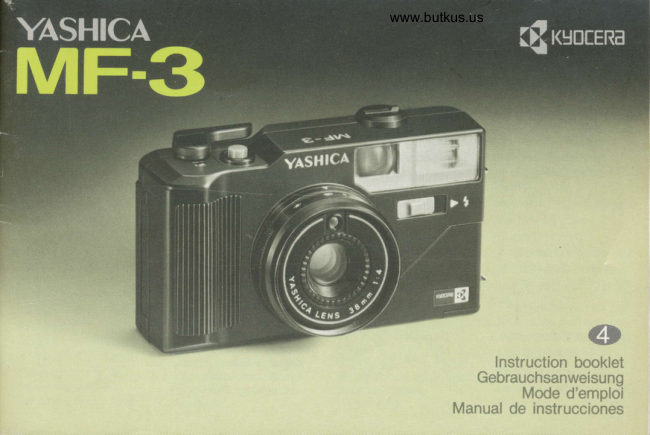
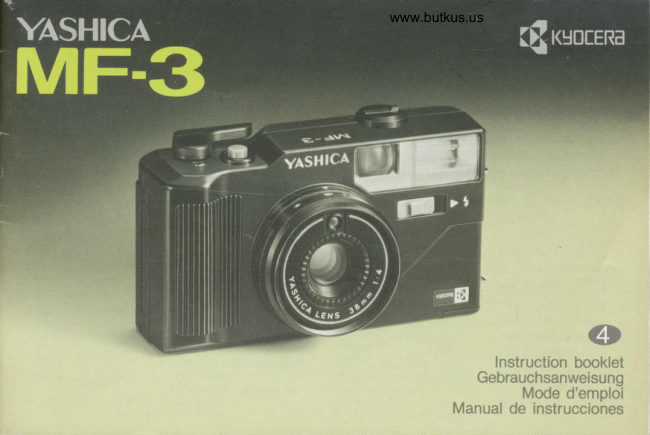
Yashica MF-3 User manual
User manual for Yashica MF-3. 21 pages in German. Read the original PDF, download or print a copy without registration.
21 pagesGerman5.6 MB PDF
Loading your manual…Open PDF directly
Document details
- Brand
- Yashica
- Model / document
- Yashica MF-3
- Document type
- User manual
- Language
- German
- Pages
- 21
- File size
- 5.6 MB
- Category
- Film cameras
- Document date
- Not specified in catalog
Search available document text
Find a term, then jump to its page in the original PDF. Image-only pages may not be searchable; check the PDF for exact wording and diagrams.
Page 1 · Read text
www.butkus.us


                in*tr*cti*n b**klct
            **brau*h*sr:w*is*ng
              M*d* d'*rng:l*i
          1,4*n*nt qJ* inctruc*i*ixls
View original page 1Page 2 · Read text
Thank you for choosing the Yashica MF-3.         Wir danken lhnen, daR Sie sich fUr die
This is a compact camera with built-in flash.      Yashica MF-3 entschieden haben. Bei dieser
Please read this operation manual carefully       Kamera handelt es sich um eine
through to become familiar with your camera      Kompaktkamera mit eingebautem  Blitzgerdt.
before using it.                                       Bitte lesen Sie diese Gebrauchsanweisung
                                                 vor Inbetriebnahme sorgfdltig durch, damit
                                                Sie mit allen Funktionen der Kamera vertraut
                                                werden.
Cantents                                     lnhalt
                                                 Bezeichnung der Teile              ................... 5
                                                     Einsetzen der Batterien ...................................  9
                                                            Einstellen der Filmempfindtichkeit   .. . .............. l3
View original page 2Page 4 · Read text
Bitte spenden Sie 2,50 Euro, um diese Website über E-Bay zu unterstützen ... www.PayPal.me/butkusView original page 4
Page 6 · Read text
www.butkus.us


          Camera Back Release Knob
            Flash Ready Lamp
            Viewfinder Eyepiece
            Sprocket
           Take-up Spool

             Battery Compartment Cover
            Film Chamber
           Film Rewind Release Button
          Camera Back
View original page 6Page 7 · Read text
www.butkus.us


Open the Battery Compartment Cover by                                  't' B&ttgr:tt:';  ir':  !"i:j'ri:
pushing  it in the directiion of the arrow " a ".        Use two 1.5 V M-size penlight batteries. (Always
Insert the two batteries with the plus 0  and         use new batteries of the same brand.)
minus *  ends correctly as illustrated inside the
battery compartmeni, then replace the cover.           Never use rechargeable nickel-cadmium
                                                                      batteries.
View original page 7Page 8 · Read text
www.butkus.us

    Turn on the Flash Switch.  lf the Flash Ready Lamp        Den Blitzschalter einschalten. Wenn die
     lights in a few seconds, the batteries are operating             Blitzbereitschaftslampe  innerhalb weniger Sekunden
     properly.                                                        aufleuchtet, bedeutet dies, daB die Batterien in
       lf it does not light within about 30 seconds, replace          Ordnung sind. Die Batterien durch neue ersetzen,
    the two batteries with new ones. After checking the        wenn die Lamoe nicht innerhalb von 30 Sekunden
     batteries, be sure to turn off the Flash Switch,                 aufleuchtet. Nach der Batteriekontrolle immer daraul
                                                                achten, den Blitzschalter auszuschalten.
   A set of new alkaline batteries will
     provide power for exposing about                                                 Mit einem Satz frischer Alkali-                                                                                      Batterien kdnnen ca. 15 Filmrollen    15 24-exposure  rolls of film with
     flash.                                                                 zu ie 24 Aufnahmen mit Blitz
                                                                                             belichtet werden.


     Placer le flash sous tension.
    Lorsque le t6moin de                                                           Active el interruptor del flash. Si la
    fonctionnement du flash s'allume                                              ldmpara de puesta a punto del
    au bout de quelques secondes, les piles sont                          flash se enciende a los pocos segundos, indica
   en 6tat de charge satisfaisant.  Si aprds 30                      que las pilas estdn cargadas correctamente. Si
    secondes le t6moin n'est pas encore allum6,                    no se enciende despu6s de transcurrir 30
    remplacer les deux piles par des piles neuves.                  segundos, reemplace las dos pilas por unas nuevas.
    Aprds avoir contr6l6 l'6tat des piles, penser d placer         Despu6s de verificar el estado de las pilas, asegdrese
     le flash hors tension.                                  de desactivar el interruptor del flash.

                                                  Un juego de pilas alcalinas nuevas le permiten   Une paire de piles fer-nickel neuves permet d'essurer                                                          exponer con flash aproximadamente 15 rollos de 24
     I'exposition de 15 pellicules de 24 poses avec le flash.        exposiciones.t0
View original page 8Page 10 · Read text
www.butkus.us

                       ffi                            ffi


   Turn the Film Speed Ring and set the ISO speed                                                            This camera accepts films with four ISO   number of the fllm you are using opposite the                                                    speed ratings of 100, 2O0, 4A0 and 1000.    index.
   The film speed is orinted on the film box.


l2
View original page 10Page 11 · Read text
www.butkus.us


                                                                     Bat mark
                                                                          Ealkenmarkierung
                                                                  Fepdre A barre
                                                              Marca en barra


   Always load and unload film in subdued         *    Pull out the film until its tip comes over the     tight.                                    q"S Take-up Spool, near the mark "   ". Make
                                                         sure that the Sorocket catches the lower film
                                      down           perforations.  S  Open the Camera Back by pushing   's" the Camera Back Release Knob.
   ql   Pull up the Film Rewind Knob, insert the               (A)                        (B)  &d film cassette into the Film Chamber and
   oush down the Film Rewind Knob.                                             Make sure the film lies flat on the film rail as
                                                shown in the illustration  (A).l4
View original page 11Page 12 · Read text
www.butkus.us


                                                                                                      it  n   Close the Camera Back and press it until   '!     locks.                                      TheRewindfilm Knobis advancingturns as properlyyou windif thethe FilmFilm
       Make blank shots until the Exposure K                                                   Aclvance Lever.  J    Counter shows "1".
    ffurn the Film Advance Lever as far as  it will go
   and depress the Shutter Release Button. Repeat
    until "1" appears in the counter.)
t6
View original page 12Page 13 · Read text
www.butkus.us


       To set exoosure. set the desired weather          fb   Bring your subject inside the viewfinder
        symbol on the ring opposite the index " r "           ^d'   frame.

                (withctick)  \@i           ffi       m     Bright sun Hazy Sun                   Cloudy
                            ?;;:r,
    . To take flash pictures, set the ring aI " | "
t8
View original page 13Page 15 · Read text
www.butkus.us


                                                              /---a\
                                             ,Lplj
                                                               \


   Use flash in cloudy weather or indoors. lf the           Turn on the Flash Switch   low light signal lamp (red) lights in the right         "ff
   side of the viewfinder when you press the
   Shutter Release Button halfway in, you will
   have to use flash to take pictures.
  "$   lf the signal lamp lights, set the Weather
                                          ".    .lt  Symbol Ring at " !


22
View original page 15Page 16 · Read text
www.butkus.us


                                                            lights,  e  As soon as the Flash Ready Lamp    t   you are ready to take your flash picture.          Take flash oictures at a distance of aboul 1.5                                           to3m.    Bring your subject inside the viewfinder frame
   and deoress the Shutter Release Button.


24
View original page 16Page 17 · Read text
www.butkus.us

    .  lf you operate the Shutter Release Button
    before the Flash Ready Lamp lights, the flash
     will not fire at all or it will fire with insufficient
     light so that your picture will turn out
    underexposed.
   o lf you are not taking flash pictures, be sure to
    turn off the Flash Switch.
   o Take care not to cover the flash reflector with
    your fingers.


             When taking pictures in the vertical format,
                 hold the camera with the flash side uo.


26
View original page 17Page 18 · Read text
www.butkus.us


   When the end of the tilm is reached, the      q   Unfold the Film Rewind Crank and turn it in   Film Advance Lever will not turn any further.     &'  the direction of the arrow. Stop rewinding  if
   Do not use force to wind it any more, and        you feel a sudden release of tension, then open
   rewind  it into fhe cassette as follows:              the camera back and remove the cassette.
                                                Send the exposed film for processing as soon as
  1   Press in the Film Rewind Release Button.           possible.


28
View original page 18Page 19 · Read text
www.butkus.us


                                               !h,l                                              I
    . When the glass surfaces of the vieMinder or         . The camera incorporates a high-voltage circuit
   the lens are smudged with fingerprint stains or        which is dangerous. In case of malfunction,
    other marks, promptly clean them by lightly         NEVER try to disassemble  it by yourself for
    wiping them with some lens-cleaning tissue,                repair.
   moistened with lens-cleaning solution. Remove           .  lf the Flash Unit is not used for a long period,
     dirt and dust from these surfaces with a blower         test the flash occasionallv to maintain the
    brush.                                                 capacitor efficiency.
  o In summer, do not leave the camera on a hot
    beach, in a hot car or its storage compartment,              (. r  !(ery Pfe(           ; >
   because not only the camera mechanism, but       o lf you are not likely to use thb camera for a
    also the film and battery performance may be          long period of time, remove the batteries to
    adversely affected.                                     prevent possible damage by battery leakage.
    . To clean the camera body, wipe it clean with         . Generally, low temperatures will reduce the
   a soft cloth. Never use benzine, thinner and            battery performance.  lf you are shooting in cold
    other solvents.                                         weather, warm the batteries in your pocket, for
   o After using it at the seaside or in a dusty           example, and always keep spare batteries on
    place, wipe the camera clean. Salt air will have         hand.
   a corrosive effect on the camera, and sand and         . Wioe both ends of the batteries clean before
    dust will be harmful to the camera mechanism.         loading them. Soiled battery contacts may cause
                                                    poor electrical contact.


30
View original page 19Page 20 · Read text
Type: 35 mm lens-shutter camera with buiFin       Film Loadlng: Easy loading.
         flash.                                            Film Rewind: Film rewind crank.
     Lens: Yashica 38 mm f/4, 3 elements in 3         Exposure Counter: Auto-resetting, additive
        groups.                                                        type,
      Shutter: Mechanical, with 1/125 sec. fixed             Built-in Flash: Sliding ON/OFF switch; guide
       soeed.                                      number 12 (lSO 100, meters); aperture setting
A     Exposurc Gontrol: CdS sensor; aperture             with flash symbol ( t ); 1.5-3 m flash range;
 'l       setting with weather symbols (tl4-t122); in low          recycling time: about 5 sec. (with new alkaline I,
lrI        light situations (EV 1'1 or under), warning lamp           batteries, at normal temperature); provided with        turns on in viewfinder by pressing shutter               flash ready lamp.
       release halfway  in.                             Power Source: Two 1.5 V M-size penlight
       Film Speed Settings: ISO '100, 200, 4OO, and        batteries (for flash and low-light warning); Ni-Cd
        1000.                                                         .batteries cannot be used.
      Viewfinden Inverted-Galilean type, direct          Dimensions: 125.5 (W) x 7'1.5 (H) x 51.5 (D)
        viewfinder; O.5X magnification, 90% picture area;     mm.
        low-light warning signal in viewfinder.              Weight: 200 g (without batteries).
      Focusing: Fixed focus with 1.5 m-o       covering range.                                 * Specifications and design are subiect to change
       Film Advance: Film advance lever.                     without notice.


   34
View original page 20Page 21 · Read text
www.butkus.us
       3,11 1eH :t,q..1$..91'.3P..-                                   .u..:i.1.9..11*..93lt'.?L?..9.,?.?s.   *.....,,!.,..,!.!r
    Attach the Strap to the camera by passing  its        Use the Camera Case with its strap attached as
    end through the Strap Lug as shown.               shown in the illustration.
            \p
      M


38
View original page 21Related documents and language editions
From the M. Butkus archive. Original publisher and archive notices are retained.
Check the model and edition against your equipment.
PDF verified 2026-10-10.