Film cameras
Yashica TL Electro camera User manual
User manual for Yashica TL Electro camera. 8 pages in English. Read the original PDF, download or print a copy without registration.
8 pagesEnglish0.7 MB PDF
Loading your manual…Open PDF directly
Document details
- Brand
- Yashica
- Model / document
- Yashica TL Electro camera
- Document type
- User manual
- Language
- English
- Pages
- 8
- File size
- 0.7 MB
- Category
- Film cameras
- Document date
- Not specified in catalog
Search available document text
Find a term, then jump to its page in the original PDF. Image-only pages may not be searchable; check the PDF for exact wording and diagrams.
Page 2 · Read text
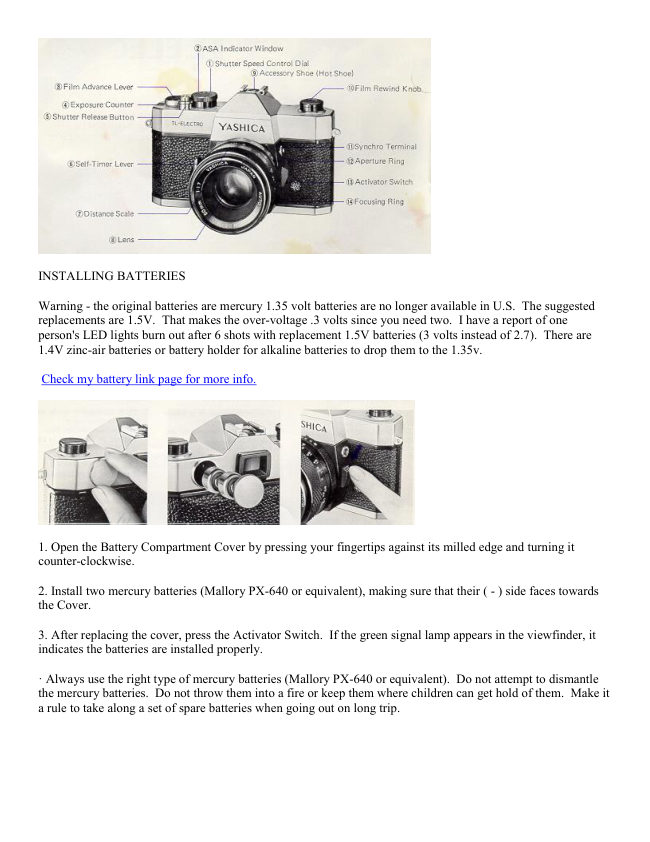
INSTALLING BATTERIES

Warning - the original batteries are mercury 1.35 volt batteries are no longer available in U.S. The suggested
replacements are 1.5V. That makes the over-voltage .3 volts since you need two.  I have a report of one
person's LED lights burn out after 6 shots with replacement 1.5V batteries (3 volts instead of 2.7). There are
1.4V zinc-air batteries or battery holder for alkaline batteries to drop them to the 1.35v.

Check my battery link page for more info.


1. Open the Battery Compartment Cover by pressing your fingertips against its milled edge and turning it
counter-clockwise.

2. Install two mercury batteries (Mallory PX-640 or equivalent), making sure that their ( - ) side faces towards
the Cover.

3. After replacing the cover, press the Activator Switch.  If the green signal lamp appears in the viewfinder, it
indicates the batteries are installed properly.

· Always use the right type of mercury batteries (Mallory PX-640 or equivalent). Do not attempt to dismantle
the mercury batteries. Do not throw them into a fire or keep them where children can get hold of them. Make it
a rule to take along a set of spare batteries when going out on long trip.
View original page 2
Page 3 · Read text
FILM LOADING (a)
1. The. back cover will pop open when the Film Rewind Knob is pulled all the way up.

2 Load the film cassette as illustrated and push the Film Rewind Knob down to its original

3. Insert the tip of the film leader into one of the slots on the Take-Up Spool.


FILM LOADING (2)
4. Wind the Film Advance Lever and make sure the Sprocket teeth properly engage the perforations along the
edges of the film.

5. Close the back cover. Advance the film by pressing the Shutter Release Button and winding the Film
Advance Lever alternately until the red figure 1 comes opposite to the triangle index in the exposure counter.

6. If the Film Rewind Knob turns in the direction of the arrow when the Film Advance Lever is wound, it
indicates that the film is being taken up properly.
View original page 3
Page 4 · Read text
ASA SPEED SETTING
Lift up the milled ring around the Shutter Speed Control Dial and turn it until the figure corresponding to the
speed rating of the film loaded in the camera centers in the ASA Indicator Window.


SHUTTER SPEED SETTING
Turn the Shutter Speed Control Dial in either direction and align the desired speed setting with the index line.


EXPOSURE SETTING


Look through the viewfinder and press the Activator Switch. You will notice that only the upper or lower half
of the green ( O ) symbol is visible. Turn the Aperture Ring until the entire symbol appears, indicating correct
exposure setting.

The Activator Switch will automatically return to the original position when the Shutter Release Button is
pressed.

* If only the upper half ( n ) of the symbol is visible, it warns against over-exposure. To achieve correct
exposure setting, turn the Aperture Ring until the entire symbol appears. If it fails to come on even when the
Aperture Ring is turned all the way, use a faster shutter speed or an ND filter to compensate for over-exposure,


* If only the lower half ( v ) of the symbol lights, it warns against under-exposure. To achieve correct exposure,
reset the aperture. If the entire symbol fails to come on even when the Aperture Ring is turned all the way, use a
slower shutter speed, or change to flash photography.

Preselection of Aperture. When taking pictures in subdued light, it may be easier and better to preselect the
aperture.

1) Set the Aperture Ring to the desired aperture.
2) Press the activator Switch, then turn the Shutter Speed Control Dial until the entire symbol appears in the
viewfinder.
View original page 4
Page 5 · Read text
NOTICE:

An infinite range of shutter speeds at in-between settings can be obtained between 1/60 and 1/1000 sec.

When correct exposure is indicated at an in between setting between 1/60 and 1 sec., reset the Shutter Speed
Control Dial to the nearest click stop setting. Then turn the Aperture Ring until the entire green symbol
appears to indicate correct exposure.

NOTICE:
When a standard lens has no Auto Manual Lever, manual extension bellows and extension tubes cannot be used
unless the lens aperture is fully oven.


FOCUSING


1. Turn the Focusing Ring in either direction while sighting through the Viewfinder.

2. Precise focus is secured when the image of your subject appears clear, without the multiple glitter, within the
microprism focusing spot at the center of the finder field.

SENSITIVITY RANGE
The sensitivity range of the automatic exposure system of the TL-ELECTRO varies according to the ASA speed
rating of the film in use. In short, the shutter speed range for automatic Thru-the-Lens exposure read-out usable
with film of different ASA speed rating is as shown in the following table: Note: The automatic exposure read-
out will not work at shutter speed settings other than those listed in the foregoing.
View original page 5
Page 6 · Read text
FILM UNLOADING


1. Stop winding the Film Advance Lever when a resistance is felt. And do not force to advance the film any
further as it may tear or come loose from the cassette, making it impossible to rewind.

2. Press the Film Rewind Release Button on the base of the camera.

3. Fold out the rewinding crank-handle on the Film Rewind Knob and turn it in the direction of the arrow until it
turns freely.

4. Pull the Film Rewind Knob all the way up to open the back cover, and take out the exposed film.


FLASH PHOTOGRAPHY


An use of flash equipment is recommended when shooting under subdued light conditions. To use a cordless
flash unit, set it on the direct contact shoe on the camera. For the use of conventional type strobe or AC flash
unit, plug its cord into Synchro-Terminal.

The FP or X synchronization is determined by the built-in automatic selector according to the setting of the
Shutter Speed Control Dial.

SPEEDS FOR FLASH SYNC

* Electronic flash---- Set speed to "60-X" (Synchronizes also at all speeds under 1/60 sec. and B)

* M.F class bulbs--Synchronizes at 1/30 sec. or slower speeds, and B.

* F.P class bulbs--Synchronizes at all speeds other than 1/60 sec.

Correct aperture setting in flash photography is obtained by dividing the flash guide number by the flash-to-
subject distance.
View original page 6
Page 7 · Read text
"B" SETTING


When the Shutter Speed Control Dial is set at the "B" setting, the shutter will remain open as long as the Shutter
Release Button is depressed. Mount your camera on a tripod and use a cable release when making exposure at
"B" or slow shutter speed settings.

SELF-TIMER


1. Wind the Film Advance Lever.

2. Push the Self-Timer Lever all the way down.

3. Depress the Shutter Release Button to activate the self-timer.

The self-timer will trip the shutter at a delayed action of 8 to 9 seconds.


BACKLIT SUBJECTS
View original page 7
Page 8 · Read text
Take exposure reading by approaching your subject or give about double the normal exposure when shooting
backlit subjects.

If normal exposure reading is T/ 16 at 1/125 sec., reset to f/ 11 at 1/125 see, or f/16 at 1/60 see,

INFRARED FILM PHOTOGRAPHY
The red ·-index is for distance compensation in infrared film photography.

1. Secure focus in the normal manner and read off the range on the Distance Scale.

2. Align the subject distance with the · index.

FILM PLANE INDICATOR
In extreme close-ups where critical focusing is required, measure the distance to the subject from this film plane
indicator and adjust the Distance Scale accordingly.

DEPTH OF FIELD


Depth of field is the extent over which all objects appear acceptably sharp. It is more extensive (1) at smaller
aperture setting, (2) when focused on a distant subject, and (3) in the background than in the foreground.

LENS INTERCHANGING
All Yashinon lenses feature screw-thread mount To change lens, simply turn the lens barrel counter-clockwise.
Parallax-free viewing and accurate Thru-the-Lens exposure control is obtained with all lenses. Make it a rule to
interchange your lens in the shade. Any Pentax thread mount will fit on this camera. They WERE made my
Sears, Sologar, Vivitar and other older makes. Be sure to check the aperture pin release quickly as these lenses
are from the 1970s. Fungus and easy focus are other items to check on such old lenses.
View original page 8
Related documents and language editions
From the M. Butkus archive. Original publisher and archive notices are retained.
Check the model and edition against your equipment.
PDF verified 2026-10-10.