Film cameras
Yashica TL Electro X ITS User manual
User manual for Yashica TL Electro X ITS. 43 pages in English. Read the original PDF, download or print a copy without registration.
43 pagesEnglish5.8 MB PDF
Loading your manual…Open PDF directly
Document details
- Brand
- Yashica
- Model / document
- Yashica TL Electro X ITS
- Document type
- User manual
- Language
- English
- Pages
- 43
- File size
- 5.8 MB
- Category
- Film cameras
- Document date
- Not specified in catalog
Search available document text
Find a term, then jump to its page in the original PDF. Image-only pages may not be searchable; check the PDF for exact wording and diagrams.
Page 3 · Read text
DESCRIPTION
                                                 1. F ilm rewindknob
                                                      2. Mirrorlock knob
                                                      3. Batterycheck lamp
                                                    4. Battery check button
              5. Direct contact accessoryshoe/ X  f lashterminaI
     6. Shutter speedd iaI lF ilm speedsetting d iaI
 7 . Shutterreleasebutton
     B. Film advancelever
g.  Film exposurecounter


       10. Aperture r ing
       11. Focusingring

 12. Exposurecheck lever

      1 3. Self-timer lever

          14. Takinglens


                      www.orphancameras.com
View original page 3Page 4 · Read text
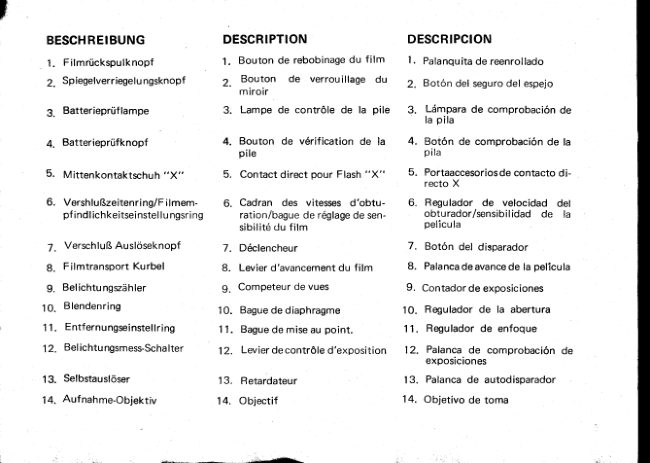
BESCHREIBUNG         DESCRIPTION          DESCRIPCION
 1. Filmr0ckspulknopf              1. Bouton de rebobinagedu film         l,  Palanquitade reenrollado
 2. Spiegelverriegelungsknopf        Z.  Bouton  de  verrouillage du     2. Boton del segurodel espejo
                                        miroir
 3.  Batteriepriiflampe                 3. Lampe de contr6le de  la pile   3. Ldmpara de comprobaci6n de                                                                                          la pila
 4.  Batteriepriifknopf                 4. Bouton de  v6rification de  la    4. Bot6n de comprobaci6n de la
                                           pile                                   Pila
 5. Mittenkontaktschuh "X"          5. Contact direct pour Flash "X"      5. Portaaccesoriosde contacto di-
                                                                                   recto X
 6. VershluBzeitenring/Filmem-      6. Cadran des  vitesses d'obtu-     6. Regulador de  velocidad del
     pf ind lichkeitseinsteI lu ngsring      ration/bague de 169lagede sen-       obturador/sensibilidad de   la
                                             sibilit6du film                       pelicula
 7. VerschluBAusloseknopf         7. D6clencheur                    7. Bot6n del disparador
 B. Filmtransport Kurbel           L  Levier d'avancementdu film      B. Palancade avancede la pelicula
 g. Belichtungszdhler               g. Competeur de vues             9 . Contador de exposiciones
10. Blendenring                  10. Baguede diaphragme          1 0 . Regulador de  la abertura
1 1. Entfernungseinstellring               'l 1. Bague de mise au point.         1 1 . Regulador de enfoque
1 2. Belichtungsmess-Schalter     12. Levierde contr6le d'exposition   12. Palanca de comprobaci6n de
                                                                       exposiciones
13. Selbstausloser                 13. Retardateur                 1 3 . Palanca de autodisparador
14. Aufnahme-Objektiv            14. Objectif                     14. Objetivo de toma
View original page 4Page 5 · Read text
FEATURESOF TL ELECTRO.X-TZ5

         Lens:  Auto Yashinon55mm t11.2;Auto Yashinon5Ommtl1-4;AutoYashinon
            50mm f 11.7;Auto Yashinon50mm tl2.O;stopsdown to f /16
       Shutter:   Electricallyoperatedfocalplaneshutterwith speedsfrom B, SLOW (about
                 2 seconds)to 1/1000 sec.,intermediateshutter speedsettingoptional;
                   self-timerplus FP-Xsync.
ExposureControl: Thru-the-LensCdS light measuringsystem;ElectronicExposureReadout
              System (exposurewarning arrows suggestexposurecorrections):ASA
                range25-800 (DlN 15-30);a 6V silveroxide batteryis usedto powerthe
                exposure control system and electric-operatedfocal plane shutter
               (EvereadyNo. 544 or equivalent).
    Viewfinder: Reflex viewfinder with microprismfocusingspot, ground-glasscollar for
                depth of  f ield analysis;focusingfrom .0.5 meter 11.75feet) to infinity;
               exposurewarningarrowsvisiblein the viewfinder.
 Film Transport:   Ratchet-type,singlc-strokefilm advancelever;automatic resettingfilm
               exposurecounter.
 Other Features:   Batterychecker,Mirror lock, Directcontactshoe,Multi-slottake-upspool
                    for easyand fast loading.
    LensShade:  57mm slip-ontype
       F i l t e r s : 55mm screw-intype
   Dimensions:  i 5 1 x 1 0 0 x 9 6 . 4 m m
       Weight:  1070grs.                                              . L


                          www.orphancameras.com
View original page 5Page 6 · Read text
Yashica'selectronicbreakthrough-ElectronicExposure
                          ReadoutSvstemhasbeenincorporatedin an SLR camera
                                  for the f irst time!
                                         It's the transistorizedlC (integratedcircuit) in the
                         TL ELECTRO-X1fS  that  pinpoints Thru-the-Lens
                           exposureat stopped-downaperture.lndicatorarrowsin
                              the finder give warningagainstover-or under-exposure,
                          and signal how to make corrections.The result-most
                                  efficient correct exposuresettingunder all light condi-
                                 tions. No more eyestrainingneedle-matching.No chance
                                  of the exposuresystemgoingout of orderdue to shock,
                                     jolts, heat or cold, becausethere are no movingparts,
                           meter-needleor hair coil. The electricallyoperatedfocal
                            plane shutter also works wondersin assuringaccurate
                            exposure.lt's a uniqueshutter systemprovidinga range
                                   of  intermediate speeds betweensettings-especially
                             important with narrow-latitudecolor film.
2

                                                                                                                                                                      ..  ;'.. r"i;l,'+   ''*-*h65d&i-.       -.h
View original page 6Page 7 · Read text
LOADINGBATTERY
1 . Remove the Battery Compartment Cover by
   turning it  in the direction of the arrow and
    install a 6V  silver oxide battery  ( Eveready
   No. 544 , PX-28 or  equivalent).


2. Ma ke sure that the (-) side faces inside. lf the
   battery is installed in a reverseposition, the
   Electronic Exposure Readout Systemwill not
   function.  Close the  Battery Compartment
  Cover securely.


                     www.orphancameras.com
View original page 7Page 8 · Read text
CHECKINGBATTERY             NOTES
                             ON lf the batteryis weak,the ElectronicExpo-
                                  SILVER OXIDE BATTERYsure ReadoutSystemwill not operatecor-
                                    o When the  battery is installed incorrectly,rectly. Beforeshooting,checkthe battery
condition. Pressthe BatteryCheckButton       1) The green lamp will not light when the
and whenthe greenlamp lights,the battery          batterycheckbutton is depressed.
hassufficientpowerto operatethe exposure       2l Theshutterspeedwill be 1 /1000 sec.when
control system. Replacethe batterywhen          the shutterreleasebutton is depressed.
the greenlampdoesnot light.             o Do not throw used silver oxide battery into
                                             the fire, trashcansor wastereceptacles.
                                    o Do not disassemblethe silveroxide batteryor
                                          leaveit wherechildrencan get accessto it.
View original page 8Page 9 · Read text
LOADINGFILM
            1. Pull out the Back cover ReleaseLever and the
            cover will pop open.
           The exposure counter will be automatically
              set at S (start ) ma r k.


          2 . P u ll o u t Film Rewind Knob, place the fil m
            cassetteinto the f ilm chamber and replacethe
            Film Rewind Knob to  its original position,
              Insert the film leader into one of the slots of
             the ta ke-up spoo| .


NOTE:   Always'loadthe film under a shadeor in subdued
             light, neverin direct sunlight.

5
                            www.orphancameras.com
View original page 9Page 10 · Read text
3. Advance the  f ilm, ffioking sure the sprocket
   teeth properly engagethe perforations of the
      f ilm.  Close the  Back Cover.


4. Wind the Film Advance Leverand make blank
   exposuresuntil the figure "1" appearsin the
   exposure counter wlndow. You're now ready
    for the f irst exposure.
View original page 10Page 11 · Read text
SETTINGFILM SPEED
1.  Lift the Film SpeedSetting Ring.


2. Turn the Film SpeedSetting Ring to align the
   ASA/DIN speed of rhe film  in use with the
   triangle i ndex mar k.


The ASA/DlN  rating denotes the degreeof right
sensitivity of the film emulsion and  is clearly
indicated on the box or the instruction which
comeswith the f ilm.


 Film speed scale
ASA                             D I N
   2 5      50     100     200     40a     800        15         t8       21      24       27       30
     I  olI r ol   l   t or il   l ot   l o                                  , o oI o oi o     '         i         i       I         i        |       |         l .      |       |       r!?   r!?   r!?   r!?   i??       i
      32 40    64 80   125160   250 320  500640             tL v        i,  ,'o     ,',  ,',    ,tu ,'u      i,  dt
                    www.orphancameras.com
View original page 11Page 12 · Read text
EXPOSURESETTING
o  Preselectionof Shutter Speed
     I n bright light, preselectthe shutter speed by
   turning the Shutter Speed Dial. Depressthe
  Exposure Check Lever and turn the Aperture
  R ing to obtain the correct exposure.
o Preselectionof Aperture
   In subdued light, preselectthe aperture. De-
   press the Exposure Check Lever and turn the
  S h utter S peed D iaI to obta i n co rrect ex posure.
o   I n  either  operation ,  correct  exposure  is
  assured.
ELECTRONIC SHUTTER SYSTEM
The  electronic shutter system provides inter-
mediate speed range at in-between setting. The
shutter speed d ial has click-stopsat each setting
between 1/1000sec. and 1130sec..When taking
pictures either of  fast moving subjects or  in
bright sunlight, it may be easierand better to
preselectthe shutter speed.Then, obtain correct
exposure by turning the aperture ring. On the
other hand, in the slower shutter speed range
between 1 l30 sec. and-index  mark  (approx.
2secs.) there are no click-stops.When taking
pictures in dim  light, preset the lens opening.
Then, obtain correct exposure by turning the
slrutter speed d ial.
View original page 12Page 13 · Read text
The red exposure warning arrows indicate
exposure corrections.
Sight through the f inder, keepingthe Exposure
CheckLeverdepressed.Eitherthe red UNDER or
OV ER exposurewarningarrowsappearsin the
lowerpart of the f inder.
In the preselectionof shutterspeed,rotate the
Aperture Ring for correctionof exposuresetting.
And  in  preselectionof aperture,adjust the
Shu tter SpeedD ia| .
In eithercase,correctexposureis obtainedwhen
the arrowsgo out.


                                              Over-exposure    Under-exposure
                      www.orphancameras.com
View original page 13Page 14 · Read text
OVER.EXPOSURE            UNDER-EXPOSURE
            Turn the ApertureRing or the ShutterSpeed  Turn the Aperture Ring or the ShutterSpeed
              Dial in the directionof the arrow in the view-    Dial in the directionof the arrow in the view-
              finder until the left exposurewarningarrow   finder until the right exposurewarningarrow
           goesout. lf the arrow fails to turn off, usean   goesout.  lf the arrow fails to turn off, usea
         ND filter.                                    largerapertureor a slowershutterspeed.Or
                                                        the use of a flash unit is recommended.When
                                                      usinga slow shutterspeedunder 1/30 sec.,the
                                                  useof a tripod is advised.


                                            Liqht-& conditions       Measurinq      ShutterSpeeds
                                              Subiects         Procedurel      & Apertures
                                          Fair: Fastmoving        Preselectionof       i /1000, j /500, 1 1250
                                    subiects                 shutter speed    sec.
                                   Hazy. Movingsubjects   Preselectionof   1 l25O& 1/125 sec.                                                                   shutter speed
                                    Overcast:Rainy         Preselectionof   1/60 & 1/30sec.                                                               shutterspeed
                                                            Preselectionof                                    Indoors:Dim light                                                                         Selectlargeaperture.                                                          aperture
                                         Special cases                            "8" setting
    t0


li--& r ; i
View original page 14Page 15 · Read text
FOCUSING
        1. For brightviewingand precisefocusing,set the
         StopdownBar to "A" position.

         2. Look throughthe f inderand turn the Focusing
          Ring until the imageon the focusingscreen
         appearsclear and crisp.


tl
                           www.orphancameras.com
View original page 15Page 16 · Read text
ru
                                                                    l n focus                             Out  of  focus

ENTFERNUNGSEINSTEL.MISEAU POINT          ENFOOUE
LUNG                               Pour une vis6e lumineuse et une    Con  el  dispositivo  reductor  de
Um  hell und prdzise fokussieren  mise au  point  pr6cise, mettre le     diafragma en  la posici6n A,  se
zu  konnen,  rtlcke  man  den   levier de diaphragme en position     puede  realizar un enfoque mds
Blendenschalterauf "A"  Position.  "A".  Regarder dans ld viseur et     precisoy de mayor claridad visual.
Durch den Sucher blicken und  tourner la bague de mi$eau point     Mire a trav6s del visor y gire el
den Entfernu ngseinstellri ng soweit  jusqu'd ce que l'imagesbir claireet    mando de enfoque hasta que apa-
drehen bis das Sucherbild klar und   nette.                                rezca perlectamente nitida y clara
scharf erscheint.                                                                     la imagen.                             bonne rniseau point
Gut eingestellt                 mauvaisemise au point.                                                                   enfocadaSchlecht fokussiert                                                                     desenfocada                         il-l

                    -r.sn*;*:-                            ,.**;J.vr    -.,                                                                                                                                     'l--i..':1:ial.                                                  ,  ;  !  . "
View original page 16Page 17 · Read text
UNLOADING
      CAUTION:
          After the lastexposure,the film must be rewound
          into  its cassettebefore removing it from the
        camera.Avoid winding the Film AdvanceLever
       when a resistanceis felt. And do not force to
        advancethe film as it may tear or come loose
        from thecassette,makingit impossibleto rewind.


          1. Pressthe Film Rewind ReleaseButtonon the
          baseof the camera.


t2
                            www.orphancameras.com
View original page 17Page 18 · Read text
Foldout the crank-handleon the Film Rewind
        Knob and turn it in the directionof thearrow.
         A slight resistancewill be felt when the film
            pulls off the take-up spool, but continue
          winding the crank-handleuntil you feel the
            film pullingaway from the slot of the take-up
           spool.


         3. Open the Back Cover and take out the film
            cassette.


t3
View original page 18Page 19 · Read text
FOCUSING
         1 . For bright viewingand precisef ocusing,set the
          Stopdown Bar to " A" position.

          2. Look throughthefinder and turn the Focusing
         R ing until the image on the focusing screen
          appears clear and crisp.


tl
                           www.orphancameras.com
View original page 19Page 21 · Read text
UNLOADING
      CAUTION:
          After the lastexposure,the film must be rewound
          into  its cassettebefore removing it  f rom the
        camera.Avoid winding the Film AdvanceLever
       when a resistanceis felt. And do not force to
       advancethe f ilm as it may tear or come loose
        from the cassette,making it impossibleto rewind.


          1. Pressthe Film Rewind ReleaseButtonon the
          baseof the camera.


t2
                            www.orphancameras.com
View original page 21Page 22 · Read text
2. Foldout the crank-handleon the Film Rewind
        Knob and turn it in the directionof the arrow.
         A slight resistancewill be felt when the f ilm
            pulls of f  the ta ke-up spool, but continue
          windingthe crank-handleuntil you feel the
                     f ilm pullingawayfrom the slot of the take-up
           spool.


         3. Open the Back Coverand take out the film
           cassette.


t3
View original page 22Page 23 · Read text
HOW TO HOLD THE CAMERA
          1. Hold the cameraand sight throughthe viewfinder.
          2. For rixposuresetting, depressthe exposurecheck lever with index or middle
            finger of the right hand and rotatethe aperturering with the thumb and index
            fingerof the left hand.
      KAMERAHALTUNG
             1. Kamera vors Auge halten und durch den Sucher blicken.
             2. Zur Belichtungsmessungdri.icke man den BelichtungsmeBhebelmit Zeige-oder Mittelfinger
              der rechten Hand und drehe den Blendenring mit Daumen und Zeigefingerder linken Hand.
      COMMENTTENIR L'APPAREIL
             1. Prendre l'appareil et cadrer par le viseur.
             2. Pour le r6glagedu temps de pose, appuyer sur le levier de contr6le d'exposition avec l'index
             ou  le m6dium de la main droite, et faire tourner la bague du diaphragme avec le pouce et
               l'index de la main gauche.
      MANERAS DE SOSTENERLA CAMARA
           1 . Sostenga la cdmara y mire a trav6s del visor.
             2. Para ajustarla exposici6n, apriete el dispositivo verificador de exposici6n con el dedo fndice
              o el cordial de la mano derecha y de vueltas al regulador de aberturas con el dedo pulgar o
               Indice de la otra mano.


t4
                           www.orphancameras.com
View original page 23Related documents and language editions
From the M. Butkus archive. Original publisher and archive notices are retained.
Check the model and edition against your equipment.
PDF verified 2026-10-10.