Camera accessories
Mamiya MZ Focusingscreen inserts User manual
User manual for Mamiya MZ Focusingscreen inserts. 1 pages in English. Read the original PDF, download or print a copy without registration.
1 pagesEnglish0.1 MB PDF
Loading your manual…Open PDF directly
Document details
- Brand
- Mamiya
- Model / document
- Mamiya MZ Focusingscreen inserts
- Document type
- User manual
- Language
- English
- Pages
- 1
- File size
- 0.1 MB
- Category
- Camera accessories
- Document date
- Not specified in catalog
Search available document text
Find a term, then jump to its page in the original PDF. Image-only pages may not be searchable; check the PDF for exact wording and diagrams.
Page 1 · Read text
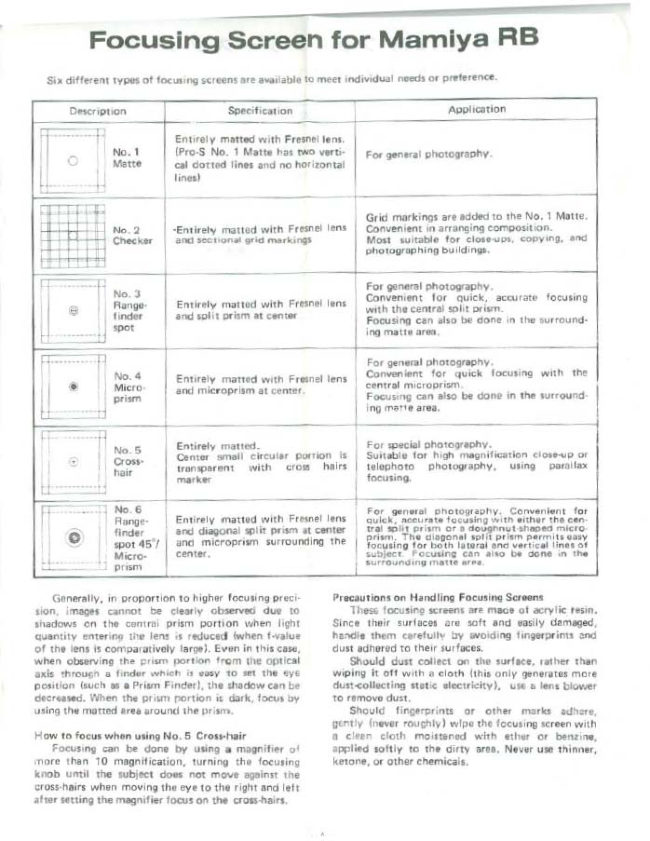
Focusing Screen for Mamiya RB

Six different types of focusing screens are available to meet individual needs or preference.

Specification

Application

Entirely matted with Fresnel tens.
(Pro-S No. 1 Matte has two verti-
cal dotted lines and no horizontal

ane

For general photography.

lines)

and sectional grid markings

“Entirely matted with Fresnel lens

Grid markings are added to the No. 1 Matte.
Convenient in arranging composition.

Most suitable for close-uos, copying, and
photographing buildings.

4+

and split prism at center

Entirely matted with Fresnel lens

| For general photography.

| Convenient for quick, accurate focusing
with the central slit orien.

Focusing can also be done in the surround:
ing matte area,

and microprism at center.

Entirely matted with Fresnel lens

| For general photography.

Convenient for quick focusing with the
central microprism.

Focusing can also be done in the surround-
ing marve area.

Entirely matted.

transparent with

marker

Center small circuler porrion is
cross hairs

| For special photography.
Suitable for high magnification close-up or
telephoto photography, using parallax

focusing.

center.

| Entirely matted with Fresnel lens |
| and diagonal split prism at center
and microprism surrounding the

For general photography. Convenient for

quick, accurate focusing with either the cen-

tral s61it prism oF 9 ut shaped
The dlagons!

cusing for both ta!

pe t Focusing

| Surrounding matte area.

Generally, in proportion to higher focusing preci-
jon, images cannot be clearly observed due to
shadows on the central prism portion when light
quantity entering the jens is reduced (when f-value
of the lens is comparatively large}. Even in this case,
when observing the prism portion from the optical
axis through a finder which is easy to set the eye
Position (such as @ Prism Finder), the shadow can be
Gecreased. When the prism portion is dark, focus by
using the matted #res around the prism.

How to focus when using No. 5 Cross-hair

Focusing can be done by using a magnifier of
more than 10 magnification, turning the focusing
knob until the subject does not move ageinst the
cross-hairs when moving the eye to the right and left
after setting the magnifier focus on the cross-hairs,

Precautions on Handling Focusing Screens

These focusing screens are mace of acrylic resin.
Since their surfaces are soft and easily damaged,
handie them cerefully by svoiding fingerprints ond
dust adhered to their surfaces.

Should dust collect on the surface, rather than
wiping it off with @ cloth (this only generates more
dust-<ollecting stetic electricity), use a lens blower
to remove dust,

Should fingerprints or other marks adhere,
gently (never roughly) wipe the focusing screen with
a cleen cloth moistened with ether or benzine,
applied softiy to the dirty sree, Never use thinner,
ketone, or other chemicals.
View original page 1
Related documents and language editions
From the M. Butkus archive. Original publisher and archive notices are retained.
Check the model and edition against your equipment.
PDF verified 2026-10-10.