Film cameras
Mamiya MZ Transmitter User manual
User manual for Mamiya MZ Transmitter. 5 pages in English. Read the original PDF, download or print a copy without registration.
5 pagesEnglish1.0 MB PDF
Loading your manual…Open PDF directly
Document details
- Brand
- Mamiya
- Model / document
- Mamiya MZ Transmitter
- Document type
- User manual
- Language
- English
- Pages
- 5
- File size
- 1.0 MB
- Category
- Film cameras
- Document date
- Not specified in catalog
Search available document text
Find a term, then jump to its page in the original PDF. Image-only pages may not be searchable; check the PDF for exact wording and diagrams.
Page 2 · Read text
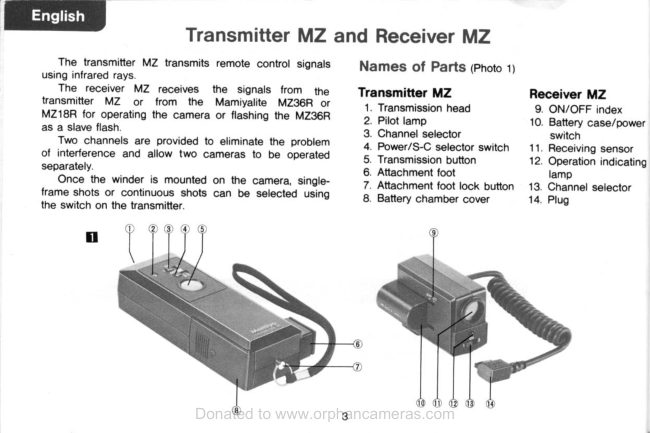
BESSY) Transmitter MZ and Receiver MZ

‘The transmitter MZ transmits remote control signals. — Names of Parts (Photo 1)
using infrared rays.

The receiver MZ receives the signals trom the Transmitter MZ Receiver MZ
transmitter MZ or from the Mamiyaite MZ36R or 1. Transmission head ‘9. ON/OFF index
MZ18R for operating the camera or flashing the MZ3BR > pot gms 10. Batiery enero
aa slave fash. 3. Channel selector switch

Two channels are provided to eliminate the problem —& power/S-C selector switch 11. Restiving sensor
Of interference and allow two cameras to be operated 5, Transmission button 12. Operation indicating
‘seperately 6. Attachment foot lamp

Once the winder is mounted on the camera, single- 7. tachment foot lock bution 13. Channel selector
frame shots or continuous shots can be selected using Battery chamber cover 14, Plup

the switch on the transmitter.

(

aDo@
View original page 2
Page 3 · Read text
Loading the Batteries

Transmitter MZ.

Slide the battery chamber cover outward in the direc-
tion of the arrow. Insert the batteries, making sure to
‘match the positive and negative polarities of the batteries
‘5 indicated in the battery chamber, and then replace
the cover. (Photo 2)

Use two alkaline-manganese or nickel-cadmium 1.5V
AA-size batteries

a 5

Receiver MZ

ull out the battery case, insert the battery taking care
to match the positive and negative polarity of the bat-
tery as indicated in the case, insert the case into the
(rooves on the receiver and push it to the OFF position
(Photo 3)

This battery case also serves as the power switch

When itis slid fully into position, the power is switched on.
It the case is left in this ON position, the battery power

will drain off approximately 5 hours later (if a silver oxide
battery is used) and so the case should be pushed back
to the OFF position when the receiver is not being used

Use one 6V alkaline-manganese battery (4LR44). silver
‘oxide battery (4SR44) or lithium battery (2CR-1/3N).

‘When the receiver MZ is mounted on the camera
attached the Mamiya Winder, or on the Mamiyalte MZ36R.
the receiver's battery is not required, since power trom
the winder or MZ36R is supplied to the receiver,

Transmission and Reception

Set the power switches of both the transmitter and re~
ceiver to ON. Set the channels on both units to 1 or 2

Transmission is possible as soon as the transmitter's
pilot lamp lights.

Single-frame shots can be taken by remote control
when the transmitter’s S-C selector switch is set to S.
When the transmission button is depressed, the receiver's
‘operation indicating lamp lights momentarily.

Continuous shots can be taken when the selector
‘switch is set to C. When the transmission button is de-
essed, the receiver's operation indicating lamp stays
lighted. it goes off when the transmission button is de-
Pressed again.

The Mamiyaite MZ18R and 36R electronic flash units
also have a transmitting capabilty. After the mode selector
switch on the flash unit is set to SLV and the channel is
also set, press the test flash button on the flash unit
View original page 3
Related documents and language editions
From the M. Butkus archive. Original publisher and archive notices are retained.
Check the model and edition against your equipment.
PDF verified 2026-10-10.