Film cameras
Rolleiflex SL66 User manual
User manual for Rolleiflex SL66. 34 pages in English. Read the original PDF, download or print a copy without registration.
34 pagesEnglish3.1 MB PDF

Loading your manual…Open PDF directly
Document details
- Brand
- Rollei
- Model / document
- Rolleiflex SL66
- Document type
- User manual
- Language
- English
- Pages
- 34
- File size
- 3.1 MB
- Category
- Film cameras
- Document date
- Not specified in catalog
Search available document text
Find a term, then jump to its page in the original PDF. Image-only pages may not be searchable; check the PDF for exact wording and diagrams.
Page 4 · Read text
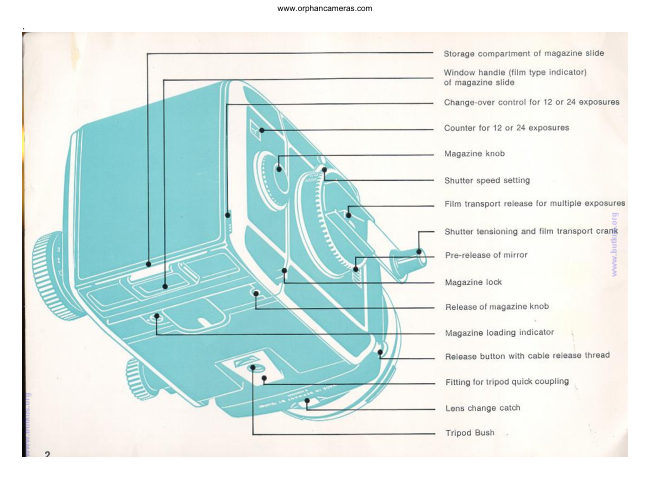
Lens locating mark

 Lens panel

 Catch of magazine back

Cover of focusing hood

 Focusing hood release

Strap holder

Depth of field scale

Distance scale

Focal length indication for distance scale

Focusing knob

Accessory shoe (for flash gun)

Flash plug release

Flash sockets

Locking knob for lens tilt from 0o to 80

Release lever for lens tilt at 0o and 80
Scales for extension, image scale
and lens tilt
Stopping down control

Double bayonet ring for optical attachments
View original page 4
Page 6 · Read text
Your First F|ule                                  Shooting Practice


Before you load or unload a film,
Before you remove or fit the magazine,
           pressBefore you                       release                 the
always       check                 the              that                    crank -is unfolded and
blocked.
For this purpose swing the crank fully for-
ward as far as it will go (1) and back again
to its stop (2).
This tensions the shutter. lt also sets up the                                   You will   f ind everything on the next four
automatic safety interlocks to prevent film                                                 pages: from loading the fresh film to unload-
waste during  f ilm changing or magazine                                                       ing the exposed film.
changing. Accidental double exposures, blank                                       You can also practice the individual steps on
frames and overlapping pictures are impos-                                  a camera without film. For this the camera
sible.                                                                                must be in its standard shooting state    with                                                                                                                                      - pulledOnce the crank locks, you know immediately                                             the magazine attached and the slide
that the camera is ready for correct opera-                                               out (push it into the storage compartnrent  in
tion.                                                                                         the back).
                                                                                                                E
View original page 6Page 7 · Read text
Loading tlre Magazine


                                                                                                      Setting the film counter lo 12 or 24 exposures:
The procedure for loading the magazine is                                               Switch over the setting lever (7). The film
the sanre wether it is on the camera or off                                                counter (5) shows by its number -- 12 or 24
the camera. When only one magazine is in use,                                                whether the magazine is set for No. 120                                                                                                -                                                                                                or 22O roll film.there is no need to remove it from the ca-
mera. ln this case the magazine slide remains                                         You can switch over even when the magazine
permanently in the storage compartment in                                                  is closed, as long as the film counter  still
the rear of the magazine.                                                            shows No. 1.
                                                                                    Loading a roll film: Swing open the spool
Basic rule: Unfold the crank (1) and turn  it                                                 holder (8). Remove the seal of the roll film (9)
forward and backward until it locks.                                               and fit the spool between the fixed and the
To open the magazine: Unlock the back (2)                                           hinged shaft pins so that the black inside
and swing open (3). This also makes the                                                 surface of the backing paper (10) faces out-
magazine knob (4) jumb out; the exposure                                               wards. Run the backing paper round the film
counter (5) now indicates No. 1. Grip the                                                        insert and thread it into the slot (11) of the
film insert by the central bar (6) and swing                                             empty spool. Tighten the paper leader by one
it out of the magazine.                                                                           or two turns of the gear wheel (12)                              www.butkus.us
6
View original page 7Page 8 · Read text
Ghecking for Readiness
                                                        to shoot


Grip the film insert by its centre bar and slide                                                                     lf in doubt, it is possible to check with theit into the magazine with the take-up spool                                               crank lock even after loading the film whether
first, so that the gear wheels on the insert                                            the camera is correctly set: push the lever
and inside the magazine engage (13). Check                                                       (18) in the direction of the crank handle and
the film advance by a short turn of the maga-                                                    at the same time try to turn the crank. lf the
zine knob (14). Then swing the magazine                                             crank is not locked, swing it down, let go
back closed and check that it locks.                                                  of the lever (18) and complete the crank
Advancing the film to exposure No. 1: Turn                                          movement forward and back again. The ca-
the magazine knob until it locks and then                                           mera is now ready to shoot.
push in (16). The backing paper is now spool-                                                                                            lf you notice that you forgot to wind the crank
ed up and the film feeler mechanism has                                               only when pressure on the release has no
locked any further film transport: the"film is                                                           effect, the same procedure still avoids wast-
ready for the first exposure. For subsequent                                                       ing a film frame.
exposures the crank advances the film.                                            You can lose the first picture   and in fact                                                                                                                               -      only  ifThe loading indicator (17) in the underside                                          wind the film through completelyof the magazine shows a dot and a dash in                                                 the cranking movement was not complete-     and
line like an exclamation mark: "The magazine                                               the crank is not pointing forward. While this
is loaded!". When the magazine is empty, the                                                  in no way harms the camera, you can avoid
dash is at right angles to the dot.                                                                                          it by making a habit of checking the locking
The Rolleiflex SL 66 is now ready to shoot.                                                           of the crank before loading the camera.
View original page 8Page 10 · Read text
Ij  rilrn Transport ancl                              Unloading the Magazine
  Shutter Tensioning


                                                                                               After the last exposure the magazine knob
                                                                                                springs out when you turn the crank    an                                                                                                      audible and visible sign that the fitm is finish--
                                                                                                                   ed.
                                                                                         Always complete the forward and back swing
                                                                                                          of the crank (9).
                                                                                           Turn the magazine knob (10) until the remain-
                                                                                       der of the backing paper is spooled up and
   After every exposure unfold the crank and                                                 the knob turns freely without resistance.
   turn it fully forward and back again until  it                                     Open the magazine (11) remove the insert.
   Iocks (8). The forward swing tensions the                                          Swing away the spool pin and take out the
   shutter while the return swing to its final                                             exposed roll.
   position advances the film. The camera is                                                 Transfer the now empty feed spool to the
   then ready for the next exposure. During                                                take-up end from which the exposed spool
   shooting the crank may remain unfolded for                                      was removed. This now becomes the take-up
   immediate operation.                                                                            spool for the next film.
View original page 10Page 12 · Read text
Scale of Reprocluction                                  Deptlr of Fleld


 In close-up work the scale of reproduction
 is more important than the subject distance.
With the aid of the scalds (for three focal
 lengths) on the bellows rail you can set the                                         You can check the extent of the depth of field
camera directly to the required scale of                                                       directly on the focusing screen or indirectly
 reproduction. ln this case the best way of                                            on the focusing knob.
getting the subject sharp is to bring the                                                    1. For lenses with spring Ioaded iris dia-
camera nearer to or farther away from  it.                                               phragm press the stopping-down key (4). This
                                                                                can be locked by inclining it and released in
The scale (1) gives the following data:                                                      the same way. The lens then stops down to
Alongside the focal length  f igure (left) a                                                    the pre-selected value. The ground glass screen
triangular mark indicates the position of the                                                      is particularly suitable for this check on the
aperture setting index to signify normal (2)                                                                  final image appearance.
and ,,retro" (3) mounting of the lens. (The                                                    2. Opposite the distance scale index lines
bottom row thus applies to the B0 mm lens                                            with appropriate aperture figures show the
mounted back-to-front.)                                                                         extent of the depth of field (for a circle of
The scale of reproduction is the ratio of the                                                   confusion of 56 microns or 0.0022 inch). Either
image size on the film to the size of the                                              estimate the actual subject distances or
originai object. For example 0.2: 115 natural                                            measure by accurate focusing of the screen
size. Every figure applies to the bar next to                                                    image.
 it.                                                                               Beyond the first full turn of the focusing knob
The figures are set and read off along the                                                    or when using the depth tilt the figures act as
common scale limit (the degree scale).                                                          index values for the measured distances.
The centre line indicates the length of the                                              At increased extensions the effective aperture
bellows extension in millimetres. For the                                             of the lens changes. When the bellows ex-
scales of reproduction with different bellows                                                     tension is more than half the focal length, the
extensions for all focal lengths, including the                                                       effective aperture (which is what matters for
use of extension tubes, see page 21.                                                           the exposure and the depth of field) no longer
The centre line also acts as the index for                                                 corresponds to the f-number engraved on the
the degree scale when tilting the lens (depth                                                lens scale. For actual depths of field under
tilt: see page 12).                                                                                  these conditions see page 25.

                                                                                                                                              11
View original page 12Page 13 · Read text
Pre-releasing the rnirrorExtended DePth
You can gain extended depth by tilting the
lens axis according to ,,scheimpflug condi-
tion" when the subject is confined to one plane
at an angle to the camera. By tilting the camera
and in addition tilting the lens axis it becomes
possible to extend the zone of sharp repro-
duction over a large distance range even at
fulf aperture. You can increase this zone
further by the depth of fieid gained on stop-
ping down.
Tilting the lens: Release the locking knob (1)
by turning to the left. Press down the lever
(2) and raise or lower the lens to set the
centre line of the scale (3) to the required
value on the degree scale. Then tighten the
locking knob (1) again.
The lever (2) engages at the two maximum                                        The movement of the instant return mirror is
tilt positions as well as in the centre position                                                  mechanically and pneumatically braked during
of 0o. The locking knob should however also                                                        releasing. The mirror starts to swing slowly,
be tightened when the ,camera is used nor-                                                    accelerates and then slows down again. The                                                                                                                 movementmally with zero tilt.                                                                      gentle conclusion of the swing
When the lens is tilted the infinity limit of the                                                   helps to keeP the camera steadier.
bellows movement is also displaced. Never                                             In addition you can pre-release the mirror,
try lo force the focusing knob beyond this                                                        for example when using a not very rigid tripod,                                                                                                                                                     the limit.                                                                                          for shots with long focal lengths or in
                                                                                        extreme close-uP range.
 "scheimpflug Indicator". Extended depth by
 tilting depends on three parameters:                                        To pre-retease the mirror: Press down the                                                                                                                                                     the 1. The distance setting to the centre of the                                                   sliding key (4). Release the shutter in
         f ield;                                                                           usual way. After the exposure the mirror
 2. The vertical height of the camera above                                                       returns into its viewing position.
   the object plane, and                                                        To bring the mirror back again without taking
3. The angle of tilt of the lens.                                            a picture, cover the lens with the lens cap,
 ln practice you can determine these three                                                    release the shutter and retension it with the
values in every case with the aid of the indi-                                                           film transport disengaged (see Multiple Expo-
 cator (see page 26).                             www.butkus.us               sures, page 13).
 t2
View original page 13Page 15 · Read text
Exposures with Filters                                 Tripocl Quick Coupling

The 50 mm, 80 mm, 120 mm, 150 mm and
250 mm lenses have the same size Vl front
bayonet mount and use the same filters.
To fit the filter: lnsert the filter in the inner
bayonet ring of the lens and secure by turn-
ing fully to the right.
The 500 mm Tele-Tessar uses its own screw-
in filters.
The 1000 mm Mirotar requires special filters
which are inserted from the side in the optical
path of the lens.
The filter mounts carry, where applicable, a
correction value for the exposure value (for
example       for the medium yellow filter).This correction-1.5  value is deducted from the
measured exposure value.
                                                                   The camera can be mounted on a tripod
                                                                                                  either via the tripod bush or      still more                                                                                                  conveniently    with the tripod quick-    coupling.
                                                                                           This utilises the-   dovetail guide in the camera
                                                                                                         base.
                                                            To prepare the quick coupling: Screw the
Exposures rrvith the                                                           coupling(1) fully tounitthetoleft.theThetripodlockingandlatchturn (2)theisknobnow
                                                                               swung out of the way and the dovetail guideLens Hood                                                                                                        unobstructed.
                                                                                    Mounting the camera: Place the camera in
The same lens hood fits lenses of 80, 120,                                          the dovetail guide, push forward and then
150 and 250 mm. Only the wide-angle Distagon                                                      tighten the knob (3) by turning to the right.
 requires a shorter lens hood.                                                                 This swings up the locking latch and presses
                                                                                             the camera firmly into the dovetail guide.
To fit the hood: Place the lens hood in any                                       To remove the camera proceed in the reverse
position over the outer bayonet ring and                                                     order, first turning the knob (1) fully to the
secure by turning to the right.                              www.butkus.us                     left.
14
View original page 15Page 16 · Read text
Neck Strap                                          lnterchangealrle
                                              Gornponents
To hang the camera round the neck, hook
 the broad snap hooks of the neck strap
 (4) into the two strap eyelets at the side of
 the camera.
The eyelets rotate freely, so that the camera
 can swing in any shooting direction and also
hangs down naturally when carried over the
 sh ou   I der.
To release the neck strap press the spring
 lock and push obliquely underneath the eyelet.
The snap hook comes free on pressing against
 the camera side.


Filrn Type lnclicator

To mark the film type loaded in the magazine,
tear off the tab of the film box, fold it in half
and push sideways into the window handle of
the magazine slide (6). This direct indication
of the film packing, featuring both its lettering
and characteristic colour, avoids mix-ups when
switching between several magazines.
View original page 16Page 17 · Read text
Lens Changing                                Ghanging the Focusing
                                           Hood


The instructions for lens changing apply
equally to lenses mounted normally and
reversed, and also for the'Luminar adapter
and the extension tubes.
To rernove the lens: Press the key (1) and at
the same time turn the lens to unlock it from
its bayonet mount and lift off. When using
extension tubes, press the corresponding key
on the extension tube.
To fit a lens: Line up the red marks on the lens
and on the lens panel opposite each other (2),
insert the lens in the bayonet mount and turn
to secure until it engages with an audible
click.
When fitting the lens in "retro" position                                        The focusing hood and focusing screen can
(reversed, the front element facing the film)                                                always be changed irrespective of the operat-
use the red mark on the front bayonet mount.                                                          ing state of the camera.
With the lens mounted in this way, and also
when using extension tubes, the automatic                                     To remove the focusing hood: Press the two
diaphragm control is disengaged and you have                                                 buttons (4) at the side with the thumb and
to set the apertures by hand.                                                          second finger of the hand while holding the
When using the Mirotar mirror lens follow the                                                              latter over the closed hood from the front' At
 instructions enclosed with this lens.                                                            the same time lift the rear edge of the hood
To change the distance scale: Fully pull out                                                       with the index finger.                                                                                                                                                     thethe focusing knob and turn it in this position                                  To fit the hood: lnsert the hood (with
(3) until the required focal length appears in                                                  magnifier release at the back) and engage  it
the cut-out window (50, 80, 150 and 250 mm).                                                 by pressing home.
The easiest way of changing the focal length                                      The folding focusing hood can be changed
 is to turn the pulled-out knob to the right when                                                     against other special hoods. These are fitted
set to the infinity stop.                                                                and removed in the same way.                              www.butkus.us
r6
View original page 17Page 20 · Read text
T Loading the Spare                                Tables and Data
    I Magazine                                          Surnrnaries       >

      I


     I

i'{


           I
 li


   Separate magazines are supplied with a
    protective cover. This is always used on the
   free magazine. To fit the magazine to the
    protective cover or to detach it, proceed as
    with the camera (6).
   When the magazine is off the camera it  is
    closed lighttight by the slide; you can load it
   in the same way as a magazine on the
    camera.
     lf you have pulled out the slide of a spare   'empty         magazine and accidentally moved the
    outer cog wheel of the magazine, the slide
    will not go in fully. Remedy: Half pull out the
    slide (7), turn the cog wheel in the direction
    of the arrow (8) until it locks, and push back
    the slide.
                                                                                                                      t9
View original page 20Page 30 · Read text
/__{\}_-..r
Depth of Field
with the lens simultaneously set to a number
of subject distances we get an equal number
of different depth of field zones. when using
the depth tilt these zones cannot therefore be                                  shows                                                                                     \tabulated. However, the indicator
visually the depth of  f ield at one selected                                                                        IBapertu re.                                                                                                                           \
lnstead of the line A, use the centre line c
to represent the subject plane. Place it over C
the indicator in such a way that the.       D                                           "il9l:tilt                   lcovers the point representing the required                                    Xin degrees. The lines B and D then show the
 limit of the depth of field in front of and behind
the subject plane. The aperture for which this
 is valid is shown bY the small star.
Third example (5): The conditions are the same
as for example No. 1, i. e. the 80 mm lens                                                                                     f rom 1'3 tocovers a subject extending
 5 metres.
 Atigning and reading off the line c gives the
 values already obtained. The circle covers the         '/
 point for a 4d lens tilt. The small star touches l'/
 in" curve for an aperture of t111. The lines B
 and D therefore show the limit of the depth                                                  ;-$ of fiefd attl11.
As shown by the location of these lines, the
 depth of field zone is also inclined together
 with the sharply focused subject plane. The
 depth of field limit encloses the subject plane
                                     increasing in space and increases with
 distance. The direction and distance at which
 this depth of field gain is most useful will
 depend on the subject.
 Depth of field gain along the camera direc'                                                                                                                                                \l
 tion (5): The different increases in the depth                                                                                                                      I of field for the upper edge, centre and lower
 edge of the image can be read off directly,                                                                                6
 for example along line X: 3.5 to 8 metres'                                                                                                                                                               I
 28                                                                                                                                                                                                                                 I
View original page 30Page 31 · Read text
Depth of field gain at right angles to the                                     When using the depth tilt, the lens is always
 subject plane (6): More significant in practice                                                                 tilted towards the subject plane. Also be sure
 is the maximum height of a subject  (i. e. stand-                                         to use the correct value for the vertical
 ing at right angles to the object plane) which                                                    distance of the camera from the subject ptane.
 will be reproduced sharply. Exact values are                                     When photographing a table top this distance
 here obtained with a ruler, utilising the scale                                                                is the camera height above the surface of the
 of reduction of the indicator:                                                                            table; when photographing a ceiling it is the
 Look up the base point of the object on the                                                    vertical distance from the camera to the
 blue line C (for example for the centre of the                                                           ceiling. The camera height becomes equal to
 field). Place the ruler at this point at right                                                 the height of the tripod on which it is mounted
angles to the subject and read off the distance                                                  only when shooting obliquely down on to the
to the point of intersection with the line B                                                                                                                                                    f loor.
(approximately 1.6 mm in the example).                                    To get an idea of the use of the indicator,
 Multiplied with the reduction factor of 100 of                                                    practice first finding the correct settings for
the indicator this gives an admissible height                                                imaginary subject conditions. This will also
of 16 cm for sharp reproduction. (With the                                                              g ive an idea of the scope of th is procedu  re.
indicator for the 250 mm lens the factor is                                         You will find for instance that with the 80 mm
200.)                                                                                                       lens, maximum lens tilt and a vertical distance
                                                                                 of about 0.6 metres, the sharpness at full
                                                                                                  aperture can extend from infinity down to as
Depth of field at other apertures: The lines B                                                    near as 1 metre.
and D of each indicator always define the zone                                                      After some practice with actual subjects you
of sharpness for one aperture (shown by the    Practical Appf ications                                 will soon gain sufficient experience to control
small star). To estimate the zone of sharpness                                       the coverage in depth even without the
at other apertures, double the angle between    Th is proced u re of extend ing the depth of    indicator. For example:
the lines B and D for double the tlnumber (for   sharpness is applicable to suitable subjects
example when using t/22 instead of tl11).          irrespective of their location in space: the   Focusing with the depth tilt: Select the subject
                                                          floor, a table top, ceiling decorations, looking    field to be covered on the focusing screen.
                                       up or down at vertical house fronts, or a row   Focus the lens sharply on the subject in the
Determining other distances: Since the visual   of houses taken obliquely from the side. In    centre of the image. Keep this distance setting
arrangement of the indicator shows all    this last case the camera is held sideways and    fixed. Slowly  tilt the lens and adjust the camera
distances reduced to the same scale, you can    the screen image observed from the side.          position so that the sharpiy focused centre of
work out any other distance of the camera   The ideal case is a completely flat plane. The   the subject remains in the centre of the screen.
set-up by measuring with a ruler and multi-   (imaginary) subject plane can also be de-  When the subject appears fully sharp also at
plying by the reduction factor. (For example   termined by individual significant points of a   the upper and lower edges of the screen, you
you get 4 metres for the overall length of the   three-dimensional subject. Parts of the subject   have the correct lens tilt. Now turn the focusing
subject plane covered.) For every job the    to either side of this plane are reproduced with   knob slightly to and fro to check whether you
indicator therefore facilitates the choice of the   acceptable sharpness as long as they lie   really have the entire image focused for
                                                                             of field zone.                 maximum sharpness.best camera set-up.                                 within the depthwww.butkus.us
                                                                                                              29
View original page 31Page 32 · Read text
The Ro!leif!e>< SL 66Gare of tlre GarTrera                                          and Accessories

                                                      We reserve the right to make any technical
                                                                               changes in the camera and its accessories.The Rolleiflex SL 66 calls for the same care
as any camera of which you expect long-term
reliability. For cleaning use the following well-
tried methods:
Remove dust with a soft camel hair brush or
a rubber blower bulb. To clean lens surfaces,
breathe on them and remove persistent dirt
with a soft, dry and fluffless (frequentlywashed)
rdg; As an anti-static protection breathe on
the g Iass su rf ace but then let the deposited
mistiness evaporate on its own.
Use special care in cleaning the Rolleiclear
focusing screen: the embossed underside must
only be treated with a soft brush or air blower.    Order No.
Protect this side especially against soiling and   560 014 Rolleiflex SL 66 with 80 mm Carl        g7g 210 50 mm Carl Zeiss Distagon tl4
finger marks.                                            Zeiss Planar t12.8, lens Gap,             979 220 80 mm Carl Zeiss Planar t12.8                                                               1201220 magazine, Rolleiclear       979 230 120 mm Carl Zeiss S-Planar f/5.6Protect the camera against the constant            No.                                                                                                     150 mm Carl Zeiss Sonnar fl4inf luence of harmful vapours or moisture.                  with central micro prism, neck strap    979 240
The increased atmospheric humidity in tropical    560 010 Rolleiflex SL 66 bodY                   979 250 250 mm Carl Zeiss Sonnar f/5.6                                                                                         1201220   979 260 500 mm Carl Zeiss Tele-Tessarand sub-tropical areas represents a corrosion   560 012 Rolleif lex SL 66 body with No.
risk to metal parts, and can give rise to mould            magazine                                                  t15.6 (in PreParation)                                                                               1201220 with        979 270 1000 mm Carl Zeiss Mirotar f/5.6on leather surfaces and to fungus growth on   560 020 Rollei mag azine No.
g lass su rf aces. lf at all possible, d ry the              protective cover                       206 010 Lens hood for Distagon lens
camera frequently by fresh air and bright sun.   560 030 Ground glass focusing screen with       206 O2O Lens hood for Planar, S-Planar and
Keep the magazine and surfaces in contact            case                                      Sonnar lenses                                                                                                                                                                                                                                                                                                                                                          f ilter size Vlwith the emulsion specially clean (gelatine    560 040 Rolleiclear with case                   206 030 Medium yellow                                                                                                                                                                                                                                                                                                                                  f ilter size Vlfragments rubbed off the film are particularly   560 050 Rolleiclear with prism rangef inder,      206 040 Green                                                                                                                                                                                                                                                                                                                                     f ilter size Vllikely to breed fungus).When not in use for                in case                               206 050 Orange                                                                                                                                                                                                                                                                                                                                          f ilter size Vlfonger periods keep the camera in a light-   560 060 Spare Rolleiclear with central micro     206 060 Light red                                                                                                                                                                                Inf ra-red  f ilter size Vltight container together with silica gel car-              prism, in case                         206 070                                                                              R 1 .5 colour conversion    f ilter size Vltridges. Store the leather eveready case   560 070 Spare neck straP                      206 080
separately. Particularly protect the camera    950 407 Eveready case                   208700 TriPod quick couPling
against every kind of dirt.                        970 480 Outf it case for the Rolleiflex SL 66                  Further accessories in preparation
30
View original page 32Page 33 · Read text
Handling Faults and Rerneclies
 Fau lt                                      Cause                                  Remedy
 The sf ide of the magazine off the camera         Gear wheel (on the front of the magazine)           Half pull out the slide, and turn the gear wheel
 will not push in fully                         moved with the slide pulled out                         in the direction of the arrow until it locks
The magazine back will not close                  Film insert wrong;y located                     Swing the insert into the mag azine so that
                                                                                                         the two gear wheels match (see illustration
                                                                                  on page 7)
The magazine will not attach'to the camera       Crank not tensioned                        Remove the magazine, and swing the
                                                                                             crank fully forward and back
The magazine will not release from the camera     Slide not fully pushed in                       Push the slide home to its  f ull extent
The release button blocks                         1. Release lock engaged                           1. Turn the lock to free the release button
                                               2. Magazine slide pushed in                     2. Pull out the slide
                                                 3. Shutter not tensioned                          3. Move the crank forward and back
    After attaching the magazine:                  4. Swing movement of crank only partially         4. Remove the magazine (with the slide pushed
                                               completed                                                    in) and complete the crank operation
                                                 5. Crank not tensioned before   f ilm loading         5. Press the lever near the crank base towards
    After advancing the loaded film to No. 1  :                                                               the crank handle and swing the crank
                                                                                                                                   fully forward and back
With the mag azine on the camera the crank       Incomplete forward movement of the crank      Remove the mag azine (with the slide pushed
movement blocks before it is complete            before attaching the mag azine (result is               in) and complete the crank movement
                                                      loss of  f ilm  f rame)
The magazine knob will not turn after           Mag azine knob pressed in too soon                  Slightly open the magazine back (the knob
loading the film                                                                                    springs out)
The to-and-f ro crank movement cannot           Magazine knob not pushed in after              Push in the magazine knob and complete
be completed                                                     tu rn ing to stop                                   the crank movement
The screen image is not visible                     Mirror pre-released                                 Either release to take the shot or return
                                                                                                  the mirror (page 12)
Lens will not swing up to the full Bo               Focusing screen   f rame protrudes forward         Rernove focusing hood, push down the screen
                                                                                              frame and slide  it to its rear stop
Flash does not fire from the X outlet             Too fast shutter speed                          Note the recommended  shutter speeds
                              www.butkus.us             (page 13)
View original page 33Related documents and language editions

From the M. Butkus archive. Original publisher and archive notices are retained.
Check the model and edition against your equipment.
PDF verified 2026-10-10.