Film cameras
Rolleiflex SL66 User manual
User manual for Rolleiflex SL66. 39 pages in English. Read the original PDF, download or print a copy without registration.
39 pagesEnglish2.0 MB PDF
Loading your manual…Open PDF directly
Document details
- Brand
- Rollei
- Model / document
- Rolleiflex SL66
- Document type
- User manual
- Language
- English
- Pages
- 39
- File size
- 2.0 MB
- Category
- Film cameras
- Document date
- Not specified in catalog
Contents
Search available document text
Find a term, then jump to its page in the original PDF. Image-only pages may not be searchable; check the PDF for exact wording and diagrams.
Page 4 · Read text
www.orphancameras.com

A camera for experts, designed for you: we congratulate you on your  choice4www.butkus.org

We take it for granted that as an owner of the SL 66 you know all about the basic technicalities of photography. So we have kept the instructions concise. Taking, the
extended scope of the camera and interchangeable components are covered in three chapters. The tabular sections sum up all important data to show you at a glance the
facts about the range of focal lengths and camera extensions.

We are sure of your photographic success with the Rolleiflex SL 66. If you have any further photographic or technical queries, your Rollei Dealer - you can recognize him
by the blue/grey Rollei service placard - or our own technical service is fully at your disposal.

Page

                                                                      1
 5. Your First Rule
                                                                                   12. Extended Depth
   Shooting Practice
                                                                                   12. Pre-releasing the Mirror
 6. Loading the Magazine
                                                                                   13. Multiple Exposures
 7. Checking for Readiness to Shoot
                                                                                   13. Flash Shots
 8. Shooting
                                                                                   14. Exposures with Filters
 9. Film Transport and Shutter Tensioning
                                                                                   14. Exposures with the Lens Hood
 9. Unloading the Magazine4www.butkus.org
                                                                                   14. Tripod Quick Coupling
 Further Scope
                                                                                   14. Accessory Shoe
 10. Distance Scale
                                                                                   15. Neck Strap
 11. Scale of Reproduction
                                                                                   15. Film Type indicator
 11. Depth of Field
View original page 4Page 5 · Read text
Interchangeable Components

 16. Lens Changing                                                                 22. Subject Distances, Subject Fields and Scales of Reproduction

 16. Changing the Focusing Hood                                                   22. Normal or Reversed Lens Mounting?

 17. Changing the Magnifier                                                        23. Focusing Correction for Infra-red

 17. Changing the Focusing Screen                                                  24. Focusing Ranges Summed   up4www.butkus.org

 18. Changing the Magazine                                                        26. The Depth Tilt Indicator

 19. Loading the Spare Magazine                                           30 .Care of the Camera

 Tables and Data Summaries                                                      30. The Rolleiflex SL 66 and Accessories

 20. Interchangeable Lenses                                                         31. Handling Faults and Remedies

 21. Scales of Reproduction, Lens Extensions,

 Exposure Factors


Your First Rule


                                                 Before you load or unload a film, before you remove or fit the magazine, before you press the release--always
                                                cheek that the crank is unfolded and blocked.
View original page 5Page 6 · Read text
www.orphancameras.com

                                                For this purpose swing the crank fully forward as far as it will go (1) and back again to its stop (2).

                                                  This tensions the shutter. It also sets up the automatic safety interlocks to prevent film waste during film changing
                                                      or magazine changing. Accidental double exposures, blank frames and overlapping pictures are impossible.4www.butkus.org

                                          Once the crank locks, you know immediately c that the camera is ready for correct operation.


Shooting Practice

You will find everything on the next four pages: from loading the fresh film to unloading the exposed film.

You can also practice the individual steps a a camera without film. For this the came' must be in its standard shooting state - with the magazine attached and the slide pulled
out (push it into the storage compartment I the back).

Loading the Magazine
View original page 6Page 7 · Read text
The procedure for loading the magazine is the same whether it is on the camera or off the camera. When only one
                                            magazine is in use, there is no need to remove it from the camera. In this case the magazine slide remains permanently
                                                      in the storage compartment in the rear of the magazine.

                                               Basic rule: Unfold the crank (1) and turn it forward and backward until it  locks.4www.butkus.org

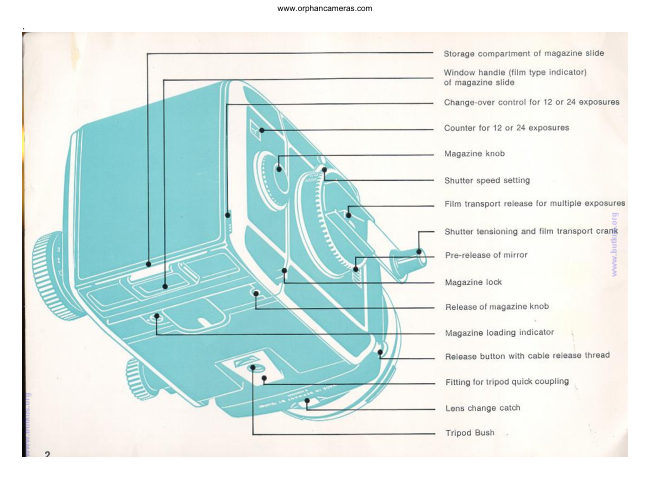
                                      To open the magazine: Unlock the back (2) and swing open (3). This also makes the magazine knob (4) jump out; the
                                               exposure counter (5) now indicates No. 1. Grip the film insert by the central bar (6) and swing it out of the magazine.

                                                    Setting the film counter to 12 or 24 exposures: Switch over the setting lever (7). The film counter (5) shows by its
                                         number - 12 or 24 - whether the magazine is set for No. 120 or 220 roll film.

                                     You can switch over even when the magazine is closed, as long as the film counter still shows No. 1.

                                            Loading a roll film: Swing open the spool holder (8). Remove the seal of the roll film (9) and fit the spool between the
                                                   fixed and the hinged shaft pins so that the black inside surface of the backing paper (10) faces outwards. Run the
                                               backing paper round the film insert and thread it into the slot (11) of the empty spool. With one or two turns of the
                                                 gear wheel (12) tighten the paper leader firmly well. This will keep the distances between the exposures sufficiently
                                                 small to avoid a possible loss of the 12th or 24th exposure (film transport control may be interfered by film windings
                                               being too loose).


Checking for Readiness to Shoot
View original page 7Page 8 · Read text
www.orphancameras.com


 Grip the film insert by its centre bar and slide it into the magazine with the take-up spool first, so that the gear wheels
 on the insert and inside the magazine engage (13). Check the film advance by a short turn of the magazine knob (14).
 Then swing the magazine back closed (15) and check that it locks.

 Advancing the film to exposure No. 1: Turn the magazine knob until it locks and then push in (16). The backing
 paper is now spooled up and the film feeler mechanism has locked any further film transport: the film is ready for the
 first exposure. For subsequent exposures the crank advances the  film.4www.butkus.org

 Releasing the magazine knob. On depressing the release (17) with a pointed object the magazine knob springs out.
 Thus the film can be wound off and unloaded after any shot-- even with the magazine removed from the camera.

 The loading indicator (18) in the underside of the magazine shows a dot and a dash in line like an exclamation mark:
 "The magazine is loaded!'. When the magazine is empty, the dash is at right angles to the dot.

 The Rolleiflex SL 66 is now ready to  shoot.4www.butkus.org


If in doubt, it is possible to check with the crank lock even after loading the film whether the camera is correctly set: push the lever (19) in the direction of the crank handle
and at the same time try to turn the crank. If the crank is not locked, swing it down, let 9 of the lever (19) and complete the crank movement forward and back again. The
camera is now ready to shoot.
If you notice that you forgot to wind the crank only when pressure on the release has no effect, the same procedure still avoids wasting a film frame.
You can lose the first picture - and in fact wind the film through completely - only if the cranking movement was not complete an the crank is not pointing forward. While
this in no way harms the camera, you can avoid it by making a habit of checking the locking of the crank before loading the camera.

Shooting
View original page 8
Page 9 · Read text
Turn the lens cap to the left and remove. Open the focusing hood (1). To close, push in the side panels.

                                      To raise the magnifier press the key (2). To fold it back again, press down the magnifier frame between magnifier and
                                                    the front of the focusing hood (3) until it engages.
                                                        1. The Shutter Speed

                                           Turn the knob (4) to engage the appropriate shutter speed. The figures 1000 to 1 are fractions of a second, B is the
                                                       setting for time exposures of any duration. Intermediate speeds cannot be set.

                                                   Shutter speeds for flash: see page  13.4www.butkus.org

                                             Exposure value correction: see pages21 and 25.
                                                        2. The Aperture

                                           Turn the aperture ring (5). It engages at full and half stop settings.

                                         The 40 mm, 50 mm, 80 mm, 120 mm, 150mm and 250 mm lenses have a fully automatic spring loaded iris
                                              diaphragm. The lens remains fully open until the moment of exposure. The aperture closes down to the pre-selected
                                                 value only on pressing the release.

                                             For other lenses: see page 20
                                                        3. Focusing

                                           Turn the focusing knob (6) until the picture appears sharpest on the screen (7).

                                          With lenses of very long focal length and when using extreme depth tilt the mirror may cut off a strip near the top of
                                                    the screen image. The film in every case still records the full picture area.

                                                Distance scale: see page 10. Depth of field: see page 11.

                                           Depth tilt: see page 12.
4. Releasing

Unlock the release button (by turning) and press (8). When the red dot is visible from above, the release is locked. When the red dot is not visible from above, the release is
free.

Time exposures at the B setting: Press down the release button for the duration of the required exposure time or keep it in the depressed position by the locking collar. The
shutter only closes on unlocking or letting go of the release.

The release button incorporates a cable release thread.
View original page 9Page 10 · Read text
www.orphancameras.com

Film Transport and Shutter Tensioning


 After every exposure unfold the crank and turn it fully forward and back again until it locks (9). The forward swing
 tensions the shutter while the return swing to its final position advances the film. The camera is then ready for the next
 exposure. During shooting the crank may remain unfolded for immediate operation.

Unloading the Magazine

 After the last exposure the magazine knot springs out when you turn the crank - an audible and visible sign that the film
 is finished.First complete any started crank movement (10) swing fully forward and back. Then keep turning the
       orgmagazine knob (11) until the remainder of the backing paper is spooler up and the knob turns freely without resistance.4www.butkus.

 Open the magazine (12) remove the insert Swing away the spool pin and take out the exposed roll.
 Transfer the now empty feed spool to the take-up end from which the exposed spool was removed. This now becomes
 the take-up spool for the next film.


Film transport principles summed up: To advance the film from exposure to exposure always use the crank-- but wind up backing paper leaders and trailers always with
the magazine knob.

Further Scope
View original page 10Page 11 · Read text
Distance Scale

 At every subject distance the Rolleiclear focusing screen with central micro prism provides a direct and precise
 check on the image sharpness.

 The distance scale on the focusing knob is normally used only for depth of field estimation, for zone focus settings
 and when using flash.

 The figures on the distance scale apply only to the first complete turn of the focusing knob (with the lens mounted
 the right way round). The distances are measured from the film plane to the subject.

 To adapt the scale to the interchangeable 50, 80, 150 and 250 mm lenses the focusing knob contains stored in it
 four distance scales. The focal length corresponding to the scale in use is shown on the face of the knob. For
 changing the scale see page  16.4www.butkus.org

 The bellows extension of 2 inches (50 mm) can be further increased by extension tubes of 40 and 80 mm used
 either singly or in combination. This yields still nearer focusing distances with all lenses.

 With the lens mounted in "retro" position subject distance can be further reduced for (reversed, front element
 facing the film) the I still larger scales of reproduction.

 Focusing ranges: see page 25.


Scale of Reproduction
View original page 11
Page 12 · Read text
www.orphancameras.com


                                                   In close-up work the scale of reproduction is more important than the subject distance. With the aid of the scales (for
                                                     three focal lengths) on the bellows rail you can set the camera directly to the required scale of reproduction. In this
                                                 case the best way of getting the subject sharp is to bring the camera nearer to or farther away from it.

                                                Explanation of the scale (1):

                                         The four scales apply to the focal lengths of 80, 150 and 120 mm (normal mounting) and 80 mm fitted back-to-front
                                                       ("retro" mounting). The triangular marks indicate the orientation of the aperture setting index on the lens when the
                                                             latter is mounted normally (2) and back-to-front  (3).4www.butkus.org

                                         The magnification factor to the left of the horizontal setting mark indicates the scale of reproduction on the film
                                             (image size/subject size), e. 9. 0.4 = 0.4 :1. The required exposure correction is indicated above the bar (for instance -
                                     = reduce the exposure value by 1 step).

                                         The figures are set and read off along the common scale limit (the degree scale).

                                         The centre line indicates the length of the bellows extension in millimeters. For the scales of reproduction with
                                                       different bellows extensions for all focal lengths, including the use of extension tubes, see page 21.

                                         The contra line also acts as the index for the degree scale when tilting the lens (depth tilt: see page 12).


Depth of Field
You can check the extent of the depth of field directly on the focusing screen or indirectly on the focusing knob.

1. For lenses with spring loaded iris diaphragm press the stopping-down key (4). This can be locked by inclining it and released the same way. The lens then stops down
the pre-selected value. The ground glass screen is particularly suitable for this check on the final image appearance.

2. Opposite the distance scale index lines with appropriate aperture figures show the extent of the depth of field (for a circle confusion of 56 microns or 0.0022 inch). Either
estimate the actual subject distances measure by accurate focusing of the screen Image.
Beyond the first full turn of the focusing knob or when using the depth tilt the figures act index values for the measured distances.
View original page 12Page 13 · Read text
At increased extensions the effective aperture of the lens changes. When the bellows tension is more than half the focal length, the effective aperture (which is what matters
for the exposure and the depth of field) no lone corresponds to the f-number engraved on the lens scale. For actual depths of field under these conditions see page 25.


Extended Depth


                                              You can gain extended depth by tilting the lens axis when the subject is confined to one plane at an angle
                                                                    to the camera. By tilting the camera and in addition tilting the lens axis it becomes possible to extend the
                                                        zone of sharp reproduction over a large distance range even at full aperture. You can increase this zone
                                                                    further by the depth of field gained on stopping down.

                                                                Tilting the lens: Release the locking knob (1) by turning to the left. Press down the lever (2) and raise or
                                                          lower the lens to set the centre line of the scale (3) to the required value on the degree scale. Then tighten
                                                                 the locking knob (1)  again.4www.butkus.org

                                                   The lever (2) engages at the two maximum tilt positions as well as in the centre position of 0°. The
                                                              locking knob should however also be tightened when the camera is used normally with zero tilt.

                                                     At the infinity setting no tilt is possible; on turning the focusing knob forward through half a turn the full
                                                                                               tilt of +8° becomes available. Important: When turning the focusing knob back with the tens tilted, the
                                                  movement limit of the bellows extension is reached before the infinity position. Never force the
                                                             focusing knob past this limit.


"Schelmptiug Indicator". Extended depth by tilting depends on three parameters:
1. The distance setting to the centre of the field;
2. The vertical height of the camera above the object plane, and
View original page 13Page 14 · Read text
www.orphancameras.com
3. The angle of tilt of the lens.
In practice you can determine these three values in every case with the aid of the indicator (see page 26).

Pre-releasing the mirror

The movement of the instant return mirror is mechanically and pneumatically braked during releasing. The mirror starts to swing slowly, accelerates and then slows down
again. The gentle conclusion of the swing movement helps to keep the camera steadier.
In addition you can pre-release the mirror, for example when using a not very rigid tripod, for shots with long focal lengths or in the extreme close-up range.

To pre-release the mirror: Press down the sliding key (4). Release the shutter in the usual way. After the exposure the mirror returns into its viewing position.

To bring the mirror back again without taking a picture, cover the lens with the lens cap, release the shutter and retension it with the film transport disengaged (see Multiple
Exposures, page 13).

Multiple Exposures


                                                               After the first exposure press the lever (5) inside the unfolded crank in the direction of the crank handle
                                                       and at the same time start turning the crank. Let go off the lever (5) and complete the normal to-and-fro
                                                            crank movement.4www.butkus.org

                                                            This tensions the shutter without advancing the film. As a check, note that the magazine knob does not
                                                                       turn.

                                                            This procedure can be repeated after every exposure to make any number of exposures on the same film
View original page 14Page 15 · Read text
frame.

                                                         Flash Shots

                                                              All types of flash can be used. The flash cable plugs into the outlets X and FP. To release the Rollei flash
                                                               cable plug, push the button (6) to the right and pull out the plug.

                                                        X-Synchronization

                                                                In a focal plane shutter two blinds run down one after the other. With flashes of very short firing delay
                                                                 the entire image is exposed only if both blinds fully uncover the film. Therefore such flashes can only be
                                                          used up to a certain shutter speed. At unsuitable speed settings (i. e. 1/60 to 1/1000 second) the flash
                                                          does not fire either.


Shutter Speeds for X-Synchronization
Electronic flash: 1/30 to 1 second and B. Flash bulbs (such as AG 3 B. XM 1 B. PF 1 B. FB 1 B. M 3 or similar): 1/15 to 1 second and B.

FP-Synchronization
Long peak FP (focal plane) flash bulbs are available specially for focal plane shutters. They yield a uniform light output over a longer period. These flash bulbs can be
synchronized with the fastest shutter speeds. Their maximum light output is utilised at about 1/60 second.

Shutter Speeds for FP-Synchronization
FP bulbs (such as XM 6 B. PF 6 B or similar): 1/1000 to 1/60 second.
View original page 15Page 16 · Read text
www.orphancameras.com

Exposures with Filters

The 50 mm, 80 mm, 120 mm, 150 mm, 250 mm, and 1000 mm (Tele-Tessar) lenses have the same size VI bayonet mount and use the same filters.

To tit the filter: Insert the filter in the inner bayonet ring of the lens and secure by turning fully to the right.

The 500 mm Tele-Tessar uses its own screw in filter.

The 1000 mm Tele-Tessar uses filters of bayonet size VI inside the lens body (see separate instruction manual).

The 1000 mm Mirotar requires special filters which are inserted from the side in the optical path of the lens.

The filter mounts carry, where applicable, a correction value for the exposure value (for example --1.5 for the medium yellow filter). This correction value is deducted from
the measured exposure  value.4www.butkus.org

Exposures with the Lens Hood

The same lens hood fits lenses of 80, 120 150 and 250mm.

A special hood is used for the 50 mm lens, a retractable hood is part of the 500 mm lens. An integrated hood belongs to the 1000 mm Tele-Tessar. The 30 mm and 40 mm
lenses as well as the 1000 mm Mirotar are used without any lens hood.

To tit the hood: Place the lens hood in any position over the outer bayonet ring and secure by turning to the right.

Tripod Quick Coupling
View original page 16
Page 17 · Read text
The camera can be mounted on a tripod or on the bracket of an electronic flash either via the tripod bush or - still
                                          more conveniently - with the tripod quick coupling. This utilizes the dovetail guide in the camera base.

                                     To prepare the quick coupling: Screw the coupling unit to the tripod or to the bracket of the electronic flash and
                                                      turn the knob (1) fully to the left. The locking latch (2) is now swung out of the way and the dovetail guide
                                                    unobstructed.

                                         Mounting the camera: Place the camera in the dovetail guide, push forward and then tighten the knob (3) by
                                                     turning to the right. This swings up the locking latch and presses the camera firmly into the dovetail  guide.4www.butkus.org

                                       To remove the camera proceed in the reverse order, first turning the knob (1) fully to the left.

                                               Caution: The tripod quick coupling is unsuitable in connection with the Polaroid magazine and/or the focusing slide
                                                        for the extension bellows.


Accessory Shoe

The accessory shoe in the left side panel takes small light-weight accessories - e. g. an exposure meter or spirit level.
View original page 17Page 18 · Read text
www.orphancameras.com


 Neck Strap

 To hang the camera round the neck, hook the broad snap                                                  Film Type Indicator hooks of the neck strap (4) into the two strap eyelets at the
 side of the camera.
                                             To mark the film type loaded in the magazine, tear off the
                                                              tab of the film box, fold it in half and push sideways into The eyelets rotate freely, so that the camera can swing in                                                              the window handle of the magazine slide (6). This direct any shooting direction and also hangs down naturally when                                                               indication of the film packing, featuring both its lettering carried over the shoulder.                                                    and characteristic colour, avoids mix-ups when switching
                                                     between several magazines.
 To release the neck strap press the spring lock and push
 obliquely underneath the eyelet. The snap hook comes free
 on pressing against the camera side.


Interchangeable Components
View original page 18Page 19 · Read text
Lens Changing

                                                   The instructions for lens changing apply equally to lenses mounted normally and reversed, and also for
                                                                 the Luminar adapter and the extension tubes.

                                             To remove the lens: Press the key (1) and at the same time turn the lens to unlock it from its bayonet
                                                    mount and lift off. When using extension tubes, press the corresponding key on the extension tube.

                                             To fit a lens: Line up the red marks on the lens and on the lens panel opposite each other (2), insert the
                                                                  lens in the bayonet mount and turn to secure until it engages with an audible  click.4www.butkus.org

                                                         For shots with the lens reversed (in the retro position), fit the front bayonet mount of the lens into the
                                                       camera mount. In this case line up the red mark on the front mount of the lens with the mark on the
                                                           camera. With the lens mounted in this way, and also when using extension tubes, the automatic
                                                        diaphragm control is disengaged and you have to set the apertures by hand.

                                            When using the Mirotar mirror lens or the 1000 mm Tele-Tessar follow the instructions enclosed with
                                                                         this lens.

                                             To change the distance scale: Fully pull out the focusing knob and turn it in this position (3) until the
                                                                required focal length appears in the cut-out window (50, 80,120 and 150 mm). The easiest way of
                                                          changing the focal length is to turn the pulled-out knob to the right when set to the infinity stop.

                                                   Changing the Focusing Hood
                                                   The focusing hood and focusing screen can always be changed irrespective of the operating state of the
                                                           camera.


To remove the focusing hood: Press the two buttons (4) at the side with the thumb and second finger of the hand while holding the latter over the closed hood from the
front. At the same time lift the rear edge of the hood with the index finger.

To fit the hood: Insert the hood (with the magnifier release at the back) and engage it by pressing home.

The folding focusing hood can be changed against other special hoods. These are fitted and removed in the same way.

Changing the Magnifier
View original page 19Page 20 · Read text
www.orphancameras.com


                                                              Changing the Focusing Screen

                                                                                        First remove the focusing hood.

                                                       To remove the frame with the focusing screen: Raise the two retaining springs (6) at
 If You Wear Glasses:                                                                        both sides, push the frame forward and lift out.

 For sharp focusing                                                       To remove the focusing screen itself: Press the two shiny retaining springs at the rear
 without glasses you can                                                                    edge of the focusing screen in succession against the frame and pull the focusing screen
 replace the magnifier in                                                                           out of its guides. Hold the screen by the edges only avoid touching the underside of the
 the folding hood by                                                                                 Rolleiclear with its embossed pattern.
 alternative magnifiers to
 suit individual eyesight                                                              The focusing screen can be changed against various special screens, which are all inserted
 defects within a range of                                                                                   in the same way. The embossed (rough) side of the screen being inserted must face the
 +3 and - 3 dioptres (to                                                                        camera.
 match the spectacle
 prescription).
                                                       To refit the frame: Drop in the frame against the name plate, press down the frame along
                                                                        both ledges at the side and pull it backwards (7) until the retaining springs engage.
 Press the magnifier
 backwards from the front
                                                                       Available Alternative Screens: edge of the mount and lift
 (5). Push the replacement
                                                                                 Rolleiclear with central micro prism. A bright central area serves for checking the image magnifier backwards into
                                                                              sharpness. the magnifier frame and
 press down to secure.
                                                                                 Rolleiclear with prism rangefinder for specially precise observation of the sharpness of the
                                                                                      vertical image lines.

                                                                                 Rolleiclear with full area micro-prism pattern. Ground glass screen with very fine grain for
                                                                               universal application.

                                                              The line grid aids in leveling the camera.


Changing the Magazine
View original page 20Page 21 · Read text
The magazine on the camera is firmly locked to the body
                                            once the slide is pulled out. To avoid double exposures and
                                               blank frames it can only be removed or fitted when the
                                                      shutter is tensioned (after working the crank) and the slide   Attaching the Magazine
                                            pushed in. Automatic interlocks ensure that the magazine
                                             can only be changed under the correct conditions.          Check that the crank is locked (if it is not, fully swing it
                                                                                                     forward and back).
                                       Removing the Magazine
                                                                                  Hook in the magazine from above (4) and press it
                                         Check that the crank is locked (if not, swing it fully forward  against the back (5) until it engages and locks.
                                            and back).
                                                                                                                  Pull out the slide and store in the rear compartment.
                                                    Pull out the slide from its storage compartment (1) and fully
                                            push it in its guides from above (2). The magazine lock      Safety interlocks:
                                                   (button 3) is now free.
                                                                                                                          1. The magazine will not go on if you omitted to tension
                                                  Press the button (3) and at the same time lift off the          the crank. Remedy: Remove the magazine again and
                                              magazine.                                           swing the crank fully forward and back.

                                      As a safety measure, the slide cannot be pushed fully home   2. With the magazine in place and the slide pulled out,
                                                                     if the crank was not fully tensioned. If this happens, pull out  the release button is locked if you did not fully tension
                                                    the slide halfway and operate the crank.                      the crank. Remedy: Before turning the crank, push the
                                                                                                                         slide in again, remove the magazine and complete the
                                                                                                       crank movement.

                                                                                  To change over to a different film type, you can switch
                                                                                            two loaded magazines at any time and irrespective of the
                                                                                                                  position of the film counter on either magazine. Since
                                                                                                                 pulling out the slide at the same time double locks the
                                                                                                magazine on the camera, it is best to close the magazine
                                                                                                       with the slide only when it is to be removed.


Loading the Spare Magazine
View original page 21Page 22 · Read text
www.orphancameras.com


                                                  Separate magazines are supplied with a protective cover. This is always used on the free magazine. To fit the
                                             magazine to the protective cover or to detach it, proceed as with the camera (6).

                                    When the magazine is off the camera it is closed light-tight by the slide; you can load it in the same way as a
                                             magazine on the camera (releasing the magazine knob --> page 7 7).

                                                                 If you have pulled out the slide of a spare empty magazine and accidentally moved the outer cog wheel of the
                                                magazine, the slide will not go in fully. Remedy: half pull out the slide (7), turn the cog wheel in the direction of the
                                               arrow (8) until it locks, and push back the slide.

                                            Important note: To ensure reliable operation of the film feeler system, the film insert of the magazine must not be
                                                    interchanged. Always check that the serial number of the magazine (on the mating surface for the camera) is the
                                          same as that on the film insert (at the left hand side).


Tables and Data Summaries -
View original page 22Page 23 · Read text
Interchangeable Lenses

+ Diaphragm Systems:

A--Fully automatic spring-loaded diaphragm. The iris is always fully open. When you release, it closes down to the pre-selected aperture just for the duration of the
exposure.

V -- Pre-selector aperture. The diaphragm closes down to the pre-selected value when you rotate the setting ring to its stop.

E -- Geometric aperture scale, shown in relative exposure factors. With the Luminar lenses the scale starts at 1 for the full aperture engraved on the lens; each succeeding
value corresponds to an exposure interval of one lens stop. The factors indicated facilitate the calculation of the exposure increase over the exposure at full aperture.

The Mirotar mirror optical system has no diaphragm and is always used at its full aperture of f/5.6. Here the exposure may be controlled by altering the shutter speeds or if
necessary by fitting special neutral density filters.

* With diaphragm shutter

* Luminar lenses: The data apply in every ease to the Luminar without adapter. The Luminar lenses 16, 25, 40, 63 mm use the same adapter with microscope thread.

Scales of Reproduction, Lens Extensions, Exposure Factors -
View original page 23
Related documents and language editions


From the M. Butkus archive. Original publisher and archive notices are retained.
Check the model and edition against your equipment.
PDF verified 2026-10-10.