Film cameras
Voigtlander Bessa w/optical finder one page per scan User manual
User manual for Voigtlander Bessa w/optical finder one page per scan. 25 pages in English. Read the original PDF, download or print a copy without registration.
25 pagesEnglish6.6 MB PDF
Loading your manual…Open PDF directly
Document details
- Brand
- Voigtländer
- Model / document
- Voigtlander Bessa w/optical finder one page per scan
- Document type
- User manual
- Language
- English
- Pages
- 25
- File size
- 6.6 MB
- Category
- Film cameras
- Document date
- Not specified in catalog
Search available document text
Find a term, then jump to its page in the original PDF. Image-only pages may not be searchable; check the PDF for exact wording and diagrams.
Page 1 · Read text
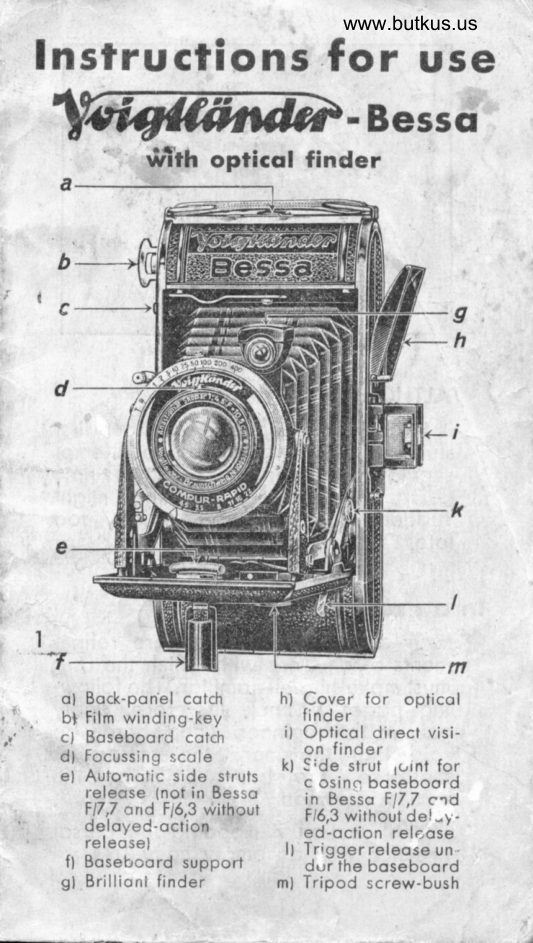
Insfrucrions forwww.butkus.ususe
                            - Besscr
        *Tth opticol finder


   c -------+


I

   ol Bock-pon'el cotch          h) Cover for opticol
   bl Film winding-key           finder
   cl Boseboord cotch                  it Opticol direcl visi-
   dl Focussing scole        on finder                                             kt Srde strut 1<,rnt for   el Autonotic side struls     c osine boseboord
      releose (not in Besso      in Besso F17,7 etd       F17,7 ond F/5,3 without       F/6,3 without de!-)  -      deloyeC-oction           ed-oclion relcose
      releosel                                   tt Trigger releose un
       fl Boseboord support       dur the boseboord.
    sl  Brillionl finder         ml Tripod screw-bush
View original page 1Page 2 · Read text
\


                                                                                                               Digitally signed by Mike Butkus
                                                                                    DN: cn=Mike Butkus, o=Butkus camera
                                                                                           manuals, ou=butkus.org,             Mike Butkus  email=mike@butkus.org, c=US
                                                                                                  Date: 2021.04.12 21:14:32 -04'00'


     ATTHOUGH
          it is eosy to operote without first
       studying these instructions no ottempt
       shou ld be mode to use this new
      Besso. Otherwise something might
      suddenly go wrong   usuolly tbo
         lote.
   In q precision Inslrument
      such os the Besso there ore ref ine-
      ments of oll kinds with which the user
       must moke himself fomilior. The follow-
      ing poges do not, therefore, opply
      only to the beginner.  lt need hordly be
      soid thot the more the comero is
      mostered, the better will be the
       results obtoined.
         Until section 7 (Looding the Bessol
       proctice with on empty cornoro:
        2

\                                                                                                 r
View original page 2Page 3 · Read text
www.butkus.us


l. Opening (Fis.2)
     Press the button c ond evenlv pull
  down the open end of the boseboord
   until the struts snop in ot k. Do not
    pull with too much or one-sided force.
  qnd closing
    ln the cose of the Besso with
   Voigtor Fi3,5, Skopor ond Voigtor
   t14,5 ond Voigtor F16,3, with deloy:ed-
   oction releose: prosS the cotch e in
   the direction of the comero body.
    In the cose of the Besso with
                          F 16,3 without de-   Voigtor  t 17 ,7 ond   loyed-oction                 releose                                    bose-                           the                                       ' (fig.Hold  boord        from            below                                                                 lift                     ond                        3l
   struts ot the red buttons- Do not press
   inwords. The boseboord con now be
   closed without effort.
View original page 3Page 5 · Read text
r


                             www.butkus.us
    2. Adiust the focus
        Besso F13,5 ond F|4,5: The feel
        focussing scole is engroved round the
     edge of the front lens mount. Turn
      the  f ront lens by the milled ring ond
      set the focus ogoinst the moik, os      shown in fig. 4. cc
       onything over 100 feet.
                                                 ot      Snopshot odiustments ore: A      12 feet ond O ot 50 feet. lf you use
      os smoll on operture os F/8   os you      con olmost olwoys do with the-   highly
       sensitive Voigtlonder film   the sh"orp     zone will extend from   -
     8 feet to 16 feet with focus set ot A,
      20 feet to oo with focus set ot Q.
         The following rule should there-
         fore be noted i
         I lor snopshots close up, set ot A.
         I For snopshots ar 20 feet or        -                             longer                       . . ronge, set of Q.        Use on operture of F/8.
         4
View original page 5Page 6 · Read text
www.butkus.us


  Hyperfoco I cho rt (ot the bock of
the comerol  :
   lf you set the focus to o certoin
ronge, soy 25 feet, then not only thot
point, but o certoin zone will beshorp. At 25 feet ond F14,5, for
exomple, everything between l9 feet
ond 36 feet will be shorp. This zone
increoses os the operture diminishes.
At 25 feet ond Fi ll,  it extends from14 feet to 102 feet.
 To reod the depth-of-focus toble,
find the operture in the left verticoi
column (e. g. F l8l ond on the corre-
sponding horizontol line there oppeors
under eoch distonce morking, the
vorious distonces coverinq the zone
of shorpness. (depth-of-focisl e. g., or
F/8 when the iens is focussed' ot
6 feet, everythino is shorp between
5 feet ond 7 feet.
View original page 6
Page 7 · Read text
Besso t16,3 ond F17,7, Turn the front
  lens mount by the milled ring, os in
  fio.5. until the red dot under the
  w"ord indicoting the required focus
   (londscop€S, groups, portroits) or the
   distonce in feet is beneoth the indi-
   coting mork. The distinguishing words
   greotly focilitote focussing,
     Portroits: shorpness extends from
     5 feet to 8 feet.
    Groups: shorpness exlends   f rom
       l0 feet to 23 feet.
     Londscop€S: shorpness extends from
     35 feet to infinity.
    N. B.   When the word "Porlroits"
   is set, the          -  lens is focussed on 5 feet,
  while of "Londscope" it is focussed  up to infinity, so do not stroin it by
   trying to turn the front lens forther on.
3. Stop Adlusrment
                                        dio-   You olreody know thot the  phrogm increoses the depth of focus,
   while ot the some time it reduces the
   lens operture ond thus lengthens the
   exposure time. (The smoller the stop
   [operture], the higher the stop num-   ber.l The stop numbers of the Besso
  ore colculoted in such o woy thot
   eoch smoller stop requires double the
   time of exposure of the preceding one.
     Exceptions:
    Chonging   f rom F/3,5 to F 15,,6
    2% limes os long.
    6
View original page 7Page 9 · Read text
opens when the trigger is first pressed
ond closes when it- is presseil o se-                            tt$ttcond time. For the      odiustment,
however, lhe shutter remoins open os
long os the pressure on the ieleose
is mointoined. The vorious morkinqs
ore set opposite the mork s by revoli-
ing the milled ring f. All shuiters orereleosed by  pressing down the
             1   trigger I
                                      (figs. 1,12,13
                      -"  ond l5l,                  which ope-
                          rotes the re-
                   leose lever                    p.  For fur-                           t ther  porf i-
                   culors see
                           ..  POges                                       '           7                   ond 8.

 When odiusting ond  settinq ot the
moximum speed of the AvLompur, some
                              resistonce
                  q is  encoun-
                    tered, due
                    to the en-
                       gogement
                      of o power-
                              t ful   spring.
                        Turn the
                    milled ring
                     gently post
                   the tension.
View original page 9Page 10 · Read text
www.butkus.us
     Singlo with ond without deloyed-
                                The   oction releose  (f igs.  I 0 ond  I I ).   indicotor f is set to the desired time
  ond the shutter is releosed by press-
  ing down the releose trigger  I.                                 1/zo                     sec. At T the  25 :   "lro, 75 :   shutter opens on the first pressure
  ond closes on the second, while of B
                                remoins   q                                 it                       open os
      r                         long os
                       pressure  is
    o                          mointoined,
                            immedio-
                        tely closing
                 when pres-
                     sure is  re-
    p                          loxed.l0
    For oll shutters: lf necessory, od-
              is possible   iustment                   between thet/- timesond             e. g. between   indicoted,   t/rr sec.': rlzniec. Exception: In the
  cose of the Compur, do- not set be-
  tween the moximum speeds.
                                     lf obsolutely
                               necessory,
                    the shutters
                        con olso
                      be reod-
                          iusted ofter
                                  setting.  An                            o           ..                             excepilon
   p                 here ogoinll                                is the moxi-
  mum speed of the Compur.
View original page 10Page 11 · Read text
5. Deloyed octlon-releose
    Compur: Adiust ond set lever os
    usuol, then push button 6 r bock ond
   ogoin set lever 6 n.
     Pronto ond Prontor ll: Adiust speed
  ond set shutter os usuol. Push lever
   7 r (or B r os the cose moy bel in the
    direction of the orrow.
     Singlo: Push lever l0 r upwords,
    ofter setting to rlzs or rlzo.
     For oll shutters: Releose in the usuol
   monner. The shutter operotes only
   ofter the deloyed-oction mechonism
  hos run down, so thot you hove
   obout l0 seconds to return to your
    position. A slight click indicotes thot
   the shutter hos been operoted.
      For B ond T ond the moximum speed
   of the Compur the deloyed-oction
    releose must not be used.
6. Flnder ond releose
   When the comero is opened, the
    opticol finder springs up into position.
   Use it for preference, since shots ot
  eye level will then hove the most
   noturol perspective.
    Hold the comero os in   f igs. 12
   ond 13, i. e. press it firmly ogoinst the
   foce ond look through the reor lens
   of the finder. The front lens indicotes
   the exoct ongle of view. The whole
   rim of this fens must therefore be
    visible.
     l0
View original page 11Page 12 · Read text
www.butkus.us


  For pictures in  the  holf-size,
2%Xl'/sin., bring up the smoll side
mosk into the  f rome; this mosk  is
hinged to the front portion of the
 f inder.
  Close the finder by simply pushing
down the cover, do not touch tha
lenses.
   It is very importont to becomeoccustomed to holding the comerocorrectly. A little proctice will soon
determine the best position; figs. l2
ond 13 con only suggest ho# the
comero should be held.
 The essentiolly procticol trigger
releose on the boseboord, ensuling
certoin releose without vibrotion, will
be found very helpful.
 To ovoid shoky pictures, press
down the trigger until it encounters o
slight resistonce, i. e. be "reody to
                                                             tl
View original page 12Page 13 · Read text
www.butkus.us


fire" os with o rifle, hold your breoth
ond evenly pull bock the trigger.                'untilProctice this         it goes smodttrly,
ond in time you will b-e oble to toke
1/r s9c. ond even 1/z sec. exposures by
hond.
  Wh en using th e  Brilliont Finder,
hold the com-ero ogoinst your chesi
ond look down verticolly into thefinder. Fig. l4 shows the' limits for
upright ond horizontol pictures.
  For exposures with the comero in
the horizontol position, turn the finder
round. Operote the boseboord triooer
releose *itn the index finqer of-ihe
right hond  (f ig. l5l for ufiright pic-.left                                -thetures, ond with the thumb of
hond for horizontol pictures.                               I
  For both finders: Do not incline the             I
comero forwords or bockwords, os
otherwise "folling lines" will result,
l2
View original page 13
Page 15 · Read text
r6
7, Looding of the Bessq
    Any 3%X2%in. film, on wooden
  or metol spools, con be used. The
   film is inserted in the comero in weok
   doylight or (when in the open| in the
   shode.
    The loocling is simple:
       l. Open the bock of the comero
   ofter pushing sidewoys the button l6o.
    2. Open out the film protecting   covers ot the top 117 wl ond the
   bottom.
     3. Put the empty spool in the top
   film chomber, ofter pulling out the
   film winding-key I ond l9b os for os it
   will oo. The slot in the spool must       -the   foce     key, while the 6ther end
  engoges on the pin 17 u.
    4. Reploce the top film protecting
   cover, push in the film winding-key
  ond turn until the cotch 17 x or 17 y
    l4
View original page 15Page 16 · Read text
www.butkus.us


engoges the slot, when the spool will
turn with the key.
  5. Ploce the new film spool in the
lower film chomber; do nol teor off
the poper bond until this is done.
Hold the protecting poper firmly ond
swing in the metol cover.
  6. Pull out the protecting poper
 (fig. l8l ond insert the point into the
wide slot in the empty spool. The red
(or green) side of the poper must lie
uppermost.
  7. Press the film key firmly inwords
ond turn three or four times until sure
thot the poper is being moved on.
It must run exoctly between the flon-
ges of the empty spool ond must not
overlop on either side. lf necessorystroighten it by pressure with o
moistened finger (fig. l9l.
  8. Close the bock of the comero.
The round operture of the top musl
                                                   t5
View original page 16Page 17 · Read text
gngoge in the groove 17 z on the
film key.
  Toke speciol core when o metolspool, with o thin core is in the top
chomber. lf the bock does not close
smoothly, something hos been done
incorrectly, so do not use force  I
  9. Open the film windows by turn-
ing the milled knob between the
windows to the right.
  10. Wind the film key evenly until
you see in the lower red film window,
first severol honds, then severol dots
ond finolly the number l. Stop wind-il''g when the number I  stoys in
the middle of the window.
     I I . When using ponchromotic   f ilm
(Voigtlonder Bessopon), the  film
windows    ofter the windino hosbeen done- properly so thot th6 cor-
rect film-number con be seen in the
l6
View original page 17Page 18 · Read text
www.butkus.us


   window    ore to be closed ogoin by           -   turning the               milled knob to t-he left
    until the bock stop.
8. Smoll size picture devlce
  enobles 16 smoll pictures size
  2% X                        I u/' in. to be ioken. Fio. 20                                       -ton-   cleorly shows how the grooved
  gue must be inserted in the picture
        f rome.
      First insert the mosk ot the bottom,
  then bend gently ond let it sprins  iri   ot the top. lt must then lie obsotujelv
   flot ond be secure both ot the top
  ond the bottom.
    N. B.   Above oll see thot the  tongues of the mosk ore octuollv in
   the            frome ond not by misfoke       .picture  behind one of the rollers.
   - The opticol finder olso hos o  tor smoll size pictures, mountedmoskon
                                                       t7
View original page 18Page 19 · Read text
20
  lhe front lens portion. This must be
   roised for oll smoll size exposures.
   ln the Brilliont finder, the four cor-  ners proiecting into the field of
  view indicote to some extent the
   outline of fhe holf-size picture, but  it
    is better to use the opticol finder.
9. The film tronsport
                                           (either                                             f irst exposure   For the  3% X2% in. or 2% X l6/e in.)  the
   fiqure "1" must be beneoth the lower
   fi[m window. For 3% X2%in. expo-   sures the figures I to 8 ore set in
   succession in the lower window.
    By meons of o speciol device, the
   smo.ll picture.window.mosk olso exposes the   upper            ln order to divide the
   film, eoch figure is set once in the
   lower, ond once in the upper window,
     i. e., first exposure "1" below, second
    l8
View original page 19Page 20 · Read text
www.butkus.us


exposure "lt' obove; third exposure
"2" below, fourth exposure "2" ebove,
ond so on.
  N. B.   Get used to turning on
immediotely ofter every exposure, os
otherwise double exposures will be
 f requent.
  After moking the lost exposure,
turn on until the protective poper is
not visible in the lower film window.
Open the bock of the co mero, hold
the end of the poper securely ond
corefully t1lrn on the film key o short
distonce. The film will thus be wound
tightly; loosely wound films ore
susceptible to light, while on the other
hond films wound too tightly will
become scrotched.
 Now pul! out the film key, ond
swi.ng out the metol protecting cover
with the full spool. Remove Jhe full
                                                   t9
View original page 20Page 21 · Read text
spool. Hold it securely to prevent  it
         f rom unwinding                                                    (f ig. 2l ), fold over   the end of the poper ond secure  it
   with the gummed strip.
I O. Glose-ups
   An interesting sphere, embrocing
    pictures of flowers ond smoll onimols,
                             reproductions.   !orge portroits ond  You will need the Focor lenses de-
    scribed below, which ore simply ploced
  over the lens. The focussinq scole
   distonces ore then chonged os Tollows,
    o) Skopor Fi1,5, Voigtor F11,5 ond
   F/3J (Portroit-Focor leni 65 ond Neor-
   Focor 361.

     by focussing   the octuol distonce becomes   t
         on        Portr.-Focor 65              36                                lNeor-Focor
                      40 indres       20 indres           50feet   37"      19   ,,       25  ,,    35   ,,       12"    32   ,,          18",  :;          8,,    n,,        6"    26   ,,             l2't'';,          5,,    24   ,,     15   ,,          4,,     2,     ,,       t4     ,,     ?:i,  {               3,5,,                    13  ,,      Fi4,5 '         n   "
    b) Voigtor F16,3 in Pronto shutter
   with deloyed-oction releose (Portroit-
   Focor 66 ond Neor-Focor 351.
     c) Voigtor F16,3 in Pronto shutter
   without deloyed-oction releose ond
   Voigtor F17,7 (Portroit-Focor 67 ond
   Neor-Focor 301.
  n
View original page 21Page 22 · Read text
www.butkus.us
                 the octuol dis once becomes
  by focussing                    Portro it-Foco r I  Neor-Foco,.       on            6 ond 67    |   30 ond 35
 Londscopes -     40 inches        20 inches     35 feel     36"       19   ,,    23 feet     35    ,,    Groups     32"              lg'/,;;     l0 feel     30    ,,      17   ,,     8 feet     28    ,,     Portroits    26   ,,               12'''',',

  Adhere occurotely to the distonce,
 meosuring from the lens. For portroits,
reduce the operture to  F 16,3 ond for
 reproductions to F112,5.  The time of
exposure re-
moins the sc-
me os when
   working
without  oFocor lens,
 i. e. it needsmerely be
 lengthened
in proportion
to the oper-
ture. When
using lenses,
the view fin-
der does not
givq   ony-
more the exoct size of the octuol
picture. As figure 22 shows, the octuol
picture will be disploced towords the
comero-edge by tlu (distonce between
comero ond obiect not under 20"1 or
by tlo (distonce between comero ond
                                                       2l
View original page 22Page 23 · Read text
obiect not under 13") of the view
   finder field.
     Portroits ore best token slightly in
   profile to get them os cleor ond no-
   turol os possible.
I l. Yellow Fllrer
    lellow filters ore indispensoble for
   obtoining ottroctive londscopes, since
  they bring clouds into view. As o
   generol rule, coloured obiects should
  Xot be token without yellow filters,
   since only with their use con the
   colour voiues of the vorious shodes
  be correctly reproduced.
     Voigtlonder filters ore ground os
   corefully rrs lenses from spectroscopi-
   colly tested gloss. They ore firmly
   mounted on the comero lens mounts.
    The times of exposure ore lengthe-
   ned os followst

                          Density         Densily
            Films        "Momenl"    "Normol"
             llluslro         2x         4X
       Bessopon         l,5x        3X

| 2. The Volgrltinder Flnder
   Mognlfier
   enlorges the smoll imooe of the reflex
   finder three  times oia shields the
         f inder  f rom  conf using reflections. lt
  2
View original page 23Related documents and language editions
VoigtländerPDF
Voigtlander Bessa
User manual
25 pages · EnglishRead →
VoigtländerPDF
Voigtlander Bessa F6.3
User manual
38 pages · EnglishRead →

VoigtländerPDF
Voigtlander Bessa F6.3
User manual
19 pages · EnglishRead →
VoigtländerPDF
Voigtlander Bessa f/6.3 Gebrauchsanleitung
User manual
39 pages · GermanRead →

VoigtländerPDF
Voigtlander Bessa w/optical 2 pages at a time
User manual
13 pages · Not specifiedRead →
From the M. Butkus archive. Original publisher and archive notices are retained.
Check the model and edition against your equipment.
PDF verified 2026-10-10.