Lenses & filters
Yashica close up lens information User manual
User manual for Yashica close up lens information. 1 pages in English. Read the original PDF, download or print a copy without registration.
1 pagesEnglish0.7 MB PDF
Loading your manual…Open PDF directly
Document details
- Brand
- Yashica
- Model / document
- Yashica close up lens information
- Document type
- User manual
- Language
- English
- Pages
- 1
- File size
- 0.7 MB
- Category
- Lenses & filters
- Document date
- Not specified in catalog
Search available document text
Find a term, then jump to its page in the original PDF. Image-only pages may not be searchable; check the PDF for exact wording and diagrams.
Page 1 · Read text
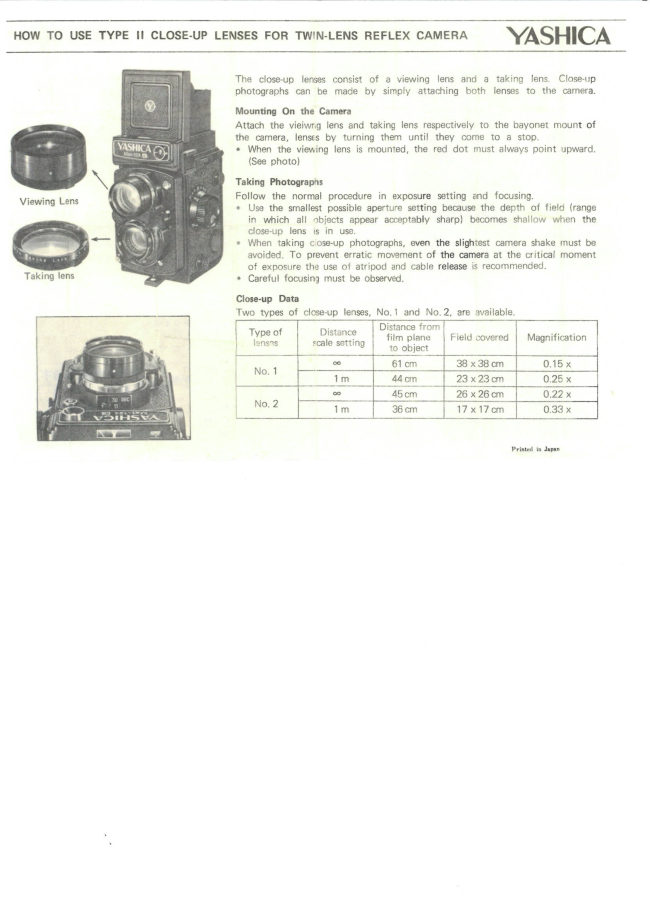
HOW TO USE TYPE II CLOSE-UP LENSES FOR TWIN-LENS REFLEX CAMERA YASHICA

Taking lens

The close-up lenses consist of a viewing lens and a taking lens. Close-up
photographs can be made by simply attaching both lenses to the camera.

Mounting On the Camera

Attach the vieiwng lens and taking lens respectively to the bayonet mount of

the camera, lenses by turning them until they come to a stop.

* When the viewing lens is mounted, the red dot must always point upward.
{See photo)

Taking Photographs

Follow the normal procedure in exposure setting end focusing

* Use the smallest possible aperture setting because the depth of field (range
in which all objects appear acceptably sharp) becomes shallow when the
close-up lens is in use.

* When taking coseup photographs, even the slightest camera shake must be
avoided, To prevent erratic movement of the camera at the critical moment
of exposure the use of atripod and cable release is recommended.

* Careful focusing must be observed.

Close-up Data
Two types of close-up lenses, No.1 and No.2, are available.
istanc m | ]
Typeot | Distance || “tipi | Field covered | Magnification
2 6lom_ 38 x38.on 0.15 x
1m ‘4aon 0.28 x
[= 45om_ | O22x
Tm Bem | i7xt7on | 033%

Printed io Japan
View original page 1Related documents and language editions
From the M. Butkus archive. Original publisher and archive notices are retained.
Check the model and edition against your equipment.
PDF verified 2026-10-10.