Film cameras
Yashica TL Electro-X User manual
User manual for Yashica TL Electro-X. 16 pages in English. Read the original PDF, download or print a copy without registration.
16 pagesEnglish2.2 MB PDF
Loading your manual…Open PDF directly
Document details
- Brand
- Yashica
- Model / document
- Yashica TL Electro-X
- Document type
- User manual
- Language
- English
- Pages
- 16
- File size
- 2.2 MB
- Category
- Film cameras
- Document date
- Not specified in catalog
Search available document text
Find a term, then jump to its page in the original PDF. Image-only pages may not be searchable; check the PDF for exact wording and diagrams.
Page 2 · Read text
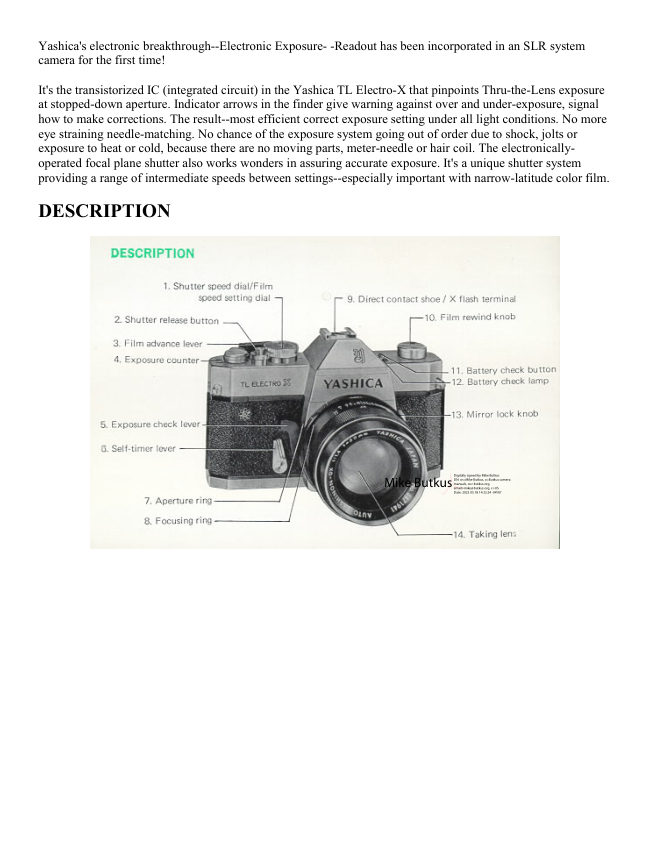
Yashica's electronic breakthrough--Electronic Exposure- -Readout has been incorporated in an SLR system
camera for the first time!

It's the transistorized IC (integrated circuit) in the Yashica TL Electro-X that pinpoints Thru-the-Lens exposure
at stopped-down aperture. Indicator arrows in the finder give warning against over and under-exposure, signal
how to make corrections. The result--most efficient correct exposure setting under all light conditions. No more
eye straining needle-matching. No chance of the exposure system going out of order due to shock, jolts or
exposure to heat or cold, because there are no moving parts, meter-needle or hair coil. The electronically-
operated focal plane shutter also works wonders in assuring accurate exposure. It's a unique shutter system
providing a range of intermediate speeds between settings--especially important with narrow-latitude color film.

DESCRIPTION


                                                                                                                                                                                                                                                                                                                     Digitally signed by Mike Butkus
                                                                                                                                                                                                                                        DN: cn=Mike Butkus, o=Butkus camera
                                                                                                                                                                                                                                                             manuals, ou=butkus.org,                                                   Mike Butkus email=mike@butkus.org, c=US
                                                                                                                                                                                                                                                                              Date: 2023.05.18 14:32:24 -04'00'
View original page 2Page 3 · Read text
www.butkus.us


LOADING BATTERY


1. Remove the battery compartment cover by turning it in the direction of the arrow and install a 6V silver oxide
battery. (Eveready No. 544 or equivalent). (webmaster: Mallory PX-28 is equivalent)

See this link on a Wein Air replacement battery.

Batteries: It seems like most TL Electros use a pair of PX640 cells stacked. However it seems that some might
take a single PX-28. It will be one or the other and fortunately there's an easy way to tell, based on the diameter
of the battery compartment. Here's a simple method: Take a common AA cell and see if it fits into the hole at
all. If it does, use a pair of PX640s. If it doesn't, use a PX28. The AA cell is between the diameter of the two,
and if it will start to fit into the hole, then the hole diameter is one that fits the PX640. If the hole diameter is
smaller, then use the PX28. Two PX640's stacked are the same height as a PX28, but the PX28 gives twice the
voltage.]

2. Make sure that the (--) side faces inside. If the battery is installed in a reverse position, the Electronic
Exposure Readout will not function. Close the battery compartment cover securely.
View original page 3
Page 4 · Read text
CHECKING BATTERY


                                                         If the battery is weak, the Electronic Exposure
                                           Readout will not operate correctly. Before shooting,
                                            check the battery condition. Press the battery check
                                                button and when the green lamp lights, the battery
                                              has sufficient power to operate the exposure control
                                                system. Replace the battery when the green lamp
                                             does not light.


NOTES ON SILVER OXIDE BATTERY

· When the battery is installed incorrectly, l ) The green lamp will not light when the battery check button is
depressed. 2) The shutter speed will be l/1000 sec. when the shutter release button is depressed.

· Do not throw used silver oxide battery into the fire, trash cans or waste receptacles.

· Do not disassemble the silver oxide battery or leave it where children can get access to it.


LOADING FILM


1. Pull out the back cover lock lever and the cover will pop open. The exposure counter will be automatically
set at S (start) mark.

2. Pull out the film rewind knob, place the film cassette into the film chamber and replace the rewind knob to its
original position. Insert the film leader into one of the slots of the take-up spool.

NOTE: Always load the film under a shade or in subdued light, never in direct sunlight.
View original page 4Page 5 · Read text
www.butkus.us


3. Advance the film, making sure the sprocket teeth properly engage the perforations of the film. Close the back
cover.

4. Wind the film advance lever and make blank exposures until the figure "1" appears in the exposure counter
window. You're now ready for the first exposure.


SETTING FILM SPEED


1. Lift the film speed setting ring.

2. Turn the film speed setting ring to align the ASA/DIN speed of the film in use with the triangle index mark.

The ASA/DIN rating denotes the degree of light sensitivity of the film emulsion and is clearly indicated on the
box or the instruction which comes with the film.


EXPOSURE SETTING


· Preselection of Shutter Speed In bright light, preselect the shutter speed by turning the shutter speed dial.
Depress the exposure check lever and turn the aperture ring to obtain the correct exposure.
View original page 5
Page 6 · Read text
·Preselection of Aperture In subdued light, preselect the aperture. Depress the exposure check lever and turn the
shutter speed dial to obtain correct exposure.

·In either operation, correct exposure is assured.


ELECTRONIC SHUTTER SYSTEM


                                   The electronic shutter system provides intermediate
                                        speed range at in-between setting. The shutter speed dial
                                         has click-stops at each setting between 1/1000 sec. and
                                         1/30 sec.. When taking pictures either of fast moving
                                             subjects or in bright sunlight, it may be easier and better
                                               to preselect the shutter speed. Then, obtain correct
                                        exposure by turning the aperture ring. On the other hand,
                                               in the slower shutter speed range between 1/30 sec. and--
                                         index mark (approx. 2 sees.) there are no click-stops.
                              When taking pictures in dim light, preset the lens
                                          opening. Then, obtain correct exposure by turning the
                                               shutter speed dial.


                                     The red exposure warning arrows indicate
                                           exposure corrections.

                                                 Sight through the finder, keeping the exposure
                                            check lever depressed. One of the red UNDER or
                              OVER exposure warning arrows appears in the
                                             lower part of the finder.

                                                  In the preselection of shutter speed, rotate the
                                                  aperture ring for correction of exposure setting.
                                    And in preselection of aperture, adjust the shutter
                                             speed dial.
                                                              I n either case, correct exposure is obtained when
                                                  the arrows go out.
View original page 6Page 7 · Read text
www.butkus.us


OVER-EXPOSURE
Turn the aperture ring or the shutter speed dial in the direction of the arrow in the viewfinder until the left
exposure warning arrow goes out. . If the arrow fails to turn off, use an ND filter.

UNDER EXPOSURE
Turn the aperture ring or the shutter speed dial in the direction of the arrow in the viewfinder until the right
exposure warning arrow goes out. If the arrow fails to turn off, use a larger aperture or a slower shutter speed.
Or the use of a flash unit is recommended. When using a slow shutter speed under 1/60 sec., the use of a tripod
is advised.


FOCUSING
For bright viewing and precise focusing, set the stopdown bar to "A" position. Look through the finder and turn
the focusing ring until the image on the focusing screen appears clear and crisp.
View original page 7
Page 8 · Read text
UNLOADING FILM


                                    When the film has been completely exposed,
                                               rewind the film and take out the films cassette.
                                                                  If you should forget this procedure and open the
                                              back cover, the film will be fogged.

                                                          1. Do not try to advance the film when a
                                                       resistance is felt: it may tear or come loose from
                                                     the cassette making it impossible to rewind.
                                             Push the film rewind button on the camera base.


2. Fold out the crank-handle on the film rewind knob and turn it in the direction of the arrow. A slight resistance
will be felt when the film pulls off the take-up spool, but continue winding the crank-handle until you feel the
film pulling away from the slot of the take-up spool.


3. Open the back cover and take out the film cassette.


FEATURES OF TL ELECTRO X

Lens: Auto Yashinon.DX`50mm f/1.47.element lens; stops clown to f/16

Shutter: Electronically operated focal plane shutter with speeds from B. SLOW (about 2 seconds) to 1/1000
sec.; intermediate shutter speed setting optional; self-timer plus FP.X sync.

Exposure Control: Thru-the-Lens CdS light measuring system; Electronic Exposure Readout (exposure
warning arrows suggest exposure corrections): ASA range 25 - 800; a 6V silver oxide battery is used to power
the exposure control system and electric-operated focal plane shutter (Eveready No. 544 or equivalent)

Viewfinder: Reflex viewfinder with microprism focusing spot, ground-glass collar for depth of field analysis;
focusing from 0.5 meter (1.75 feet) to infinity; exposure warning lamps visible in the viewfinder

Film Transport: Ratchet-type, single-stroke film advance lever; automatic resetting exposure counter
View original page 8Page 9 · Read text
www.butkus.us


Other Features: Battery checker, Mirror lock, Direct contact shoe, Multi-slot take-up spool for easy and fast
loading

Lens Shade: 57mm slip-on type

Filters: 55mm screw-in type

Dimensions: 151 x 96 x 96.4mm

Weight: 1050grs.

  Models with f/1.7 and ft2.0 are also available.


SLOW SHUTTER "B" SETTING


When using shutter speeds slower than 1/30 sec., the use of a tripod and a cable release is recommended.

Caution: At an intermediate setting between SLOW and B settings, the Electronic Exposure Readout will not
function. Do not set the shutter speed dial between SLOW and "B" settings.

"B" Setting
When a long exposure is required, set the shutter speed dial at "B" setting. At this setting, the shutter remains
open over the duration the shutter release button is depressed. For long exposure, the use of a tripod and a cable
release is recommended.
View original page 9
Page 10 · Read text
EXPOSURE SETTING WHEN SHOOTING AGAINST LIGHT


                                 When shooting against light or photographing a
                                                  subject near a window, or against an excessively
                                                   bright background such as snow-covered landscapes,
                                                 the main subject is liable to appear extremely dark
                                              (under-exposed) if the exposure is set in the normal
                                           manner.

                                    To obtain sparkling results in such case, approach
                                            your main subject and take exposure reading by
                                               seeing to it that the bright light in the background is
                                         warded off from the lens.

                                                 In case the main subject cannot be approached, it's
                                              necessary to give from twice to four times the normal
                                               exposure.

                                                             If the normal setting is f/16 at 1/125 sec., set the
                                                 aperture at f/11 at 1/125 sec. or at f/11 at 1/60 sec.. In
                                                 the above circumstance, disregard the left exposure
                                           warning arrow when taking the picture.


HOW TO HOLD THE CAMERA


1. Hold the camera and sight through the viewfinder.
2. For exposure setting, depress the exposure check lever with index or middle finger of the right hand and
rotate the aperture ring with the thumb and index
View original page 10Page 11 · Read text
www.butkus.us


                                   ·X FLASH SYNC. TERMINAL
                              Two "X" Sync. terminals are provided. One of them is
                                             the Direct Contact Accessory Shoe, and the other on the
                                              side of the camera body. When using an Electronic flash
                                            or ordinary flash unit, connect the synchro cord to "X"
                                              terminal.

                                                       · FP FLASH SYNC. TERMINAL
                               When using ordinary flash unit with FP or M class bulbs,
                                          connect synchro cord to "FP" terminal.

                                    The compact Yashica AG-D, is a dual use flash unit for
                          AG type bulbs. Use it as a cordless flash unit by slipping
                                                                  it into the direct contact accessory shoe or as a
                                           conventional flash unit by connecting the synchro cord to
                                             the camera synchro terminal.


Flash Mark X When using an electronic flash unit, always set the shutter speed dial to this X setting. The
shutter speed is set at about 1/90 sec.


EXPOSURE SETTING


                                         Correct exposure setting in flash photography is
                                         obtained through the guide number for flash bulb or
                                             electronic flash unit in use. The guide number is shown
                                   on the package of the flash bulb or on the body of
                                             electronic flash unit. Divide the guide number by the
                                          camera-to-subject distance.

                                    Guide Number (32) =f/16 (Correct aperture)
                                        Distance (2 meters)

                                    Guide Number (100) =15 1--f/16 (Correct aperture)
                                        Distance (6.6 feet)
View original page 11Page 12 · Read text
"R" MARK


The red dot (R mark)` is used when taking a picture with infrared film. For infrared photography, focus your
camera in the ordinary manner and then set the distance reading to the R mark.

FILM PLANE MARK
The red mark on the camera top indicates the position of the film plane: Strictly speaking, the camera-to-subject
distance means the distance from the film plane to the subject. In close-up photography, measure the distance
from the film plane mark to the subject.

SELF-TIMER


                                              1. Give the film advance lever a full turn to charge the
                                              shutter.

                                              2. Charge the self-timer by shifting the self-timer lever all
                                          the way down.

                                              3. Depress the shutter release button and the self-timer
                                                trips the shutter at a delayed action of 8 to 10 seconds.

                             NOTES:
                             When the self-timer does not function, even if the shutter
                                           release button is depressed, it's because the shutter is not
                                        charged. Charge the shutter by advancing the film
                                     advance lever and press the shutter release button.


MIRROR LOCKUP
View original page 12Page 13 · Read text
www.butkus.us

Push the mirror lock knob upward in the direction of the arrow to flip up the mirror and lock it in position. To
return it to its original position, turn the knob down.

This mirror lock system permits mounting of ultra wide-angle lens.


DEPTH OF FIELD


                                    The area in the foreground and background over which
                                              objects appear acceptably sharp when you focus your
                                      camera on a subject at a given range is called the "Depth
                                            of Field." As shown here, the depth of field is more
                                            extensive when the lens is stopped down (right photo)
                                           than at full aperture (left photo). The depth of field can
                                              also be determined by referring to the depth of field scale
                                     on the lens barrel. If the subject is at a distance of two
                                         meters and an aperture setting of f/16 is selected. all
                                              objects within the range indicated by the figures 16 on
                                         both sides of the red index mark (approx. 1.5 to 3.2
                                           meters) will appear acceptably sharp in the picture.

                                    The depth of field is more extensive . . .

                                                       · when the lens is stopped down.

                                                       · when you focus your camera on a distant subject.

                                                       · in the background than in the foreground.


PREVIEW OF THE DEPTH OF FIELD


                                To preview the depth of field at the preselected
                                              aperture, depress the exposure check lever and sight
                                         through the viewfinder. Always keep the stop down bar
                                    on the lens barrel at "A" for depth analysis.

                                    At this setting, the diaphragm remains fully open to
                                           assure maximum brilliance of the image in the finder at
                                                      all times, except for the fraction of a second the
                                        exposure is made.

                              When the camera is used with extension bellows or
                                           tubes for macrophotography, the stop down bar on the
                                             lens barrel should be set at the "M" position. The
                                            desired aperture can be set manually.
View original page 13Page 14 · Read text
NO EXPOSURE FACTOR REQUIRED


                                                The TL Electro-X features the Thru-
                                                         the-Lens metering system which
                                                      measures the average brightness of
                                                              the light coming through the taking
                                                              lens and exposure compensation is
                                                           not required, when using any lens, or
                                                                                filter. Perfect exposure is assured
                                                        every time.

                                                The stop down bar should be set at
                                            "M" position when the lens is used
                                                        with extension bellows or tubes for
                                                       macrophotography.


INTERCHANGING OF LENSES


                                   The Yashica interchangeable lenses from wide angle to
                                            telephoto feature thread mounts and can be mounted or
                                      dismounted rapidly.

                               NOTES: You should interchange the lens in subdued
                                                    light, never in direct sunlight.


A WIDE RANGE OF INTERCHANGEABLE LENSES
View original page 14Page 15 · Read text
www.butkus.us


ACCESSORIES


Lens Hood             Filter                Extension Bellows
Use of a lens hood is   Better overall results    Effective for extreme
recommended for      can be obtained        close-ups and
subjects in bright       through use of a       macrophotography.
light, sea or snow        filter when shooting   The use of the bellows
scenes, and to          sea or snow scenes,     provides
prevent unnecessary     etc. under glaring      magnification of the
stray light from         sunlight and for       image up to 2.4X the
falling on the lens.      obtaining special         life-size.
                          effects
(57mm slip-on type)
                 (55mm screw-in
(54mm slip-on type     type)
for f/1.7 and f/ 2.0
lens)              (52mm screw-in
                       type for f/1.7 and
                          f/2.0 lens)
View original page 15Page 16 · Read text
Extension Tubes       Right-angle          Microscope Adapter
Useful for copying     Viewfinder          The microscope
and close-up work. A   This exclusive right-    adapter is used for
set of 4 tubes can be     angle viewfinder       microphotography.
used singly or in any     slips on to the          There is no need for
combination for any    camera eyepiece and    compensation of
degree of                   is designed for         exposure factor.
magnification up to     convenient viewing
maximum.            and focusing.


Eyesight-Adjustable   Yashica-Lite
                                          Grip/Tripod ST-7
Eye-cup         AG D This compact                                       Use it as a camera
The eye cup has a        flash gun can be used
                                    GRIP or a TRIPOD.
frame to accept a        as either cordless
                                                  Light, Compact,
lens of 18mm            flash gun or
                                                  Versatile --
diameter. Mount the     conventional flash
                                                indispensable for
prescription lens          unit. The PVC cord
                                                   quality results.
from your optician to     is housed within the
the frame four            reflector section.
comfortable viewing.
View original page 16Related documents and language editions
From the M. Butkus archive. Original publisher and archive notices are retained.
Check the model and edition against your equipment.
PDF verified 2026-10-10.