Film cameras
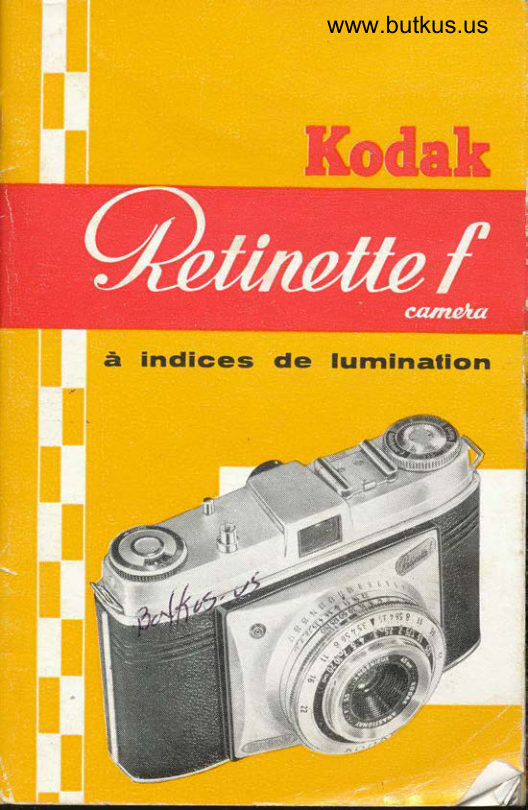
Kodak Retinette Quick Guide Quick start guide
Quick start guide for Kodak Retinette Quick Guide. 20 pages in English. Read the original PDF, download or print a copy without registration.
20 pagesEnglish6.1 MB PDF
Loading your manual…Open PDF directly
Document details
- Brand
- Kodak
- Model / document
- Kodak Retinette Quick Guide
- Document type
- Quick start guide
- Language
- English
- Pages
- 20
- File size
- 6.1 MB
- Category
- Film cameras
- Document date
- Not specified in catalog
Search available document text
Find a term, then jump to its page in the original PDF. Image-only pages may not be searchable; check the PDF for exact wording and diagrams.
Page 2 · Read text
manuals,c=US
        camera
  Butkuso=Butkus       -04'00' Mike by                      email=mike@butkus.org,19:46:14         Butkus,
  signed         cn=Mike          2023.03.30   DigitallyDN:ou=butkus.org,Date:
Butkus
Mike
View original page 2Page 5 · Read text
www.butkus.us


Conlenfs

Poge
  415 The bosic points of photogrophy
  6   Holding the comero
  7   Setting the distonce
  8   Setting the exposure (shutter speed ond operture)
  9   Tensioning ond releosing
l0/lI    Inseriing ihe film
  12  The film counler ond film indicotor
   l3   Unlooding the comero
  14  Depth of field
   l5   Zone focusins
  '16 The synchronised shutter:  f losh shots ond pictures
        with the self-iimer
  17   "Retinette" occessories
  18  Chonging portly exposed films; hints
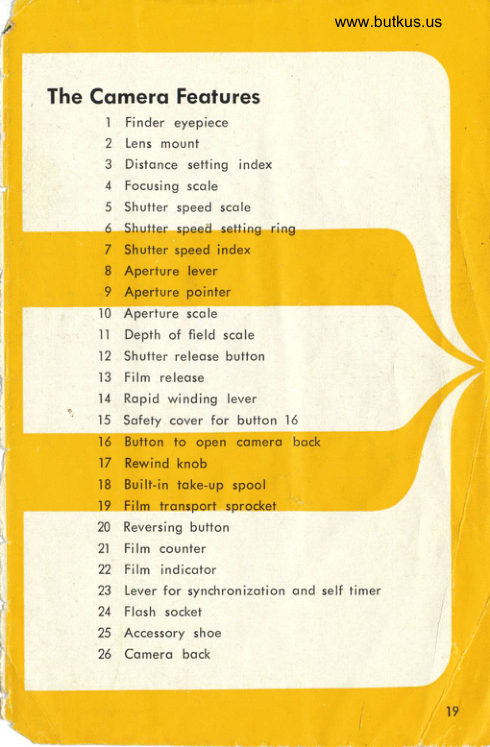
19121 Generol view of the "Retinette"
22123 The "Retinette" exposure toble
View original page 5Page 6 · Read text
Pidure toking is so simple:

    "How do I set il?" Thot is the first question of mony o proud
    owner of q new comero who of course wonls lo qet down io
     toking pictures os quickly os possible.
    Well, don't worry; picture toking is reolly quite eosy. Just think
     of the vost numbers of omoleurs who olso hod to stort ot one
     time ond todoy moke the most beoutiful photogrophs with their
     comero. You only hove to know o few bosic focts obout photo-
       g ro pny.
     Three comero settings ore importont for o technicolly good
      piclure: distonce, shutter speed ond operture.
    The distonce setting controls lhe shorpness of the piclure. Cor-
      rect exposure meons thot the omounl of light reoching the film
     through the lens is so odiusted thot, photogrophicolly  speoking,
        it neither over nor underexposes lhe negotive. An obvious
     exomple should moke ihe principle of exposure cleqr. With bril-
      liont sunshine the light outdoors is much stronger thqn with
      overcost sky. In o given exposure time the lens thus posses more
      light on o bright doy thon on o dull one. In the lotter cose you
    must lherefore keep the shutter open for o correspondingly
     longer lime to ensure thot the film receives lhe required omount
    of light for correct exposure.
    The shutter with its different shutter speeds (exposure times)  is
     therefore one meons of meosuring out the omount of light - by
     determining the time for whrch it is ollowed to oct.
    The other meons is the operiure. To undersiond how it works,
      sit down in front of o mirror ond look reolly closely ot your
   own eye. Then toke o pocket iorch ond shine it into the
     pupil.  lf this wos wide open  it  immediotely controcts. As
    soon os you switch off the light it opens up ogoin ond thus
     odiusts itself to the reduced brightness. The operture of the
     "Retinette" works in iust the some woy. Only its opening does
     not odiust itself outomoticolly like the eye; you must first find
                                                     .#{s     4
\
View original page 6Page 7 · Read text
Dislonce, shutter speed ond operturewww.butkus.us


out lhe correct opening for lhe subiect brightness ond lhe shutter
speed. Alternotively, you con determine it with on exposure
meter. The operture number you hove reod off for ihe required
shutler speed then hos to be set on the lens.The importontpoint
is now to choose lhot combinotion of shutter speed ond oPerture
which is most suitoble for the subject to be photogrophed. A
sports shot, for instonce, requires o very fost shutier speed, ond
you hove to open fhe operture occordingly.
              $*         "'" n .16 B rt


On the other hond you need o smoll operture for greoter depth
of field (which we sholl discuss in more detoil on poge 14). Since
o combinotion of greot depth of field ond fost shutter speed  is
only possible in very fovouroble light conditions, you will hove
to decide whether lo choose o fost shutier speed or o smoll
 operfure. Once you get the ideo of how to moke the best com-
 promise, ond oi the some time remember thot for o given ex-
 posure o smoll operture (high operture number) requires o
 longer shutter time ond vice verso, you hove underslood the
moin points of picture toking.

                                                                                    fl
View original page 7Page 8 · Read text
How to hold ond Yiew . .


     To be reolly reody for ociion
     you must hove o comero which
       is ot the sqme lime hondy os
       well os convenienl in operotion.
       In designing the 'lRetinette" vre
      poid speciol ottention to moking
          it comfortoble to hold without
      ony disturbing corners or edges.


      The illustroiions on the left show
     you how to hold the comero.
       Experience hos shown lhol these
       holds ore the most useful ones.
       But thot does not meon thot they
     ore the  on ly  possible woys.
      Sometimes the physicol size of
     your honds, or hobit, moke o
     more or less different hold more
      fovouroble. So try  it out for
       yourself ond choose the comero
       position which suits you best.


     The lorge bright finder of your
       "Retinelte" cleorly shows your
       subiect. But you must hold the
      eye close to the viewfinder eye-
      piece (1). Then you ore olso sure
       ihot you see the correct field of
     view ond con iudge the effecl
     ond moke ony odiustments you
      wish before exposing.
View original page 8Page 9 · Read text
www.butkus.us... ond how to set the dislqnce


lf your vision is foulty (other
thon through ostigmotism), but
you do not weor spectocles ond
thus cqnnot see the subiect
cleorly, we con supply correc-
tion lenses to screw inlo the fin-
der eyepiece. When ordering
these, pleose stote the power in
diopters (* or     required.                -)                  on pogesAs olreody mentioned
4 5, the correct setting of lhe
distonce lorgely determines the
shorpness of the piciure.
You will probobly wont to know
more oboul the best woy of
meosuring how for lhe subjeci
is from the comero. Here is o
useful hint: if you hoven't yet
got much experience in estimol-
ing distonces, poce the dislonce to fhe sublect. Toke one poce
os equol lo obout 21/2feet. Once you hove used the cqmero for
some time, you will soon gei into guessing the correct distonce
on sight. For photogrophs ot close ronge where you meosure
the distonce occurotely, remember lo meosure from lhe plone
of the film;   i. e. obout the reor edge of the top of  your
"Reti netie".
With subiects over13 feet you con rely on guess work. The
deplh of field zone (see poge l4) increoses so ropidly ot greofer
distonces thot smoll errors of estimolion become comporotively
 u n imoorlo ni.
Move the focusing scole (4) by lurning the lens mount (2) until
the distonce figure required on the scole is opposite the red
triongulor distonce setting index (3). Your "Relinette" - or to be
more exoct the lens of your "Relinette" - is then shorply focused
on the subiect.
View original page 9
Page 10 · Read text
Then set the shutter cnd operture

After lhe distonce you hove to set the exposure, in other words
the shutter speed ond operture.  lf you hove no exposure merer
(such os ihe KODATUX L, the scole of which is morked in the
some shutler speed ond operiure volues os your..Retineite")
you con use the exposure tqble on poge 22. With some con-
sideroble experience you con even guess the exposure.
Turn the shutter speed setting ring (6) until the red dot (Z) is
opposite the desired shutter speed on the scole (5). Quite simple
isn't it?


                       www.butkus.us

Now for the operlure required for correct exposure. Rememoer
whot we soid on poges 4-5 obout lhe connection between shut-
ier speed ond operture?
Move the serroted operture lever (8) underneoth the shutter un-
til the pointer (9) points to the required figure on the operture
scole (10). The "Retinette" is now fully set. Hove you noticed
how eosily oll three settings con be reod oft from obove: Thol
is one reoson for the inslont reodiness for oction of the ..Re-
linette'. The other reoson is the ingenious ropid winding lever.
 Its operolion  is exploined on the next poge.


8
View original page 10Page 11 · Read text
Now you cqn wind qnd relessewww.butkus.us

When you hove set the distonce ond exposure, hold the comero
to your eye, sight your subiect, ond press the releose button (12).
You con only press this buiion  if the shutter is tensioned.
To lension the shutter pull oui the ropid winding lever (14) in
one movement os for os it will go. Let go, ond it will shoot bock
into its originol position. lf  it does noi move bock you did not
pull out for enough; so complete the tronsport movement.  This
ot ihe some time tensions the shutter ond - os soon os lhe comero


is looded with o film - winds on the film by one frome ond
odvonces the film counter (see poge 12)'
Now you con releose. You will notice how smoothly the releose
button operoles; fhis is importont to ovoid comero shoke.
Moke o hobit of operoting the ropid winding lever immediotely
ofter every exposure so os to hove your comero olwoys reody
for oction. Put the comero to your eye, sight the subiect in
the finder, ond press the releose button (12). You connot press
the button until you hove tensioned ihe shutter.
View original page 11
Page 12 · Read text
[ei's sfqrf: opening


Before you lood o film to foke your first pictures iust think bock
once more over oll lhe operotions which you hove proclised
ond see if you remember them oll. For once the cqmero is
looded you ore reolly working with it, ond o wrong or for-
gotten setling con hove onnoying resulfr.
Before looding the film you hove to open lhe comero bock (25).
On the botfom of the comero you will find ihe lripod bush sur-
rounded by o sofely device (15) to cover fhe bution (16). lf you
push lhe milled end of this lever in fhe direction of the orrow,
the opposite end uncovers o buttori {16). Depress this button ond
the comero bock will spring open. But hold lhe comero in such
o woy (preferobly by the top orid bottom) thot you do not press
the bock ogoinst the body.
This locking system hos obvious odvontoges. You con only open
fhe comero deliberotely and nol by ony occidentol movement
or knock.
Now insert ihe film. Do this speciolly corefully,
'10
View original page 12Page 13 · Read text
the comerq bqck to loqd the filmwww.butkus.us


T
I


        Fully pull out the rewind knob (17) ond iurn the built-in toke-up
      spool (18) by its serroted flonge until o slit in the spool points
      upwords. Push the trimmed end of ihe film protruding from the
I      cossette sufficiently for into this slii to onchor  it. Then pull the
        film ocross the film trock ond insert lhe cossette into the cosselle
I       ch o m ber.
     When the film end ond cqssette ore correctly in position push
       bock the rewind knob, turning  it ot the some time in the direc-
       iion of the orrow to lension fhe film. Moke speciolly sure lhot
      the teeth of the lronsport sprockel (19) engoge lhe film per-
        forotions.

     Now you con close the comero. Shut lhe bock ond press it gently
       ogoinst the body unfil the cotch engqges, securely closing the
       "Retinette" ond fully protecting lhe film ogoinst the light.
                                                                                                               ll
View original page 13Page 14 · Read text
Remember the film counter cnd {ilm indicotor


 Before you mqke the first exposure don't forqef to set the film counter. ond the film indicotor. The film counter (21) olwoys
 shows the number of shors still ovoiloblJ. W[;;   ii tii'r*ir,eo No.. r,l9u en  toke o_ne more picture but you then hove to rewrnd fhe tilm qnd unlood  it.


To help you to remember whot type of film you hove looded
 rnlo lhe comero, set fhe film speed or type on ihe film indicotor
 \tzl on the top.ot the rewind knob. Grip the rewind knob with
two trngers ond turn the inner serroled rinq with one finqer ot
the other hond until the triongulor index mork V pointsio thetype or speed of ihe film.
Y.tt"." l!,".fi|m. counter of .your .,Retinette,' hos reodred No. l,thrs Indrcofes thot the whole film is exposed. Toke it out of th6comer-o stroightowoy even if you don't intend io lood onother
trlm.., You..ore then noi likely to forget it loter, nor will youoccidenlolly.  pu.ll out the film end from the cosseite by wor(ing
lhe ropid winding lever lo moke o furlher exposure s6me othei
ilme.


t2
View original page 14Page 15 · Read text
When the film is finished: Unloodingwww.butkus.us


     To unlood lhe exposed film, first depress lhe reversing butlon
ii:        in(20)ihein directionthe bose of6f thethe orrowcomerounlilondtheturnreversinglhe rewindbution.ceosesknob (17)       to rotote. This is eosily observed by the smoll block dot neor
       ihe rim of the knob.
     Now vou hove rewound the whole lenoth of the film into the
        cqsselie. You only hove lo open lhe coinero bock, to pull ouf
       the knob 17 (see ill.) ond to remove the cossetle.
        Preferobly do not lood ond unlood the film in brilliont sunlighl,
       to ovoid fogging ihe first few fromes. Re-wrop the exposed film
       in ils originol pocking.


    The Film Releose
            lf the ropid winding lever
       should ever lock, pressrng
        fhefilm releose button  (13)
        will free it without wost-
         ing .o. frome or cousing o        doubleexposure.     I here moy
       be vorious reosons for lhis.
       For instonce, the winding
        lever will lock if you try
       out fhe comero with the
        shulter set lo I second ond
      work the lever before ihe
        shutter hos closed. Never
        use force, but simply press
        the film releose (13).
View original page 15Page 16 · Read text
The deprh of field is imporlonl


We hove olreody menlioned thot depth of field ploys on rm-
portont role in pbotogrophy. But you moy qsk: whoi does this
meon ?
Well, thoi is eosily exploined. The lens reproduces shorply nol
only ihot porl of the subject on which it is octuolly focuseo.
but olso o certoin zone in front ond behind. This zone is colled
fhe deoth of field.
The extenl of the depth of field increqses the more you slop
down the lens ond olso the forther the subiect is from the
comero. To permit o quick reoding of ihe depth of field for ony
operture ond dislonce, o depth of field scole (ll) is orronged
symmetricolly oround the distonce index (3).
Suppose you hove set the operture to f/8 ond the distonce to
7 feef. This is how you reod off the depth  to the left of                                                                                        'dislonce index the figure 8 is opposite obout                                 5 feet, ond to
lhe right opposile oboutl3feet.  This tells you thotwith o setting
ol 7 feet ond operture fi8 you hove o depth of field zone
exiend;ng from 5 feet to l3 feet within which everything will be
shoro.
The diogrom (obove) is intended to moke the connection between
distonce ond operlure clearer. The port printed in yellow shows
the depth of field zone for eoch operture ot o distonce sefiing
of 3 metrg.s.


14
View original page 16
Page 17 · Read text
Zone focusing for moving subiecfswww.butkus.us


The best pictures for nolurol expression ond life ore often
condid snopshots. However, such opportunities ore generolly
so fleeiing thot you rorely hove time to work out the ideol
comero setting.
For lhose occqsions your "Relinelte" corries o so-colled zone
focus selting. This is o dislonce setting which with the operlure
set to the red dot beiween fr5.6 ond f/8 yields o useful depth
of field zone. For shots with
this zone setting you must
however hove sufficient light.
To use the focusing zone, set
the distonce scole of  your
'Retinette" to the red figure 15,
qnd ihe operture pointer to
the red dot belween f/5.6 ond
fi8. You now hove o depth ot
field zone extending from 9 feet
to 50 feet. With this setting
you con shooi olmost onY
moving subiect oi o moment's
notice, without stopping to
ih  i nk.
View original page 17
Page 18 · Read text
live shots with flqsh


Every omoieur likes to be independent of the
light; to photogroph ot ony time, in o dorkish
room or by dull weoiher, or even to brighten
up deep shodows when the sun is shining.
The *Retinette" hos o synchronized Compur-
Ropid shutter. This permits flosh shots up to
l/3s second wifh most flosh bulbs (io t/60 second
with the Osrom XP. ond to l/125 second with
5peed Midget bulbs). Wifh the electronic
flosh units w}ich ore becoming increosingly
populor with mony omoteurs, the shorlest
shutter speed of l/569 second con be set.
The flosh unit is connected to the Bosh socket (24). The flosh is
fired on releosing the shutter of the 'Retinette". The operture
fo be used con be obfoined from the so-colled guide numbers
of the bulbs included with eoch pockoge. Divide this guide
number by ihe distonce to get fhe required operture. For in-
stonce,  if the guide number is 120 ond you ore 15 feet from the
subiect,120+-15:8. For correct exposure you therefore set the
operture to f/8.

The Self-Timer
Hoven't you somelimes wished you could see yourself more
often on your own pictures? But of course you connot ot lhe
some lime be behind ond in front of the comero. With the
"Retinette" this is no problem ony longer, for it hss o builFin
self-timer. After releosing, this deloys the shutter opening by
obout l0 seconds. You therefore hove plenty of lime to toke
your ploce in the picture,
When lhe shutter is tensioned - but not before! - the syn-
chronizing lever (23) con be set to V, While the self-timer
mechonism runs down with o soft hum, the synchronizing lever
moves bock io X. And lhot opens o further possibility: you con
olso toke flosh shots with the self-limer.

16
View original page 18
Page 19 · Read text
More scope with occessories   www.butkus.us


There ore cerioin photogrophic subiects which o comero con
only cover with suitoble qids. The ciosest distonce of 3Vt, feel
is such o limit. With the close-up rongefinder ond the two
supplementory N-lenses lhe "Retinette" will olso cover close-ups
between 35210 ond113/4ins. This mokes instontoneous exposures of
 insects, smoll reptiles or birds os eosy os longer time exposures
of flowers ond other stotic subiects with the oid of the toble-
stond. The "Relinette"  is thus excellently suited for professionol
purposes in oddition to omoteur photogrophy.

Colour shots in porticulor demond occurote exposure. The   '
Kodqlux L photo-electric exposure meter wilh its wide meosur-
ing ronge gives the correct exposure by reflected or incidenl
light reodings. lt is cleorly colibroted in the some volues os
the shuiter speeds ond opertures of the new "Retinetteo' Compur
 s h utter.

The frome finder model b hos been speciolly designed for shots
of moving subiects. lis greot odvontoge is thot it permits ob-
servotion of the subiect in noturol size before it octuolly enters
the picture oreo. You con therefore eosily onticipote exoctly
the right moment for pressing the buiton. You con equoiiy
well use the frome finder model b for close-ups with the sup-
plementory N-lenses, for it provides for porollox compensolion
down lo o distonce of 9l/s inches.

The Kodqblilz ond ils exlension unil ore olmosf indispensoble
occessories, for they moke the "Retinette'o independent of the
ovoiloble light. The groined soft-light reflector of both units,
bosed on the lotest odvonces in illuminoiion technique, yields
on evenly diffused flood of light. The current source of the Kodo-
blitz is o 22.5 volt onode bottery which permits the use of two
to lhree extension units wilhout extro botteries.

The lens hood, seven different filleri for correct block-ond-white
tone rendering, lhree Kodqchrome fillers, o polorizing filter
to eliminote reflections from shiny surfoces, ond the sofl focus
disc complete the "Retineite'o ronge of occessories.
                                                                         t7
                                                                   .u
View original page 19Page 20 · Read text
Chonging Portly Exposed Films

lf you wont to chonge o porily exposed film - for instonce from
blqck-ond-white to Kodochrome  - first note lhe number on the
film counter before you unlood the film. When relooding it set
the film counter to the diomond-shoped mork in the some woy
os when you first looded the film. Then insert the film, close
the comero, ond olternoiely work the ropid winding lever qnd
the film releose button - never press the shutter releose! - until
the film counler indicotes the number ot which you originolly
unlooded the film. To be quite sure thot you do not get double
exposures it is odvisoble to odvonce the film by one odditionol
frqme.

A Few More lmportont Hints
 lf you hove corefully reod the preceding seciions you will
reolise how eosy the "Retinette" is to hondle. However,  if you
should still hove ony doubt on some point, pleose turn to your
photo deoler or get in touch wiih us.
To ensure thot, you must, however, treot your comero well.
At the some time moke equolly sure to keep the lens ond finder
window olwoys cleon. Cleon the gloss surfoces with o soft rog
os employed for polishing spectocles. And don't forgel lo dust
the inside of your comero occosionolly with o soft brush to
 remove ony grit ond scrops of emulsion. lf the lens should
 steom over due to sudden temperoture chonges, woit o couple
of minutes until the moisture evoporotes of its own occord.


                                                                                                      ;.'.::'.,1."i
View original page 20Related documents and language editions
From the M. Butkus archive. Original publisher and archive notices are retained.
Check the model and edition against your equipment.
PDF verified 2026-10-10.