Film cameras
Leica Model C3 ERRORS User manual
User manual for Leica Model C3 ERRORS. 2 pages in German. Read the original PDF, download or print a copy without registration.
2 pagesGerman0.1 MB PDF
Loading your manual…Open PDF directly
Document details
- Brand
- Leica
- Model / document
- Leica Model C3 ERRORS
- Document type
- User manual
- Language
- German
- Pages
- 2
- File size
- 0.1 MB
- Category
- Film cameras
- Document date
- Not specified in catalog
Search available document text
Find a term, then jump to its page in the original PDF. Image-only pages may not be searchable; check the PDF for exact wording and diagrams.
Page 1 · Read text
UJ,n    t1


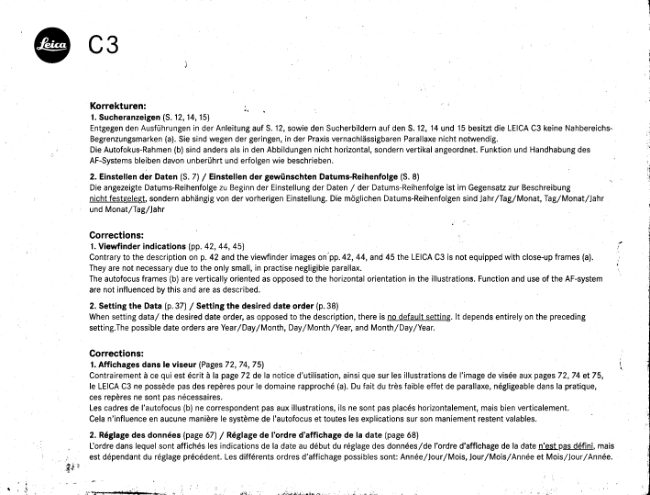
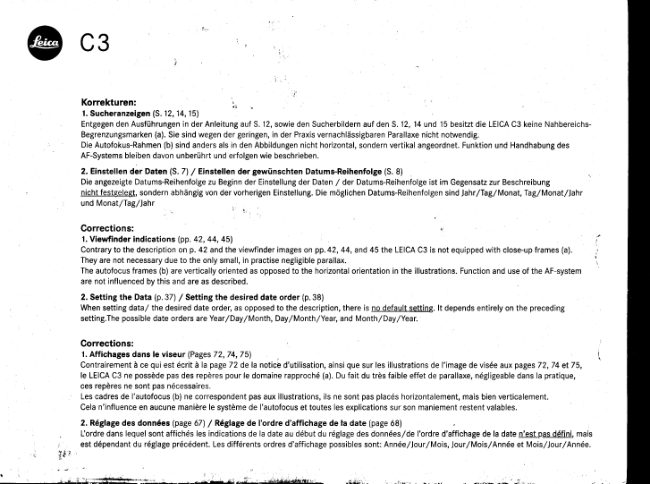
                Korrekturen:                                 ,
                        1. Sucheranzeigen(S. 12,14,151
                  Entgegenden Ausfrihrungenin der Anleitungauf S. 12, sowie den Sucherbildernauf den S. 12, 14 und 15 besitztdie LEICAC3 keine Nahbereichs-
                 Begrenzungsmarken(a). Sie sind wegen der geringen,in der PraxisvernachliissigbarenParallaxenicht notwendig.
                   Die Autofokus-Rahmen(b) sind anders als in den Abbildungennicht horizontal,sondernvertikalangeordnet.Funktionund Handhabungdes
                 AF-Systemsbleibendavon unberiihrt und erfolgenwie beschrieben.
                       2. Einstetlen der Daten (5.7) / Einstellen der gewiinschten Datums-Reihenfolge(S. 8)
                   Die angezeigteDatums-Reihenfolgezu Beginnder Einstellungder Daten / der Datums-Reihenfolgeist im Gegensatzzur Beschreibung
                      nicht festggleg!,sondern abhiingigvon der vorherigenEinstellung.Die moglichenDatums-Reihenfolgensind JahrlTaglMonat, Iag/Monat/Jahr
                   und Monat/fag/lahr

                    Corrections:
                        1. Viewfinder indications (pp. 42, 44, 45\
                   Contraryto the descriptionon p.42 and the viewfinderimages on'pp.42,44, and 45 the LEICAC3 is not equippedwith close-upframes (a).
                 They are not necessarydue to the only small, in practisenegligibleparallax.
                 The autofocusframes (b) are verticallyorientedas opposedto the horizontalorientationin the illustrations.Functionand use ofthe AF-system
                    are not influencedby this and are as described.
                       2. Setting the Data (p.37) / Setting the desired date order (p.38)
               When setting data/ the desireddate order,as opposedto the description,there is no default setting.lt dependsentirelyon the preceding
                    setting.Thepossibledate orders areYear/Day/ Month, Day/Month/Year,and Month/Day/Year.

                     Corrections:
                        1. Affichages dans le viseur (PagesT?,74,75l.
                   Contrairementd ce qui est 6crit d la page 72 dela notice d'utilisation,ainsi que sur les illustrationsde I'imagede vis6e aux pages72,74 et75,
                         le LEICAC3 ne possddepas des repdrespour le domaine rapproch6(a). Du fait du trds faible effet de parallaxe,n6gligeabledans la pratique,
                   ces repdresne sont pas n6cessaires.
                  Les cadresde l'autofocus(b) ne correspondentpas aux illustrations,ils ne sont pas plac6shorizontalement,mais bien verticalement.
                  Cela n'influenceen aucune manidrele systdmede I'autofocuset toutes les explicationssur son maniementrestent valables.
                        2. R6glage des donn6es (page 67) / R6glage de I'ordre d'affichage de la date (page 68)
                     L'ordredans lequelsont affich6s les indicationsde la date au d6but du r6glagedes donn6es/de I'ordred'affichagede la date n'est pas d6fini, mais
                     est d6pendantdu r6glagepr6c6dent.Les diff6rentsordres d'affichagepossiblessont: Ann6e/Jour,/Mois,JourlMois/Ann6e et Mois/Jour,/Ann6e.
             Sri

r , l
View original page 1Page 2 · Read text
! a  i
,4?''
   I     c3;,i @

                 Errata:
                  1.Zoekerindicaties(p.102,104,105)
                       In tegenstellingtot wat te lezenis in de beschrijvingop p. 102 en te zien op de zoekerbeeldenop p. 102, 104 en 105, is de LEICAC3 niet uitgerust
                  met close-upkaders(a). Zijzijn overbodigaangeziende parallaxin de praktijk verwaarloosbaarklein is.
                De autofocuskaders(b) zijn verticaalgeoridnteerd,in tegenstellingtot de afbeeldingenwaarop ze horizontaalgeoridnteerdzijn. De werking en het
                    gebruikvan het autofocussysteemworden hierdoorechter niet beinvloeden verlopenzoals beschreven.
                       2. Instelling van de data (p.97) /  lnstelling van de gewenste volgorde (p.98)
                         ln tegenstellingtot wat vermeldwordt in de beschrijving,is er geen standaardinstellingvoor de datumvolgorde;die hangt gewoon af van de vorige
                       instelling.Erzijn drie datumnotatiesmogelijk:)aar/Dag/Maand,Dag/Maand/Jaar en Maand/Dag/Jaar.

                   Correzione:
                        1. Indicazioni nel mirino (pagine 132, 134, 135)
                   Contrariamentea quanto descrittoa pagina 132 compresole immaginidel mirino nelle pagine 132, 134 e 135, la LEICAC3 non d dotata di cornici
                    per riprese'rawicinate'.Non sono necessariedata la minima ed irrilevanteparallasse.
                  Le cornici dell'autofocus(b) hanno un orientamentoorizzontalein contrastocon le illustrazioni.ll funzionamentoe I'uso del sistemadi messa a
                   fuoco automaticonon sono influenzatida ouesto fatto d sono come descritto.
                        2. L'impostazione della data (p. 127)/ llimpostazione  dell'ordine della data (p. 128)
                   Per I'impostazionedell'ordinedella data completa,al contrariodella descrizione,non c'd una sequenzaobbligata.Le possibilicombinazionisono:
                  anno/ giorno/mese, giorno/mese/anno, e mese/giorn o / anno.

               Correcciones:
                       1. fndicaciones en el visor (pp. 162,164,165)
                   Contrariamentea la descripci6nen lap6g. 162 y las imdgenesdel visor en las p5g. 162,164y 165, la LEICAC3 no estd equipadacon encuadres
                  de aproximaci6n(a). Estosno son necesariosdebido al pequeffoy practicamenteilegibleparalaje.
                  Los encuadresautofocus(b) est5n orientadosverticalmentey no horizontalmentecomo apareceen la ilustraci5n.El uso y funcionesdel
                   sistemaAF no est5n influenciadospor 6sto y son tal cual se describen.
                                                                                                    '158)                        2. Ajuste de fecha (p6g.1571/ Ajuste del orden deseado para la fecha (p59.
               N o h a y u n q j u s t e p o r d e f e c t o p a r a e | o r d e n q u e s e v i s u a | i z a c u a n d o s e p r o c e d e a | a j u s t e d e f e c h a / a | c o n t r a r i o d e | a d e s c r i p c i 6 n , e | o r d e n
                 dependedel riltimo ajuste realizado.Las posibilidadesde orden son: Affo/DialMes,Dia/Mes/Airo, y Mes/DialAfio.                           .Q
                                                                   S
                                                                                                                                                                                                                                                                                                                                                               !5
                         LeicaCameraAG/ Oskar-Barnack-St'a8,e11 / 0-35606Solms/ Telefon+4910\644Z-208-O/ Teletax+49(016442-208-333/ into@leica+amdra.com/ M.leicacamera.com                     3
View original page 2Related documents and language editions
From the M. Butkus archive. Original publisher and archive notices are retained.
Check the model and edition against your equipment.
PDF verified 2026-10-10.