Photography reference
Tamron Adaptall / Adaptall - II Product booklet
Product booklet for Tamron Adaptall / Adaptall - II. 4 pages in English. Read the original PDF, download or print a copy without registration.
4 pagesEnglish0.2 MB PDF
Loading your manual…Open PDF directly
Document details
- Brand
- Tamron
- Model / document
- Tamron Adaptall / Adaptall - II
- Document type
- Product booklet
- Language
- English
- Pages
- 4
- File size
- 0.2 MB
- Category
- Photography reference
- Document date
- Not specified in catalog
Search available document text
Find a term, then jump to its page in the original PDF. Image-only pages may not be searchable; check the PDF for exact wording and diagrams.
Page 1 · Read text
TAIVIRONADAPTALL-2
I NTERCHAT.IGEABLE CUSTOM
  MOUNTS INSTRUCTIONS


       AtrlAPTALL.2
 Be sure to usean appropriateADAPTALL
 2 mount for CANON FD, MTNOLTAMD,
 KONICA AR and CONTAX'respectively
 for the TAMRON new SP/ADAPTALL 2
 lenses.


 The TAMRON ADAPTALL  2 Custom
 Mount attaches simply and securely to
 your TAMRON SP and ADAPTALL 2
 Automatic SLR Lens becomingin effect,
 an  integral part of the lens. With the
 Tamron ADAPTALL  2 Custom Mount
 System,your lenscan tre used with virtual-
 ly all the most popular SLR camerasby
 attachingthe appropriatemount.

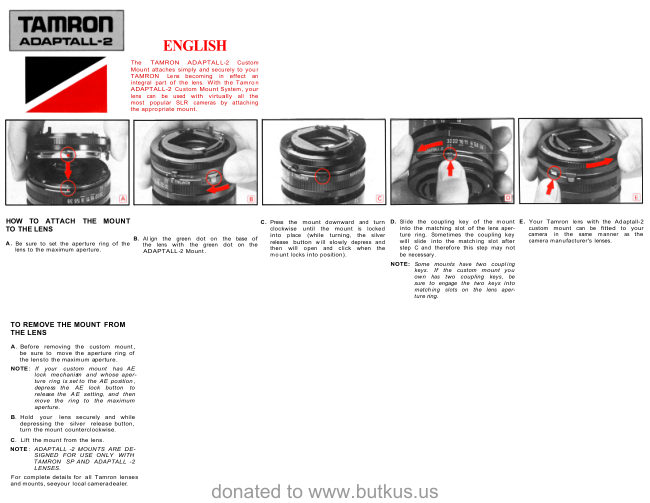
HOW TO ATTACH THE MOUNT TO
THE LENS
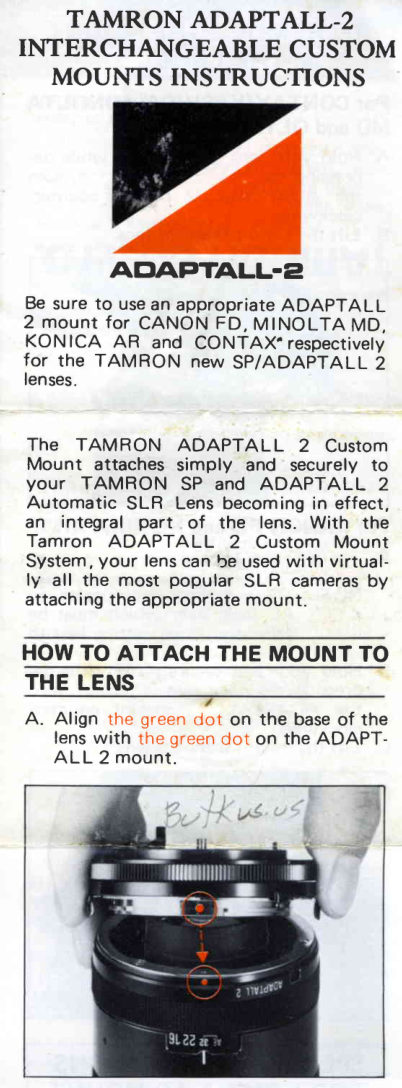
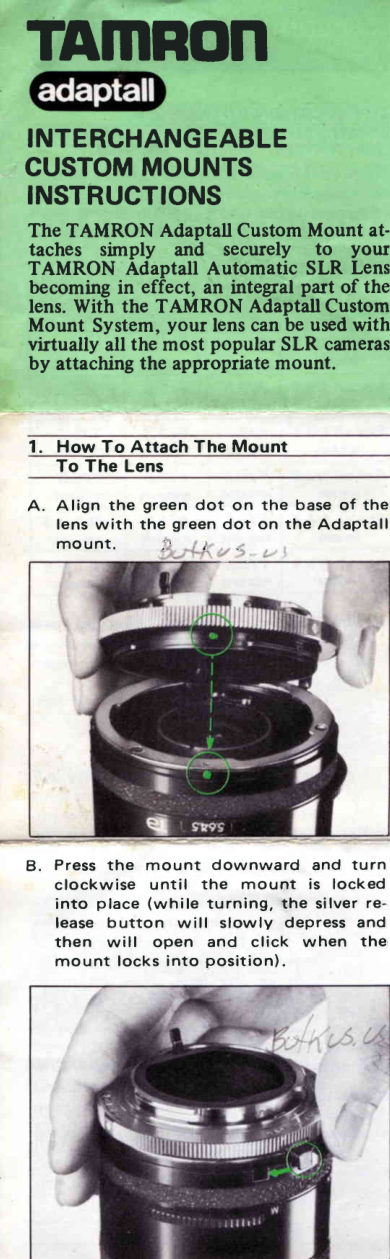
 A. Align the green dot on the base of the
    lens with the green dot on the ADAPT-
   A L L 2 m o u n t .
View original page 1Page 2 · Read text
B. Press the mount downward and turn
   clockwise until the mount is locked
    into place (while turning, the silve
   releasebutton will slowly depressand
   then  will open and click when the
   mount locks into position).


C. Slide the coupling key of the mount
   into the matchingslot of the lensaper
   ture ring Sometimesthe coupling key
    will slide into the matching slot after
   step B and therefore this step may not
   be necessary.


NOTE. The CANON F D and M INOLTA
    MD mounts have two coupling
       keys.

       SN31 :lHI  I |OUJ
 INNOWfHI ]NOru3UOI
View original page 2Page 3 · Read text
TO REMOVETHE MOUNT
 FROMTHE LENS
For CONTAX/YASHICA,Ml NOLTA
MD and OLYMPUSOM
A. Hold your lens securely and while de-
   pressing the silver releasebutton, turn
    the ADAPTALL   2  mount  counter-
   clockwise.
B.  Lift the mount from the lens.


For CANON FD and KONICAAR
A . T h e   l e n s a p e r t u r e r i n g m u s t b e s e t t o
       t h e A E p o s i t i o n .
   NOTE: These mounts incorporate an
        AE  lock  lever which must be
          depressed when  setting lens to
           the AE position.
B. Hold your lens securely and while de-
   pressing the silver release button, turn
   the ADAPTALL   2  mount  counter-
   clockwise.
C.  Lift the mount from the lens.
View original page 3Page 4 · Read text
SPECIALINSTRUCTIONS
  FOR KONICAAR MOUNT
 This ADAPTALL  2 mount requires one
 additional adjustment
 before  it is mounted on the lens.
 A. On the rear of the mount (seediagran
    below) there are two locking screws (l )
   and (21. Loosen these screws with a
    coin by turning counterclockwise.
 B  Slide the knob (3) to align the index
     (4)  with  the corresponding f  value
   w h i l e h o l d i n g t h e   l o c k i n g s c r e w ( 1
    with your f ingers.
 C. Tighten the two locking screws(1) and
    Ql firmlV with a coin.

                @


NOTE: ADAPTALL  2 MOUNTS ARE
      D E S I G N E D  F O R  U S E O N L Y
    W I T H   T A M R O N   S P  A N D
      ADAPTALL   2  LENSES. USE
    W I T H  A N Y  O T H E R  L E N S E S
    W i L L R E S U L T - f N  I N C O R R E C T
     M E T E R C O U P L I N G .
For complete details for  all TAMRON
LENSES AND MOUNTS, see your loca
cameradealer.


Manufacturers   of  lenses for  photographic,
industrial,  laboratory,  video, and scientific
applicat io n s .
TAmROn CO.TLT
17- 1'1,   7-c h o m e ,  T a k i n o g a w a ,   Kita -ru
Tokyo,  J a p a n .
T e l :  ( 0 3 ) 9 1 6 - 0 1 3 1
Cable: "T A M R O N T A I S E   I T O K Y O"
T e l e x : 2 7 2 - 2 2 2 0 T A M R O N
                             Printed  in Japan
                               7 9 0 3 2 0 0 0 0 u
View original page 4Related documents and language editions
TamronPDF
Tamron Adapt-A-Matic Mount another
User manual
9 pages · EnglishRead →
TamronPDF
Tamron Adaptall
Product booklet
4 pages · EnglishRead →
TamronPDF
Tamron Adaptall-II
Product booklet
1 pages · EnglishRead →
TamronPDF
Minolta tamron adaptall 03
User manual
16 pages · German, French, SpanishRead →
TamronPDF
Tamron Adaptall , Deutsch
User manual
24 pages · German, French, Spanish, EnglishRead →
From the M. Butkus archive. Original publisher and archive notices are retained.
Check the model and edition against your equipment.
PDF verified 2026-10-10.