Light meters
SEKONIC Flash Master L-358 User manual
User manual for SEKONIC Flash Master L-358. 41 pages in English. Read the original PDF, download or print a copy without registration.
41 pagesEnglish2.0 MB PDF

Loading your manual…Open PDF directly
Document details
- Brand
- Sekonic
- Model / document
- SEKONIC Flash Master L-358
- Document type
- User manual
- Language
- English
- Pages
- 41
- File size
- 2.0 MB
- Category
- Light meters
- Document date
- Not specified in catalog
Search available document text
Find a term, then jump to its page in the original PDF. Image-only pages may not be searchable; check the PDF for exact wording and diagrams.
Page 2 · Read text
www.orphancameras.com

  SEKOTUIC
    Flash MasterL-358


        OperatingManual


www.orphancameras.com
                                                        l
View original page 2Page 3 · Read text
www.orphancameras.com
                                                  '1':-    Congratulationson your purchatseof a
 SekonicFlash MasterL-358 ExposureMeter.
This meter providesa wide range of functionsthat correspondwith most
manufacturerscamerasettingsin all formats,which will satisfyprofessionalsas
well as seriousenthusiasts.
Its sealedhousingand controlsmake it waterand moistureresistant.
Yes,you can use it in the rain,but it is not an underwatermeter.
Its large LCD displaymakes readingseasy and lightsup automaticallyin dark
surroundings.
In ordernot to crowdthe controls,four functionswhich are less frequentlyused,
are confinedto DIP switches,locatedin the batterycompartment.
Becauseof its many features,the L-358 requiresthis ratherextensivemanual.
But sinceyou will neveruse them all at the same time,once you have learnedall
aboutit, it is simpleand its use will becomesecondnature.
The Zoom MasterL-358has undergoneextensivequalitycontrolsat everystep
of manufacture.Pleaseread this instructionmanualthoroughly,to be able to take
advantageof its many featuresand to obtainthe long servicelife it is designed
for.
Thankyou for your confidencein Sekonic


                                                                                                                                            .ded*i*b!'Lh                       .          -=*lh,:
View original page 3Page 6 · Read text
www.orphancameras.com
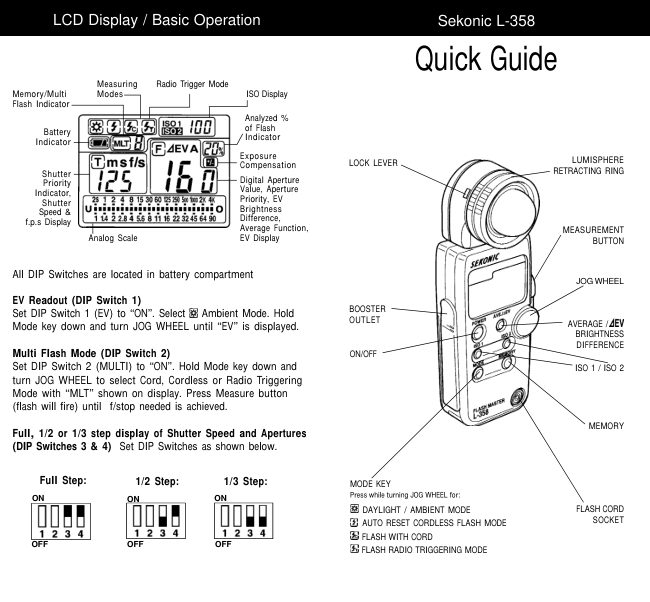
2. Explanationof the LiquidCrystalDisplay


             @tEVA
       Emsf/s
       lr'5      Il                                                                                                                                l  l  r  l  t       15I   t   l 3060r125250500looo2K4K
          U rI  t rr  I rl r r r r r r   r tl   lll l l r   riririririri  g
              11.422.845.68 11ia izs2+t oaglo


      NOTE:
            For explanationpurposes,the displayillustratedhere shows all icons and readouts
            simultaneously.Actualdisplaywill nevershow as above'


Auto Electro-LuminescentDisplay(EL)
     In low light(EV 6 or less),a greenbacklightwill automaticallyilluminatethe entireLCD.When using
    the Minilight Receptoror a Booster(optionalaccessories)the LCD will be illuminatedaftermeasuring,
    regardlessof the ambientlightlevel.
     fn-e ICO will not be automaticallyilluminatedduringmeasuring,or in CordlessFlashmode.
    The Electro-luminescentbacklightwill automaticallyturn off 20 secondsafter last operation.
   When usingthe spot viewfinderattachment(1",5"or1O'NPFinder)if the lightlevelf rom the spot
    measurementis differentfrom the light levelwhen readingthe LCD data,thebacklightmay not
     illuminatethe display.
     In this case,coverthe spot viewfinderattachmentwithyour handwhilepressingthe mode buttonto
     activatethe backlight.


 '2-
        a,xn'*k**li*&,;&.                                      *giu;-*r.           -.*-*ft;s;  -;xe*@Ceg.
View original page 6Page 7 · Read text
www.orphancameras.com
                    2. Explanationof the LiquidCrystalDisplay
e  MeasuringMode lcons
    A       Ambient(seepage 11)
  @       Auto-ResetCordlessFlash(see page 17)
  @      Cord Flash(see page 15)
   @t      Wirelessflash radiotriggeringmode (see page 30)
 (   ISO Display
    ISO 1    DisplaysISO fitm setting
     IFliFI     Displayssecond ISO film settingwhen ISO 2 button is depressed
 rilv   FlashAnalyzingindicator
   %       0 "/" to 100% in 1o7oincrements(percentageof flash in the totalexposure)

@  +/- CompensationIndicator
   E       Appearswhen +/- Compensationis set
 rv F \  Digitalaperturevalue,Aperture Priority,EV BrightnessDifference,Averagefunction,EV display
   E       Appears when in Aperture Priority(f/stop)mode (see page 12)
    lEV     Appearswhen usingbrightnessdifferencefunction(See page 25)
   A       Appearswhen usingAveragingfunction(see page 24)
   EV      Appearswhen using EV mode (see page 13)

    AnalogScale
    Displaysmarks at aperturesor shutterspeed indicatingfull or half step valuesfor measurement,
    memory,averagevalues
   U      Appearswhen belowdisplayrange
       ,ii:       Blinkswhen underexposedbelowmeasurementrange
            Appears when above display range    .9_
     ,9.       Blinkswhen over exposedabove measurementrange
@  Shutterpriorityindicator,shutterspeed displayfor still photographyor frames per second (f/s)for
    cinematography
   E       Appearswhen in Shutter priority (T) mode (see page 1 1)
  m       Appearswhen shutterspeed is in minutes
   S       Appearswhen shutterspeed is in full seconds
     f/s      Appearswhen cine speed is set in framesper second(see page 14)

v    BatteryPower Indicator(see page 4)

   Memory/ MultipleFlashIndicatorDisplay
  @  I     Appearswhen in Multi (cumulative)flash measurement mode and shows the cumutated
          number(seepage 19)
    u   t     Appears when readingis memorizedand shows the number in memory (see page 23)


                                                                                               -3-
                                                                            ..ll*iJ                  ."uieiiliroEe
View original page 7Page 8 · Read text
www.orphancameras.com
3. BeforeUsing

1.  Attach the strap
        Attachthe Strap@ by passingthe small end loop throughthe
        eyelet@ and passingthe otherend of strapthroughit.


  A wnnrutruo
                      .  Please olace in a location where an infant cannot reach and accidentally get the strap
           wrappedaroundhis neck.There is dangerof strangulation.

2.  Inserting the battery         ''|.        Requiresone 3.0 v CR123Alithiumbattery
     2. Open the Batterycompartmentcover latch @, and re-
      movethe Batterycompartmentcover to.
      3.  Insertthe battery,observingthe polaritywith the +,- marks
          in the batterychamber.
      4.  Align the tabs of the Batterycompartmentcover with the
        notchesin the backof the meter,and pressdown to close
        the Batterycoverlatch.

   NOTE:
         @rsea|,becarefu|thatdirtdoesnotgetstuckontherubber
             seal and that the seal is not damaged.
                    .  Remove battery if meter is not used for an extendedperiod. Batteriescan leak and
          damagethe exposuremeter.Disposeof used batteriesproperly.
                        lf the 1CD does not light,checkthat the batterycapacityis sufficient,and checkthat the
              battery positiveand negativeterminalsare not reversed.
                    .  The meter has a connectorfor a plug-inradiotransmittermodule.Donot removethe
            connectorcover unlessyou are installingthe radiomodule,failureto do so couldcause
             the electroniccircuitboardto be exposedto damagingstaticelectricity.

 3.  Checking battery caPacitY
         .  When the Powerbutton@ is ON, the batterypowerindicatoron the LCD is displayed.
       E       (Displayed) Batterypower level is good.
      G       (Displayed) Battery power level is low.Have a spare battery ready'
                  (Blinking)  Replacebatteryimmediately'
         ;F

      Reference:
                        . We recommendyou alwayshavea sparebatteryon hand.
                         .   lf the liquidcrystaldisplayextinguishesimmediatelyafterthe displayappearswhen power
                    is firstapplied,that is an indicationthat the batteryis dead. Pleasepromptlyreplacethe
                 battery.
                         . A 3 second pause betweenpower on and off is recommendedto avoid damageto the
               meIer.


 -4-
      i*i98dr&*dr      S*d*";                                                                                                         .r*-dii'.ei6#!*.
View original page 8Page 9 · Read text
www.orphancameras.com
                                                3. BeforeUsing
 4.  Replacingbattery during measurementor when using the memory function
     1.  Alwaysturn the powerOFF beforereplacingbatteries.lf batteriesare removedwith the power
       ON, measurementsand settingsin memorycan no longerbe recalled.
     2.    lf after replacingthe battery,or during measurements,strangescreens (displaysthat have not
       beenset) appearin the LCD,or nothinghappens,no matterwhat buttonis pushed,removethe
         battery and wait at least ten seconds and then replacethe battery.This allowsthe softwareto
         automaticallyreset.
   A wnnNrrue'
                             '  Neverplacebatteriesin fire,short,disassemble,or heatthem.The batteriesmiqhtbreak
           down,and causean accident,injuryor pollutethe environment.

 5.  Auto Power Off function
     1.  To conservebattery power,the meter will turn off about twenty minutesafter last use.
     2'  Whetherthe Auto PowerSavingfeatureturns the poweroff or the Powerbutton@ is pressed,
        the settingsand measuredvalues remainstored in memory.When the power buttonis pressed
        againthe last settingsare displayed.

      Reference:
                   ' The powershutsoff automaticallyafter 1 minutewhen the powerbuttonis pressedand held.
6.  Setting main ISO film speed
     1.  Hold down the lSOl buttonO and turn Jog wheel @
         to selectISO film speedfor the film beingused.
     2.  You can also change the ISO film speed after taking
      measurements.The new value is automaticallv
        displayed.


7.  Setting second ISO fitm speed
    1.  This featureis usefulwhen usinga secondfilm with
         differentISOfilm speed,usingpolaroidrMproofingfilm,
        or for exposurecorrection(when using a filter,close-
       up photography,etc.).
    2.  Hold down the ISO 2 button@ anOturn Jog wheelto
        selectISO film speedof the film beingused.
    3.  Oncethis is set,aftertakinga measurement,the mea-
       suredvaluefor the secondfilm speedwill be displayed
      when the ISO 2 buttonis depressed.
    4.  You can also change the second ISO film speed after taking
       measurements.The new value is automaticallydisplayed.


                                                                                                             -5-
                                                                                                                                  .:-;r!,-     ,;d!..-    .,       +*Ar;:.i
View original page 9Page 10 · Read text
www.orphancameras.com

3. BeforeUsing

8.  MesurementLock and MeasurementLock Off
     1. Holddown the Modeset button(D and lSOl buttonO
       and "LOC"will appearto indicatethat the settingsare
       locked.Thelast measurementis held untilthe lock is
        released,even if the Jog wheel @ is accidentally
       moveo.
        However,ifthe measurementbutton@ is pressed,a
      new measurementis displayedwith the same locked
         settings.

                                                           I
      2. To releasethe Measurementlock, performthe same
        operationfor the Measurementlock, Hold down the
      Mode set and lSOl buttonand "Off"will appearto in-
         dicatethat the Measurementlock is released'


       Reference:
              .   lf the powersupplyis OFF or Auto OFF when in the lockedposition,the dial lockfunctionwill
         continueoperatingwhenthe powersupplyis turnedon again'


  -6-
           alw..         .".,*EB&;i***m"
View original page 10Page 11 · Read text
www.orphancameras.com

                                             4. BasicOperation
1.  Setting measuring mode

    1.  Hold down the Mode set button@ anOturn the Jog wheel
    @ to selectthe desiredmode.The modeswitchingsequence
          is shown in the charl below:


             Shutterspeed priority                        WirelessMultipleFlash       with Radio
          mode (Ambientlight)                       RadioTriggeringmode       transmittermodule
            See page 1.1                          See page 30                                                                                Dip switch2


             Aperture Prioritymode                       WirelessFlash Radio        with Radio
            (Ambientlight)                               Triggeringmode             transmittermodule
           See page 12                           See page 30


                                                    WirelessFlashRadio        with Radio
                          i  See page 13                                                                  I                    Triggeringsettingmode       transmittermodule
                                                                                     i Dip switch 1       See page 28


                                                                                Dip switch2


                         i CordlessMultipleFtash      I
                         i (cumulative)mode
                    I  See page 21

   2.  Modesenclosedin dottedlinesi-___-icanonly be selectedwhen the respectiveDlp switchis in
    ON position(see page 8).
   3.  Modes enclosedin l-l    lines can only be selectedwhen OptionalRadioTransmitterModuleis       installed.


                                                                        'E1
View original page 11Page 12 · Read text
www.orphancameras.com

4. BasicOperation

2.  Setting DIP Switches
     1.  Switcfresfor settingmodesthat are used infrequentlyare housedin the Batterycompartmentof
        the meter.Selectthe mode you want priorto beginningmeasurements'
     2.  The DIP switchescan be set by slidingthe DIP switch@ for the mode you want to select in the
     ON position.

     *  EV settings
      When DIP switch1 is turnedon, EV exposurereadingis possible(ambientlight)

      *   Multisettings
      When DIP switch2 is turnedon, multipleflash (cumulative)mode is possible.

      *   Direct settings
                lf DIP switch3 is on, it is possibleto displaythe shutterspeed and Aperturein the stop that are         set by DIP switch4.                                                                                                           It
               lf turnedoff,shutterspeed is displayedin full stop and the Apertureis displayedin 1/10stop.

      *   Stop settings
       The combinationof shutterspeedand Apertureis displayedin 1/2
        stoo when DIP switch4 is off and in 1/3 stop when it is on.


             T: full stop                  T: 1/2 stop               T : 1/3 stop
             F: 1/10stop                 F: 1/2stop               F : 1/3 stop


 '8'
       **r**.d&i*a&d&i,,                                                    *i**i&&sied!a;r+.r-.i           :,:.!-,*,             .,*ld-*t    .":jei*.fi:$M&e:-
View original page 12Page 13 · Read text
www.orphancameras.com

                                              4. Basic Operation
3.  When set for incident light        'l
         .  Incidentlight measurementscan be performedwith the lumispherefully extendedor in the
        retractedposition.Youcan switchbetweenLumispherein the up positionor retractedposition
       bv firmlyrotatingthe Lumisphereretractingring O untilit clicks.
      ^


                   Lumisphere                      RetractedLumisphere

     When the Lumisphereis raised
       This is used to photographpeople,buildings,and otherthree dimensionalobjects.
      Measurementsare basicallymade by the methodof measuringwith the lumisphereaimed in
       the cameradirection(moreprecisely,in the directionof the lightixis of the lensj at the position
        of the subject.

      When the Lumisphereis lowered(flat diffuserfunction)
       This is used to photographmanuscripts,paintingsor other flat copy.lt can also be used for
      measuringilluminationlevels(see page 25), or brightnessdifference(see page 23).


   NOTE:
                       lf the device is used with the Lumisphereretractingring in a middle position,OistriOuteO
              lightqualitywill change,and suitablemeasurementscannotbe made
                                         t  Do not push the Lumispheredown manually.
                     a    lf the lumispherebecomessoiled,wipe it with a soft,dry cloth. organic solutions(paint
             thinner,benzene,etc.) must not be used underany circumstances.


                                                                     &,     : *.;;-*:isii$ii!l*iiLl,.;u**;l*,***#t*                      oMaN*,^:*e,.*-^.-                   d$iE*!  il
View original page 13Page 14 · Read text
www.orphancameras.com

4. BasicOperation

4.  When set for reflected light
       .   This methodmeasuresthe brightness(luminance)of the light reflectedfrom the subject.lt is
        usefulfor distantobjectssuch as landscapes,when you cannotgo to the positionof the subject,
        or for meteringsubjectsthat generatelight (neonsigns,etc.),highlyreflectivesurfacesor
        translucentsubjects(stainedglass,etc.)'

    < Usingthe lumigrid> (ReceivingAngle 54')
     1.  Removethe LumisPhere
       The lumisphereunit is removedby holdingboththe
       upperand lowersectionsof Lumisphereretracting
         ringO and turningit counterclockwisewhilepushing
         the Lock lever @ downward.

     2.  Mountthe lumigrid
       To mount Lumigrid@, align the mount/removal
         indicatoron the Lumigridwiththe  markand,while
        pressingit, turn it in the clockvGe directionand
        secure it in place by raisingthe Lock lever until it
         clicksinto place.


     3.  Take measurementsby aimingthe lumigridpreciselyat the area of the subjectto be measured
        from the oositionor directionof the camera.
     4.  Followthe same procedureto mountthe lumisphere.
 A cnurtoru'
                                treceivingsectionwhenmountingorremovingthe|umisphere
          or lumigrid.

    < Usingthe viewfinder> 1o,5o and 10" Non-Parallaxspot-Finder(NP finder)
        Thl Non-ParallaxSpot-Findermountedon the meter,measuresthe lightof the exactarea you
        are viewing.Sincethe Spot-finderis measuringthe reflectedlight (light reflectingoff a
        subject),measurementsshouldbe takenat the cameraposition.


 -10'  g&*r,gffi**greind,-
View original page 14Page 15 · Read text
www.orphancameras.com
                                               5. Measurement

1.  Measuringambient light
    In this measurementmode,we have the choiceof shutterprioritymode,apertureprioritymode and
   EV mode.Holddown the Modeset button@anOturnthe Jog wheel@to selectambientmeasurement
   modeS.
    1-1 Shutter Speed Priority mode                             SEKONIC
                                                                                       rra      --------ll )         1.  Hold down the Mode set buttonand turn the Jog
           wheel to select ShutterSpeed Prioritymode f,.                                                                                       I                                                                         nl?5          ll
                                             LJ

        2.  Turn the Jog wheel to set the desired shutter
           speed.                                                                     )


        3.  Press the Measuring button @ to make a
          measurement.Releasethe Measuringbuttonto       Set shuttersoeed
          completethe measurement.The measuredvalue
            (aperturevalue)at that time will be displayed.                 Measuredf stoo value

           While pressingthe Measuringbutton,the meter
          measurescontinuouslvuntilit is released.
   NOTE:                    Tis ra.fl-.r
                  .  The LCD paneldisplays1/10stoponlywhen Dip             1 1.122.84 5J 811 t62232156490
            switches3 and 4 are in off oosition.


    Reference:
                   .  ft is possibleto switch between tull, 1/2 and 1/3 shutter speed stop by setting DIP
            switches3 and 4.
                   . Youcan set shutterspeedsfrom 30 minutesto 1/8000 seconds. After 1/8000 the shutter
           speedsof 1/200and 1/400can be set.
             After measurement,the F stop value correspondingto the shutterspeed is displayed
          when the shutterspeed is changed.
          The measuredaperturevalue is displayedeitherfull or half stop incrementson the
           analogscale.(1/3stop incrementsis not possible.)
             "E.u"(Exposureunder)or "E.o"(Exposureover)appearswhenthe combinationof shutter
           speedand apertureare outsidethe displayrange.Changingthe shutterspeedor aperture
             with the Jog wheelwill allowyou to find a combinationthat is possible.
                     lf the "E.u" or "E.o" readoutblinks,this indicatesthat the light level is beyondthe
          measurementrangeof the lightmeter.Adjusta lightingin this case.


                                                                                                                                   - 11 -
                                                                                          .. -""&a-
View original page 15Page 16 · Read text
www.orphancameras.com
    5. Measurement

         1-2  Aperture Priority mode

                1. Holddownthe Modeset button@ and turnthe Jog wheel
         @ to selectapertureprioritymode E.
                2. Turn the Jog wheel to set the desiredf stop
                 value.
                                                                                               )

til

               3. Pressthe Measuringbutton@  to make a                 Set J stop value
               measurement.
                Releasethe Measuringbuttonto completethe
              measurement.The measuredvalue (shutter
               speed)at the time will be displayed.                          T  f                              t            t
               While pressingthe Measuringbutton,the    1fi25 1 2 4 8 153060U525050fr2X4Xl.h:
              meter measures continuouslvuntil it is
                  released.
                                                          Measured


         Reference:
                              .   lt is possibleto switch betweenfull,1/2or 1/3 F stop values by settingDIP switches3 and
                    4.
                              . You can set f stops from F1.0 to F90 (full f stops)
                              . The measuredshutterspeedvalue is displayedeitherfull or half stop incrementson the
                analogscale.(1/3stop incrementsis not possible.)
                              . Aftermeasurement,the shutterspeedcorrespondingto the F stop is displayedwhen the
               F stop is changed.


             Me*                                     ,e$e*,wecs"**-*-a;E"r;@&
View original page 16Page 17 · Read text
www.orphancameras.com
                                               5. Measurement

    1-3 EV mode
       Open the Batterycompartmentcover @ and slide the EV DIP switch (see page 8) to the ON
         position.

          1. Hold down the Mode set button @ and turn the
          Jog wheel@ to selectEV value mode.


        2 . P r e s s t h e M e a s u r i n gb u t t o n @ t o m a k e a           Shuttersoeed
          measurement.Releasethe Measuringbuttonto
           completethe measurement.The measuredvalue
          (EV value)at that time will be disptayed.
                                                                             EV
           At the same time, the shutter speed will be           T          ,i,          displayedin the digitaldisptayarea, and the        It?5   r Lr.:j
           correspondingf stopwill be displayedin the analog
            displayarea.                                                                                                                                                                      l 1 4 2 ,.Jouo u rrroj

           While pressingthe measuringbutton,the meter
          measurescontinuouslvuntil it is released.


Reference:
                  '  "E.u" (Exposureunder) or "E.o" (Exposureover) appears when the combinationof shutter
       speedand apertureare outsidethe displayrange.Changingthe shutterspeed or aperrure
         with the Jog wheel will allowyou to find a combinationthat is possible.
                lf the "E.u"or "E.o" readoutblinks,this indicatesthat the lightlevelis beyondthe measurement
        range of the light meter.


                                                                                 -13-
View original page 17Page 18 · Read text
www.orphancameras.com
    5. Measurement

         1-4 Cinematography
             1 . Holddown the Modeset button@ and turn the Jog wheel
         @ to select ambientlight shutter speed prioritymode
        E
ilt


                Turnthe Jog wheel@ to selectthe Cine Speedfor thelnt,'         camerathatwill be used.Cine Speedare displayedafter              1
                 1/8000,1l2OO,1l4OOand the unitis in framesper second
                       (f/s).The followingCine Speedswill display:
                    2, 3, 4, 6, 8, 12, 16, 18,24, 25,30,32, 36, 40, 48, 50, 60,
                64,72,96,120,128,150,200,240,256,300and 360
                        f/s.
                                                                                                                                                                   l
                3. The shutterangle that these speeds are based on, Is
               180 degrees.For other anglesmake the followingISO
                    film soeedcorrections.

                                     Amountof ISOfilm
                     Shutteropen angle       speedcorrection
                       160 degrees              -1/3

                    220 degrees              +1/3

                    * Exampleof correctionvalue
               -113:DecreaseISO film speed by 1/3 stop,example:ISO 100 -113stop = ISO 80
               +1/3: Increaselso film speed by 1/3 stop,example:lso 100 +1/3 stop = lso 125
                4. Press the Measuring button @ to make a             Measuredf stop value
                measurement.Releasethe Measuringbuttonto
                completethe measurement.The measuredvalue
                            (f stop value)will be disPlaYed.
                 While pressingthe measuringbutton,the meter       ,1.
                measurescontinuouslyuntilit is released.
                                                                                                                                                                                                                                                                                    i i4 2 2.s4b.6I 11t6 2232456490

                                                                     Measuredf stop on analogdisplay#                                                                     Set shutterspeed

       Reference:
                         . The measuredaperturevalue is displayedeitherfull or half stop incrementson the analogi$rti            scale.(1/3stop incrementsis not possible.)


                                                                                        n.giri1&Eo*lni"J"dffi&s.
View original page 18Page 19 · Read text
www.orphancameras.com
                                               5. Measurement

 2.  Measuringflash light
    This methodof measurementcan be done in the followingmodes;with cord,withoutcord,multiple
     flashwith cord, multipleflash withoutcord and Wirelessflash radiotriggeringmode (withoptional
     radiotransmittermodule).When Measuringflash light,the shutterspeed and F stop value (value
    combiningambientlightand flashlight:totalamountof light)are displayed.Theambientlightand
    flash lightare each displayedas separatevaluestogetherwith the total amountof lighton the
    analogscale. In addition,the ratioof llash lightto the total amountof lightis displayedat that time
    as a value in 10"k steps.Theflash readingis displayedas a blinkingmarkabovethe analogscale.(See
    page 27 for details)

    2-1 Cord Flash mode
        The most positivemethodto assure proper synchronizationand measurementof flash units.
        Connectthe meterto the flashwith a synchronizationcord. Be sure to replaceSynchro termi-
         nal cap @ after your measurement.

          1. Connectthe flash synchrocord to the Synchro
            terminal@ on the exposuremeter.


                                                                                                                                                                                                  i .  i  l ) 6 j r t _

         2. Hold down the Mode set button @ and turn the
           Jog wheel@ to selectcord flash mode @.

          3. Turn the Jog wheel to set shutterspeed.When
             settingshutter speed, first check the settingsto
            confirmthat they correspondto the settingson the
           camera.


                                                                   Measuredf stoo value
          4. Pressthe Measuringbutton@ to triggerthe flash.                      exposureof flash in
          The measuredvalue(f stop value)will be displayed.


                                                                                   1/10
                                                                                                                                                                                   f stop                        ?,1:H..[li
                                                                                                                                           ',rnr r.rot*il, rrrrrrrr
                                                                                                                                  ",

                                                                 measured f stop value
                                                                                               (totalexposure)


                                                                                 -15-
,.-'!.,.i-;..***h,-                *{,B}It{ffis*                           *@g**r"          'r;;;,.;;#:s$;*rd{i   ,.
View original page 19Page 20 · Read text
www.orphancameras.com

   5. Measurement
    A cnurtoru,
                                a  There is dangerof electricshock if the meteris handledwith wet hands,duringrain,in
                 areassplashedby water or where there is a lot of moisture,if you use cord synchronized
                   flash.
               Undersuch conditions,it is recommendedthat you use the meterin the cordlessflash
             mode or wirelessflash radio triggeringmode, and keep the Synchroterminalcap in
                 prace.       NOTE:                                                                                        iiE                                                                                                                                                                                                                                                     lr,.,
               The electronicflash unit may fire when you connectthe Synchrocord or operatethe                           l
           POWERSwitch.                                                                                                                                                                                                                           i
                                 a  For flash unitswith extremelylow electrictriggervoltage,the flash may not fire' In this
                 case,make measurementsin the cordlessflash modeor wirelessflash radiotriggering
               mode.

         Reference:
                              .   lt is possibleto switch between lull,1/2 and 1i3 shutter speed stop by setting DIP switch
                 3 and 4.
                              . The shutterspeedcan be set f rom 30 minutesto 1/1000 of a second.After 1/1000sec, the
           m e t e r c a n b e s e t a t  t h e  f o l l o w i n g i n t e r m e d i a t es p e e d s : 1 1 7 5 , 1 / 8 0 ,
                  1/90.1/100,11200,or 11400.
                              .   lf the film speed is changedafter the measurementis taken,the new convertedmeasured
                 value (f stop value)will be displayed.
                              . After measurement,the F stop value correspondingto the shutterspeed is displayed
              when the shuttersPeedis changed.
                              . ,,E.u"(Exposureunder)or "E.o"(Exposureover)appearswhen the combinationof shutter
               speedand apertureare outsidethe displayrange.Changethe shutterspeedwiththe Jog
                wheel and take measurementsagain.
                              .  lf the "E.u" or "E.o" readoutblinks,this indicatesthat the light level is beyond the
               measurementrangeof the lightmeter.

          2-2  Auto-reset cordless flash mode
            Measurementsare made by the meter receivingthe lightfrom the flash.This measurement
           mode is used when the Synchrocord will not reach becauseof the distancebetweenthe flash
            and meteror when use of the Synchrocord is inconvenient'
                 1. Hold down the Mode set button @ and turn the
                Jog wheel 6t to set Auto-resetCordless Flash
             modeE.


                 2.  TurntheJog wheel to set shutter speed.When
                   settingshutterspeed, first check the settingsto
                 confirm that they correspondto the settings
                  availableon the camera.


It'

        -1S
                        ;;.;.*                 r.sfi*.e:o-                                                                             ,;.ir*r8E8Er".
View original page 20Page 21 · Read text
www.orphancameras.com
                                                5. Measurement

          3. When the Measuringbutton@ is pressed,the
         mode mark @ will blink and the meter is readyto
           measure.Thereadyto measuremodewillcontinue
               for approximatelyg0 seconds.
         D u r i n gt h i s t i m e , f i r e t h e f l a s h a n d m a k e a
           measurement.


                                                                      Set shutter speed
                                                                    Measuredf stop value
           4.   lf the 90 secondperiodis exceededand the blinking                                    of flash in
          mark stops, pressthe Measuringbuttonagain to                       exposure
             returnto readyto measure.
                                  j,lE          5. When the light from the flash is received, the        5.r,I
          measuredvalue (f stop) is displayed.Even after                   .1 1r. 2. 2.6. r 4. 5q. : lI- 11t62232156190
           measurement,the modemark@ continuesto blink
           a n d  t h e m e t e r  i s  i n  r e a d y s t a t e a n d n e w
          measurementcan be made. (Auto-resetfunction)           (totalexposure)


NOTES:
              a When firinga flash,if the flash brightnessis 9EV lowerthan the ambientlight,the meter
       may fail to detectthe light.In this case, make measurementsusingthe Cord flashmode.
              a  Rapidstartfluorescentlampsand speciallightingare sometimesmistakenfor flash,and
         accidentallymeasured.In this case, make measurementsusingthe Cord flash mode.


Reference:
                   '  After measurement,the F stop value correspondingto the shutter speed is displayedwhen
         the shutterspeed is changed.
                   '  Settingthe shutterspeed is similarto the previousinstruction(see page 15) of "Cordflash
       mode"of section2-1.
                   ' A new convertedvalue is displayedwhen the film speed is changed after taking the
        measurement.
                   '  Readingsoutsidethe displayrangeor beyondthe measuringrangeare similarto the previous
          instruction(see page 16) of "CordFlashmode"of section2-1.


                                                                              -17-
                                   -j*"'                 -d*riema*.                    , -=d.*j*    -         ;i$ii@;,,i.;,,             w6":,,.':.".;:'*-;"".
View original page 21Page 23 · Read text
www.orphancameras.com
                                              5. Measurement
A cnurroru,
           .  There is dangerof electricshock if the meter is handledwith wet hands,during rain, in
        areassplashedby wateror where there is a lot of moisture.
       Under such conditions,it is recommendedthat you use the meter in the Cordlessflash
       modeor wirelessflashradiotriggeringmode,and keepthe Synchroterminalcap in place.

NOTE:
       The flash unit may flash when you connectthe synchrocord or operatethe POWERswitch.
      When firinga flash to take measurements,check the camera'ssynchronizingrangeand
         set the propershutterspeed.
             a  For flash unitswith low electrictriggervoltage,the flash may not fire. In this case, make
       measurementsin Cordlessflash mode or wirelessflash radiotriggeringmode (see page
          21).


Reference:
                  '  Settingthe shutterspeed is similarto the previousinstruction(see page 15) .
                  ' Readingsoutsidethe displayrangeor beyondthe measuringrangeis similarto the previous                              '16)         instruction(see page       .
                  '   lf the film speed is changedafter the measurementis taken, the new convertedmeasured
        value (f stop value)will be displayed.


    2-4 Cordless flash (cumulative)mode
       Thesemeasurementsare usedwhen the lightgeneratedby the flashis inadequatefor proper
        exposure.The repeatedflashpops can be accumulateduntilthe desiredapertureis displayed.
       The cumulativenumberis infinite.Onlyone digitis displayedif the cumulativenumberis ten or           '
        more.Displayreturns0 (0=10,1=11,2=12elc.)

          1. Slide DIP switch2 to MULTI(see page 8) to the
        ON position.

          2. Hold down the Mode set button@ and turn the
          Jog wheel @ to selectcordlessmultipleflash
            (cumulative)mode E @.
           Turn the Jog wheel to set shutterspeed.When
            settingshutterspeed,firstchangethe settingsto
           confirm that they correspondto the settings
            availableon the camera.


                                                                                    -19-
                                                r;,i,     .inrjsl&id65i.l;:,                                      ,                            ,,.'.l,;&&              ..
View original page 23Page 25 · Read text
www.orphancameras.com
                                        6. AdvancedFunctions

1.  Memory function
    This meter can store up to nine measuredvalues in memory.This featurecan be used in the follow-
    ing modes:ambientlight(shutterspeed priority,aperturepriorityand EV),flash (with,withoutcord
   and wirelessflash radiotriggering).

     1.  Pressthe Measuringbutton@ and take a measure-
       ment.

     2.  Pressthe MemorybuttonO and storethe measured
       value in memory.
      The numberof values in memory is displayedon
        the LCD.The memorizedvalue is displayedon the
       analogscale.By repeatingthis operation,up to nine
        values can be stored in memorv.


    3.  Memorycan be clearedby holdingdown MODE set
        button@ and ISO 2 button@ or changingmea-
       surementmode.

    4.  Memory Recall
      Whenthe Jog wheel@ is rotatedwhileboth Memory
        button@ and the Mode set button@ are held down
        together,the measuredvaluestoredin the memory
          is displayedalongwith the memorynumber.When       any previousstoredvalue is recalledwith the ex-    s  ll-t
        ceptionof the last storedvalue,the "M" and number                       5.6| 11rt 22324s6490
          will blink.


   NOTE:
                   .  The memoryfunctioncannotbe used in "flashcumulativemode."
                   .  Measuredvaluesfor ten times and overwill be displayedbut cannotbe storedin memory.


                                                                                -21
   -.. *d*r,*a**,                                                                        -xe#tl**-.'nr:-*.*                              -!:.'-^,:"*ui
View original page 25Related documents and language editions
SekonicPDF
Sekonic the quick guide
Quick start guide
2 pages · EnglishRead →
SekonicPDF
Sekonic Flash Master L-358
User manual
42 pages · FrenchRead →
SekonicPDF
Sekonic Flash Master L-358
User manual
39 pages · GermanRead →
SekonicPDF
Sekonic Flash Master L-358
User manual
41 pages · ItalianRead →
SekonicPDF
Sekonic Flash Master L-358
User manual
41 pages · SpanishRead →
From the M. Butkus archive. Original publisher and archive notices are retained.
Check the model and edition against your equipment.
PDF verified 2026-10-10.