Film cameras
Polaroid 108 film information User manual
User manual for Polaroid 108 film information. 5 pages in English. Read the original PDF, download or print a copy without registration.
5 pagesEnglish1.3 MB PDF
Loading your manual…Open PDF directly
Document details
- Brand
- Polaroid
- Model / document
- Polaroid 108 film information
- Document type
- User manual
- Language
- English
- Pages
- 5
- File size
- 1.3 MB
- Category
- Film cameras
- Document date
- Not specified in catalog
Search available document text
Find a term, then jump to its page in the original PDF. Image-only pages may not be searchable; check the PDF for exact wording and diagrams.
Page 2 · Read text
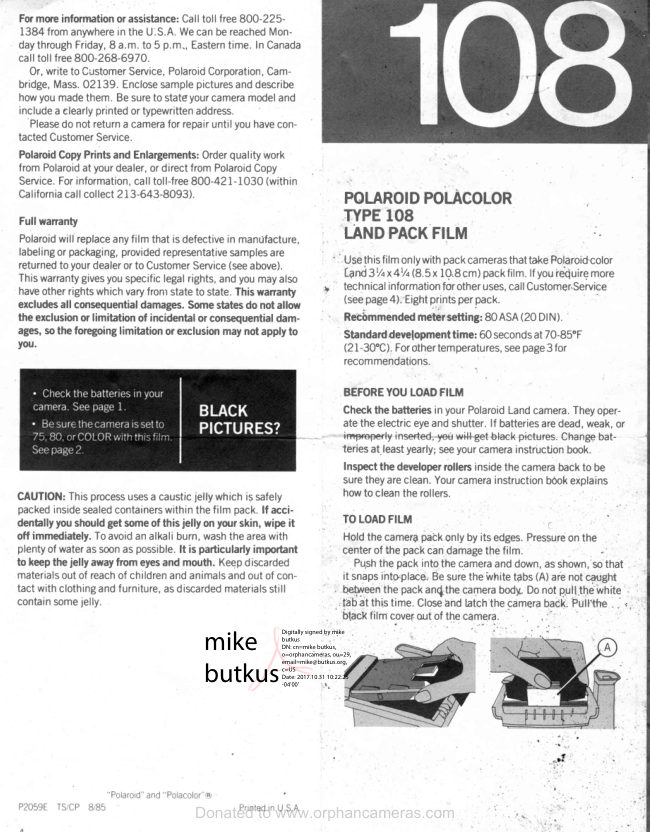
For more information or assistance:Call toll free 8OO-225-
1384 from anywherein the U:S.A.We can be reachedMon-
daythroughFriday,8 a.m. to 5 p.m., Easterntime. In Canada
call tol I free 800-268-697 O.
  Or, writeto CustomerService,PolaroidCorporation,Cam-
bridge,Mass.02139. Enclosesamplepicturesand describe
how you madethem. Be sureto stateyourcameramodeland
includea elearlyprintedor typewrittenaddress.
  Pleasedo not returna camerafor repairuntil you havecon-
tactedCustomerService.
PolaroidCopyPrints and Enlargements:Orderquality work
from Polaroidat yourdealer,or direct from PolaroidCopy
Service.For information,call toll-free800-421-1030 (within
Californiacall collect 2L3-643-8093).            POLAROIDPOI.ACOLOR
 Full wanang                      TYPE108                                                                                                          .,Polaroidwill replaceanyf ilm that is defectivein manUfacture,    LAIIDPACKFILM
labelingor packaging,providedrepresentativesamplesare                        '  '
returnedto yourdealeror to CustomerService(seeabove).         Usethis film onlywith pack camerasthat take Polaroid-color                                                    [anO3t/qx4Vq(8.5 x 10.8cm) packfilm. lf you ieQuiremoreThis warrantygivesyou specificlegalrights,and you may also
haveother rights which vary fronr state to state. This wananty         ,   technicalinformationfor otheruses,call Customer,Service                                                           (seepage4).'Eightprintsper packexcludesall consequentialdamages.Some statesdo not allow
the exclusionor limitation of incidentalor consequentialdam-              '  Rec6mmended meier setting: 80 ASA (20 DI N ) .
ages, so the foregoinglimitation or exclusion may not apply to        Standarddevelopmenttime: 60 secondsat 70-85"F
you.                                                           (21-30'C).Forothertemperatures,see page3 for
                                                     recommendations.

                                            BEFOREYOU LOADFILM
                                                    Checkthe batteriesin your PolaroidLand camera.Theyoper-
                                                              ate the electriceyeand shutter.lf batteriesare dead,weak,or
                                                                                         -   impr€pedy inseded;yeu w+l+€etbla€k pictures. Change bat-
                                                                      teries at.leastyearly;seeyour camerainstructionbook.
                                                               Inspectthe developerrollersinsidethe cameraback to be
                                                           surethey are clean.Yourcamerainstructionbookexplains
CAUTION:This processusesa causticjelfy which is safely        how to cleanthe rollers.
packedinsidesealedcontainerswrthinthe film pack.lf acci-
dentally you should get some of this jelly on ytlttr skin, wipe it       TO LOADFILM            :                T
otf immediately.To avoidan alkali burn, washthe areawith         Hold the camer4patk only by its edges.Pressureon the                                                                                                                                                               'plentyof wateras soonas possible.lt is particularlyimportant        centerof the pack can damagethe film.
to keepthe jelly awayfrom eyesand mouth. Keepdiscarded          Pu,shthe pack into the cameraand down,ras'shown,so that
materialsout of reachof childrenand animalsand out of con-               it snapsinto'place.Be suie the ivhitetabs (A) are not caught
tact with clothingand f urniture,as discardedmaterialsstill                 , betneenthe packan{the camerabody. Do not p.uilltrewhite     I
containsomejelly.                                                   ,t'dbat thLstime. Closeand latch the cameraback,Puit't,he- , *,1'
                                                                          Ur.f   f ilm cover out of t[g caT;er?.
                                                                                                                                                                                                                                                                                                                                                                                                                                               , - "
                                                                                                             Digitally signed by. mike"  i                                                                                                                                                             :
                                                                                        butkus
                                                                                  DN: cn=mike butkus,              mike        o=orphancameras, ou=29,
                                                                                         email=mike@butkus.org,
                                                                             c=US
                                                                                                Date: 2017.10.31 10:22:25               butkus -04'00'


                                  " Polaroid" and " Polacolor"rg
P2O59E TS/CP 8/85          DonatedP r i ntot e dwww.orphancameras.comi n U S A
View original page 2Page 3 · Read text
BEFOREYOUTAKEA PICTURE                            Watchthe temperature
Setyourcamerafor colorfilm. lf set incorrectly,you will get                 It affectsthe developmentof yourpictures Bestresultsare
blackpictures                                            obtainedbetween70-B5F (21-30'C).At othertemperatures,
. Automaticcarn€rES:Setto 75,80, or COLOR                    adjustthe Lighten/Darken(L/D)controland developmenttime
                                                       as shown.lf pictureshaveweaktonesand a reddishtint,
                                                      extendthe developmenttime by up to 30 seconds.
                                                 Temp.    Fo     Co             Sec.   L/DControl
                                                  Between  85-90   30-32        60         I Darken
                                                    Between   70-85   2 1-30        60    Normal

                                                   Between  60-7O   L5-21        75            l Lighten

                                                   Between  5 5 - 6 0   1 3 -1 5         9 0          I t o 2 L i g h t e n
 . Non-automaticcafl-r€rdS:SetyourexposuremetertoBO
ASA(20 DIN) Therecommendedexposureforsubjectsin
 brightsunis llI25, f/11(EV14);in brightopenshade,Il60,
f/B(EVr2)
ChecktheLighten/Darken(L/D)control.                  TO DEVELOPA PICTURE
Formostpictures,leaveit at                             Be sureto holdthe cameracorrectlyfor tab pulling,as shown
the normalposition,as shown                                         in yourcamerainstructionbook.
 lf yourpictureis too lightor
toodark,youcanadjustthe                                Whitetab: Gripthe centerof the tab and pull it allthe wayout
controlto get a betterresult                                        of the cameraA yellowtab will popout (lf no yellowtab
                                                      appears,don'tpullanotherwhitetab SeeyourinstructionSet rt one or two markstoward
Lrghtenwhenyourpictureis                                book )
too darkor towardDarken                                  Yellowtab: Gripthe centerof the tab and pull it straightoutwhenit is too light Then,                    til                   at a moderatespeeduntilthefilm is allthe wayout Begin
retakethe oicture               DARKEN             timing developmentnow.
lmportant:Settingsto lightenor darkena pictureshouldbe         Do not bendor twistthe film as you pull;doingso can cause
madern additionto thoseshownunderWATCHTHE            someof the pictureareato developunevenlyor not at all
T E M P E R A T U R E                                               After the full developmenttime
Focuson your subjector set your camera'sdistancescale.          Peelthe printfrom the negative,startingat the end nearthe
                                                         yellowtab
                                                       Avoidcontactwith the developerchemicals(seeCAUTION,
                                                  page4). Foldthe negativemoistside in and discardit
                                                        Handlingand careof prints
                                                     Avoidtouchingthe faceof a newlyseparatedprint;it willdry
                                                   soonto a hard,glossysurface.lf it curlsafterseparation,it
                                                             willstraightenby itselfin aboutan hour.Do not coatcolor
                                                               prints
YOUARE NOWREADYTO TAKEA PICTURE.                     Polarordalbumsare availableat yourdealer.Theyareespe-
                                                                    ciallydesignedfor Polaroidpicturesand areconvenientandDaylightpictures
                                                      easyto use
Standso the lighton the sceneis comingfrombehindyouor
                                                         Storageof unusedfilmfromthe side.Youwill get bestresultswhenboththe sublect
and the backgroundare lrt wrthapproximatelyequal             To preservefreshness,storeyourf ilm in a cool,dry place.In
brightness                                                                 its sealedpackage,this film can be refrigerated(notfrozen);
                                                         beforeusingit, allowat leastone hourfor it to reachroomIndoorpictures
                                                        temperature.H igh temperaturesand humiditycan damage
Usef lashfor indoorpicturesSeeyourcamerainstruction          the f ilm and spoilthe picturequalityAvoidleavingf ilm or
bookfor the correctflashbulbsor f lashcubesto useand the         loadedcamerain a hot,humidplace,directsunlightor the
f lashrangefor yourcamera                                gJoveor luggagecompartmentsof a car wheretemperatures
                                              may be high Keepthe packsin theirboxesuntil readyto use
                                                Usebeforeexpirationdateon the box


                     DonatedDonatedtotowww.orphancameras.comwww.orphancameras.com
View original page 3Page 4 · Read text
The Lighten/Darken control                            Indoor pictures
    For most pictures, leave     LIGHTEN
       it at the normalposition,
   as shown. lf your pic'
    ture is too light or too
    dark,you can adjustthe
    control to get a better                       Useflashfor indoorpictures.Seeyour camerain'
    result.Set it one or two                              structionbookfor the correctflashbulbsor flash-
   marks toward Lighten                        cubesto useand the flashrangefor your camera.
   whenyour pictureis too                    DARKEN        How to developa picture    dark or toward Darken
   when it is too light. Then, retake the picture.                                                Developmenttime is 60 seconds.      Settings to lighten or darken a picture should                                          Be sureyou are holdingthe cameracorrectlyfor    be made in addition to the temperature settings                                                     tab pulling.Seeyour camerainstructionbook.   shown below.
                                                White tab: Grip the center of the white tab and
                                                             pull it all the way out of the camera.A yellowtab    Film loading                                                                    will pop out. (lf no yellowtab appears,don't pull
    Hold the film pack only by its edges. lf you press       anotherwhitetab. Seeyour instructionbook.)
    against the center of the pack, you can damage                                                 Yellowtab: Grip the center of the tab and pull    the film.                                                         straight Pullat a moderatespeeduntilthe film is     Push the pack into the camera and down, as                                                                          all the way out. Begin timing developmentnow.    shown, so that  it snaps into place. Be sure the                                          Do not bend or twist the film as you pull; this    white tabs (A) are not caught between the pack                                               can causesome of the picturearea to develop    and the camera body. Close and latch the camera                                                unevenlyor not at all.    back. Pull the black film cover out of the camera.
                                                   Separatingprint; handlingnegative
                                                         After the recommended development time,
                                                       quicklyseparatethe printfrom the negative'Start
                                                            at the end nearthe yellowtab (B).


   Watch the temperature
       It affectsthe developmentof your pictures.
                                                 Avoidcontactwith the developerchemicals(see    65oFll8oC     UseCold-Clipandadjust                                         CAUTION,page 4). Fold the negative(C) moist       or below      Lighten/Darkencontrol.                                                     side in and discardit.    At the temperaturesgiven below,adjustthe L/D
     control,as shown.L/D controlsettingsto adjust        Effect of under-and overdevelopment
    exposure(seeabove)shouldbe madein addition       Thisfilm has improvedcolorqualityand develop-
     to thesesettings.                            ment time latitude.lf, in coolconditions,your pic'
                                                      tures have weak tones and a reddish-bluetint,
                                                 extenddevelopmenttime by 10 to 20 seconds,   88m                                          for a better result.Excessiveoverdevelopment
                                                                    will increasecontrastand givea slightbluishtint.
                                                                                       It is betterto overdevelopslightlythan to under-
                                                   develop.
                                                   Handlingand care of prints
                                                 Avoid touchingthe face of a newly separated
                                                               print; it will dry to a hard,glossysurfacewithina   n    n                                                few minutes.lt can then be stackedwith other
     55'F (13"C)   55"-65"F    g0'F (32'C)          prints.lf it curlsafter separation,it will straighten
        or below     (13'-18"C)     or above         by itselfin aboutan hour.Do not coatcolorprints'
       , , ,                                         The brilliantpicturesmadeon PolaroidPolacolor
                                              Landfilm are amongthe most stableand resistant
         UseCold'Clip                                to fadingever knownin photography.
                                                      Polaroidalbums are availableat your dealer'
        lf you do not havea Cold-Clip,CustomerService      Theyare especiallydesignedfor Polaroidpictures
      will send one free of charge.See page4.            and are convenientand easyto use.                       DonatedDonated toto www.orphancameras.comwww.orphancameras.com
---   n
View original page 4Page 5 · Read text
We havediscontinuedthe manufactureof drint      PolaroidType 108 Polacolor2mounts,        sincethey                are                    not needed                               with                                        this new
 film.    However,                         if you                 have                        a special                             need                                              for      l-andfilm pack instructions
mounts,they can be purchasedwhile existing      Type 108 Polacolor2 is an improvedcolorfilm. lt
stocks last. For information,see your dealeror       has specialmetallizeddyes that producevivid,
contactPolaroidCustomerService(seebelow).        fade-resistantcolors in 60 seconds.And since
Storageof unusedfilm                             Polacolor2 pictureshavea specialanti-curlback.
                                                        ing, print mounts are no longer neededor sup-To preservefreshness,store your film in a cool,                                                     pliedwith this film.dry place.High temperaturesand humiditycan
damagethe film and spoil picturequality.Avoid      Use this film only with pack camerasthat take                                                  Polaroidcolor Landfilm with print size3Ytx 4Ycin.leavingfilm or a loadedcamerain a hot, humid                                                 (approx.8.3 x 10.8cm). Eight prints per pack.place,direct sunlight or the glove or luggage
compartmentsof a car wheretemperaturesmay      Recommendedmeter setting: 75 ASA (19 DIN).
be high.Keepthe packsin their boxesuntil ready      Developmenttime: 60 seconds.
to use.Usebeforethe expirationdatestampedon       For best results at temperaturesbelow 65oF
the box.                                          (18"C),developyour picturesin the Cold-Clipsup-
 -----------_--\                                         pliedwith your camera.LrffiJ
    l B f f i l                                               Before
wherein the continentalU.S.A.exceptMassachu-
setts call 800-225-f 384 toll-free.From Massa-
chusettsand Canada,callcollect(617)864-4568.
Our CustomerServiceRepresentativescan be
reachedweekdaysbetween8 a.m.to 5 p.m.,your
localtime.Or,writeto CustomerService,Polaroid                                         Checkthe batteriesin your PolaroidLandcamera.Corporation,Cambridge,Mass.02139.Whenwrit-                                           They must be fresh and insertedcorrectly.Deading,describethe troubleyou are havingand indi-                                                     or weak batterieswill causeblackpictures.Yourcateyourcameramodel.Includea returnaddress                                         camerainstructionbookhas batteryinformation.and,if possible,picturesamples.
  Pleasedo not return a camerafor repairuntil
you havecontactedCustomerService.
Full warranty
Polaroidwill replaceany film that is defectivein
manufacture,labelingor packaging,provided
representativesamples are returned to your       Inspectthe developerrollersinsidethe camera
dealeror to CustomerService(seeabove).This       back to be sure they are clean.Your camerain.
warranty excludes all consequentialdamages        structionbook explainshow to cleanthe rollers.and does not apply to outdated film.
                                               Set your camerafor color film
Caution                                       Automaticcameras:Set to 75 or COLOR.
This processuses a causticjelly which is safely
packedinsidesealedcontainerswithin the film
pack.lf accidentallyyou shouldget some of this                        =
jelly on your skin, wipe it off immediately.To                      FOLARSFEEO
avoidan alkaliburn,washthe areawith plentyof
wateras soonas possible.lt is particularlyimpor-             lf your camera has a
tant to keep the jelly away from eyes and mouth.        LightingSelector,set it
Keepdiscardedmaterialsout of reachof children      as shown, for most
andanimalsand out of contactwith clothingand        pictures.
furniture,as discarded materials still contain
somejelly.                                     Non-automatic cameras: Set your exposure
                                            meter to 75 ASA (19 DIN).The recommended
This film should not be used with the laminating processes of       exposurefor subjectsin brightsun is L/I25,t/LI                                         (EV14);in brightopenshade,I/6O,t/8 EV L2l.identification  systems  where  temperatures  exceed  25O"F
(120'C) Special bulk.packaged Type lO8 film  is avaibble for
such applications.For information, write to the Industrial Market.
ing Department, Polaroid Corporation, 575 Technology Square,
Cambridge,Mass.02139

"Polaroid"and "Polacolor"are trademarksol Polarord          Pl092G 12/75
Corporation.Cambrrdge,llass, U S A'Polaroid"@  DonatedPrintedlnUSAto www.orphancameras.com
4                                                                                                                                                                     I
View original page 5Related documents and language editions
PolaroidPDF
POLAROID 220
User manual
37 pages · EnglishRead →
PolaroidPDF
POLAROID 350
User manual
53 pages · EnglishRead →
PolaroidPDF
Polaroid 110A
User manual
30 pages · EnglishRead →
PolaroidPDF
Polaroid 125
User manual
23 pages · EnglishRead →
PolaroidPDF
Polaroid 135
User manual
25 pages · EnglishRead →
PolaroidPDF
Polaroid 210
User manual
27 pages · EnglishRead →
PolaroidPDF
Polaroid 215
User manual
25 pages · EnglishRead →
PolaroidPDF
Polaroid 225
User manual
29 pages · EnglishRead →
PolaroidPDF
Polaroid 230
User manual
28 pages · EnglishRead →
PolaroidPDF
Polaroid 240
User manual
27 pages · EnglishRead →
PolaroidPDF
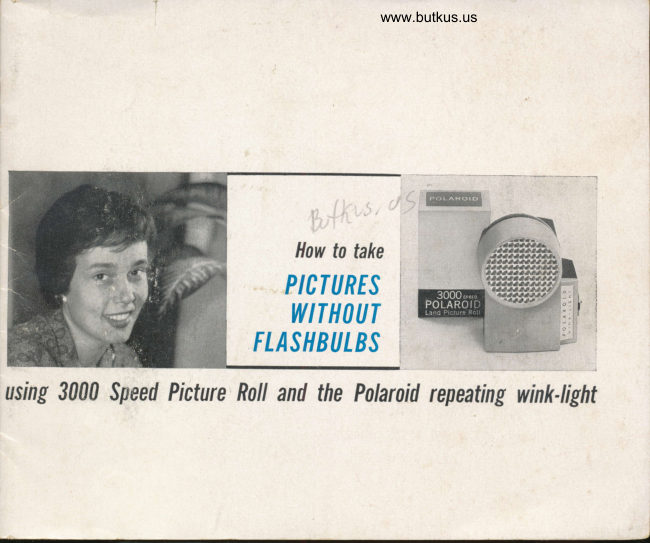
Polaroid 3000 Wink Flash
User manual
13 pages · EnglishRead →
PolaroidPDF
Polaroid 315
User manual
50 pages · EnglishRead →
From the M. Butkus archive. Original publisher and archive notices are retained.
Check the model and edition against your equipment.
PDF verified 2026-10-10.