Film cameras
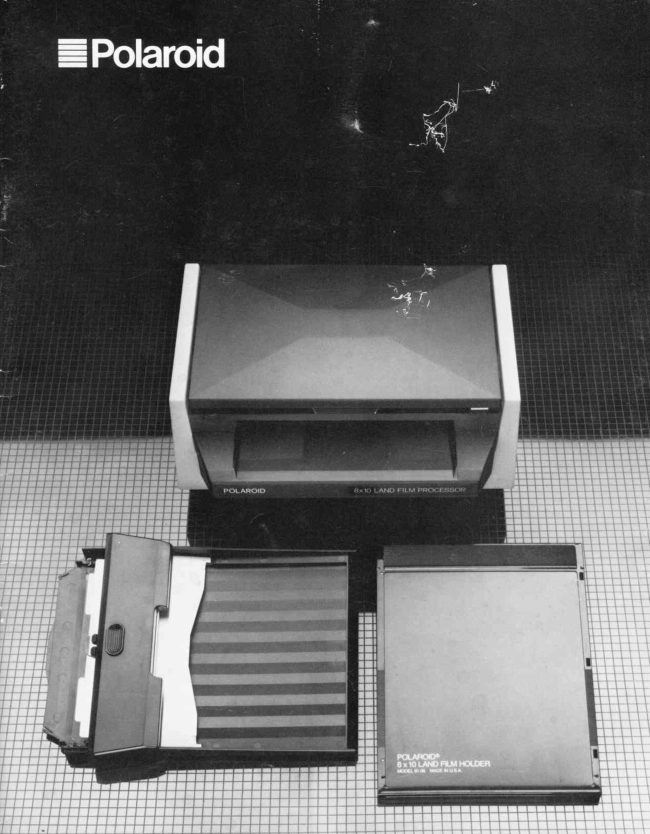
Polaroid 8X10 processor instructions User manual
User manual for Polaroid 8X10 processor instructions. 11 pages in English. Read the original PDF, download or print a copy without registration.
11 pagesEnglish1.8 MB PDF
Loading your manual…Open PDF directly
Document details
- Brand
- Polaroid
- Model / document
- Polaroid 8X10 processor instructions
- Document type
- User manual
- Language
- English
- Pages
- 11
- File size
- 1.8 MB
- Category
- Film cameras
- Document date
- Not specified in catalog
Search available document text
Find a term, then jump to its page in the original PDF. Image-only pages may not be searchable; check the PDF for exact wording and diagrams.
Page 3 · Read text
English

                                                                                                        thatthe fol-    HOWTOUSETHEPOLAROID8 X 10         Underwriters'Laboratories,Inc.(UL)requires
     FILMPROCESSOR,THEFILMHOLDER    lowingsafetyinformationbe providedin the U.S.A.
    MODEL81.06,ANDTHELOADINGTRAY IMPORTANT    MODEL81.09
                   SAFEGUARDS       Introduction                             AS WITH ANY ELECTRICALLY OPBRATED EQUIP-
           Polaroid 8 x 10 photography provides a self-containedlarge-    MENT, BASIC SAFETY PRECAUTIONS SHOULD BE
          format instant photographic system. You need no darkroom,    OBSERVED IN THE USE OF THE POLAROID 8 X 10
         no chemical solutions and no time-consumingprocessing    F I L M P R O C E S S O R T. H E S E A R E P R O V I D E D A S A
          procedures. The Polaroid 8 x 10 film holder can be used on    REMINDER:
         most 8 x 10 camerasthat take standard 8 x 10 film holders, on         I. FOLLOW ALL INSTRUCTIONS.
           specially adapted copy cameras and other cameras of extra      2. DO NOT LEAVE UNIT UNATTENDED WHILE IN
           Iarge format, and on a variety of technicalimaging devices.         USE.
          The system describedin this booklet consistsof:                                                                           3. IF UNIT WILL NOT BE USED FOR EXTENDED
                                                  PERIOD OF TIME, UNPLUG FROM ELECTRICAL               1. Polaroid 8 x l0 film.                                                       OUTLET. GRASP PLUG, NOT CORD, AND PULL TO
              2. The Polaroid8 x 10film holder Model8l-06.              DISCONNECTFROM OUTLET.
              3. The Polaroid 8 x 10 film processor.                             4. DO NOT OPERATE UNIT WITH DAMAGED CORD OR
              4. The processorloadingtray Model8l-09.                   UNIT WHICH HAS BEEN DROPPED OR DAMAGED,
                                                           UNTIL IT HAS BEEN EXAMINBD BY AUTHORIZED
           Please note that the film holder Model 81-06cannot be used      SERVICE RtrPRESENTATIVE.
           without both the processorand the loading tray Model 81-09,      5. DO NOT LET CORD HANG OVER F'RONT EDGE OF
           available separately. For the most up-to-date film information,      TABLE OR COUNTER OR TOUCH HOT SURFACES.
            refer to the instruction sheet packagedwith the film.                                                                            5. UNIT MUST BE GROUNDED. POWER CORD HAS
                                                              T H R E E - P R O N G E D G R O U N D I N G P L U G , W H I C H
     Cameraadaptation                        MUST BE PLUGGED INTO APPROPRIATE OUTI,ET.                                               DO NOT, UNDER ANY CIRCUMSTANCES,REMOVE         To adapt cameras or imaging devices of extra large format for                                              GROUNDPRONGFROM PLUG.
         use with the Polaroid 8 x l0 film holder, some basic require-                                                                              7. IF EXTENSION CORD IS NEEf)ED, USE GROUNDED         ments must generally be met:                                               CORD WITH SUITABLE CURRENT RATING. CORDS
                                                   RATED FOR LOWER AMPERAGE THAN UNIT MAY              1. The film holder must be centered on the lens axis.                                                   OVERHEAT. ARRANGE CORD SO THAT IT WILL              2.  It must lie perpendicularto the lens axis.                                                 NOT BE TRIPPED OVER OR PULLED.
              3. The film must lie in the same plane in the camera as the                                                                              8. TO AVOID ELECTRIC SHOCK HAZARDS, DO NOT              ground glass screen at the time of focusing.                                                  ATTEMPT TO DISASSEMBLE UNIT. FOR SERVICE
                                              OR REPAIR WORK, CONSULT AN AUTHORIZED
     Powersupply                               POLAROIDSEMBLY CANSERVICECAUSECENTER.ELECTRICINCORRECTSHOCK HAZARDREAS.
        The film processor should be operated only at the voltage     WHEN APPLIANCE IS USED SUBSEQUENTLY. DO
          indicated on each unit. Processorsintended for use in the      N O T  I M M E R S E U N I T   I N W A T E R O R O T H E R
          U.S.A. are designed for the 110-120volt supply. For coun-       FLUIDS. DO NOT OPERATE UNIT NEAR WATER OR
            tries with a 220-240volt supply, appropriate processors are      WITH WET HANDS.
          provided.
         A power cord is supplied with the processor. When not in
          use, the cord can be stored in the specialrecessin the base of
          the processor.                   KEEPTHESE                     If electricity is not available, the processing rollers can be
          operated manually with the manual drive arm. Instructions            for it's use are packaged with  it. A manual timer or stop-  INSTRUCTIONS
         watch must also be used, becausethe electronic timer will notI         function.                                                        :
           I nformationandtechnicalassistance
                 If you should require help with your Polaroid 8 x 10 film sys-
          tem, or  if you have any other photographic problem, please
            call us toll free from within the U.S.A. at 1-800-343-5000,
        Mondayto Friday, 8 a.m. to 8 p.m. Eastern Time. Or, write to
          the Polaroid Resource Center, 784 Memorial Drive, Cam-
          bridge, MA 02139. Outside the U.S.A., please contact the
          Polaroid officenearest vou.


                               www.orphancameras.com
View original page 3Page 4 · Read text
Unnecessarilybright and directionallight on photo-    ThePolaroid8 x 10 system                       possible.                                                                 graphicequipmentalwaysintroducesthe possibilityof somelight        Pleaseseethe photoson the fold-outat the backof the booklet.                                                                   leakage.The heatgeneratedby stronglight can alsobe harmfulto
                                                                  the film.
       The film hotder Modet 81-06
        A. Buttons, to unlatch holder
        B. Dark slide (partly removed)                   Cleanlinessis important
        C. Dark slide handle                                   To get the most satisfactoryresults, the equipment and the film
                                                             must be clean.The following require particular attention:        D. Dark slide stop line
        E. Orangetongue, to securenegative envelope                 1. Processingrollers
         F. Negative guide lines                                You shouldwipe the rollersbeforeyou processeach photograph,


                                                                                                         cn=mike butkus,       G. Felt strips (light seal)  mike               DigitallyDN:     signed by mike butkus         to be sure they are free from dust and other foreign matter.
                                                                                                            o=orphancameras,                                                                                                                             ou=29,       Remove the roller accesslid by pressing down with the thumb       The film processor                                                     email=mike@butkus.org,                                                                                                                    c=US                                                                                at the point indicated (fig. 10) and then lifting it out. Press the                                                                                                                         Date: 2017.10.31 10:10:43                                                                                                                                                                   -04'00'
        H. Processingtimer                                                                 processbutton and hold it down and, while the rollers rotate,                 butkus
               l.  Loading tray insertion slot                                wipe a dry, Iint-free cloth back and forth along the full length of
                                                           each roller (fig. 11). Releasethe processbutton. Replacethe        K. Processbutton                                                                                               lid.         L. Processingcompartment(extended)                                                                      Occasionallythe rollers may need a more thorough cleaning.
       M. Lid for processingcompartment (partly open)             Remove the roller assemblyfrom the processorand clean the
        N. Roller assembly(removableunit)                                entire length of the rollers (fig. l2), using a dampenedcloth if
       O. Latchesfor roller assembly                               necessary.
                                                                    Before you reinsert the assembly,remove all dirt and parti-        P. Roller accesslid
                                                                         cles that may have collectedin the processor,below the rollers.       Q. Processingrollers
        R. Location for manual drive arm                            2. Feltstripson film holder
                                                                Beforeyou loadfilm, be surethe felt stripson the film holderare      The processorloading tray Model 81-09                                                                      clean. The felt strips (fig. 13) serve as a light trap. During the
        S. Positivesheetinsertionslot                              use of the holder, these strips may gradually gather dust. At
         T. Film holder insertion slot                                     regular intervals, gently rub a finger back and forth along the
                                                                                    strips, to remove dust. Alternatively, wipe the full length of        The numbersthroughoutthe text refer to illustrationson the                                                             each strip very lightly with the sticky side of a small piece of         fold-outpagesat the backof the booklet.                                                           masking tape. This will collect dust and other particles that
                                                     may have accumulated.
                                                                                                                                                                                    {
    Setup the equipment                           3. Felt stripson loadingtray
                                                            Below eachof the two protrusions indicated by the arrows (fig.      When the processoris in its operating position, it will extend                                                                    14) there is a short felt strip. These strips are not easily visible,       about 30 inches (75 cm) from front to back. Select a working                                                                       but can be easily located with a finger. To keep these strips        surface which is deep enough. Be sure you also have enough                                                                            dust-free, periodically run a finger gently back and forth along       spaceto hold the negative and positive film containers,and for                                                             eachof them.        loading the film holder.
         Place the processorso that its insertion slot is facing toward     4. The positivefilm sheet
       you and is about level with the front edge of the table (fig. 1).                                                                Before you load each positive sheet into the loading tray,       Plug the power cord in at the rear of the processor(fig. 2) and                                                                       inspect it to be sure it is clean. If necessary,gently and lightly         into the power supply socket. Swing back the processingcom-                                                               brush the image-receivingsurface of the sheet with an anti-       partment and its lid (fig. 3). The openedcompartment must lie                                                                                  static brush.        horizontally,as shown,so be sure there is no obstructionbehind
        the processorwhich might prevent this.
          Ifyour processoris new, and has not been used before, you
       must insert the processingroller assembly,which is packaged  Howto usethe system                                          {        separately. Carefully lower the rollers into the well in the                                                                                                                                                                                                                                               '       processor(flg. a). Lower the side near the timer into placefirst     1. Loadthe negative
         1fig. 5); the assembly will  fit only when the circular hole is     Placethe film holder on a flat surface,with the dark slide facing        aligned with the circular pin. Then lower the right side. When    upwards and the dark slide handlefacing to your right. Depress w        the assemblyis seatedproperly, lock it in placeby pushing back     the two blue rectangularbuttons (fig. 15), without at the same
        the two latches (fig. 6). Be sure the roller accesslid is seated    time trying to lift the cover of the holder. Depressingthe but-        properly (fi9.7).                                                                     tons will unlatch the cover and automatically make it spring up
         Hold the processorloading tray in front of the processorin      slightly. You can then open the holder. Open it all the way, so
        the way shown (fig. 8). Insert the tray into the processor,eas-     that it lies flat.
        ing it in gently as far as it will go. It will then sit snugly against       Carefully lift the uppermost negative envelope from its
View original page 4Page 5 · Read text
the envelope must hook securely onto the orange tongue on      earlier. A positive sheet lyrng face up for an extended period
the film holder (frg. 17) and the envelopemust end up in the     might gather dust, which could affect the quality of the
position shown (fig. f8).                                      photograph.
  Be sure neverto pull the negativetab or the other end of the       Carefully  lift  the uppermost positive sheet from  its
envelope.Doing so would separatethe negativefrom the envel'     container. Hold  it so that the side with the image-receiving
ope and renderit unusable(fig. 19).                                 layer, whieh is also the side with the processingpod (fig. 26),
                                                            faces upwards. Do not touch the surface of the sheet and do  Be sure that the negative is centered between the two blue
guide lines on each side of the film holder (fig. 20).                not press on the processingpod area.                                                               Holding the sh-eetwith [h-e pod farthest away from you and  Close the holder and press the cover down firmly to latch                                                                facing upwards, slide it into the tray, below all the metal partsit. Be sure that both ends are securely latched. The three                                                                                    (fig. 27). Slide it in gently until you feel distinct resistance.arrows at the base of the negative envelope must protrude                                             When the sheet is fully and correctly inserted, its edges willfrom the holder.                                                                                         lie within the recessedarea of the tray (fig. 28).
2. Removethe negativeenvelope                    Do not attempt to load a positivesheet into the film holder.
Pull out the negative envelope at the base of the film holder,    6. Removethe film holderfromthe cameraor imag-
where you see the three arrows. Do this with care, because   ing deviceand insertit into the processorloadingincorrect envelope removal can result in blemishes in the fin-                                                      tray.ished photograph.
  Never press or squeezethe film holder; never bend or    Be sure the paper negativetab is straight, and not bent or
crimp the protruding envelope; always pull the envelope out      folded.
straight (not up or down or sideways); pull the envelope out       With the dark slide facing down and the paper negative tab
slowly, all the way.                                           toward the processor, place the film holder into the tray and
  The following method of envelope withdrawal is easy and     begin to slide it in. The tab must feed in between the two
safe.                                                      metal parts (fig. 29). To enable the holder to enter the tray,
  Lay the film holder on the film processor with the edge of     press down at the points indicated (fig. 30) while you are
the envelopejust behind the roller assembly (fig. 2l). The    pushing the holder in. Push it in as far as it will go. The
dark slide and the three arrows on the envelope must face     holder will be properly and fully inserted when it is in the
upwards. Grip the envelope at each end without bending it.      position shown (frg. 3f ).
Draw the envelope and holder forward horizontally. Do not    7. Setthe timerand processthe photographraise them. The holder will be held back by the raised roller
assembly(frg. 22) as the envelopecomesout.                 The processingtime extends from the time the processbutton
  Discard the envelope. Do not pull the negativetab that pro-       is pressedto the moment the positive photograph is separated
trudes from the upper end of the film holder.                   from the negative. Set the timer  (fig. 32), following the                                                             processing directions in the film instruction sheet.  A useful tip: When you load several film holders at the same                                                           For a processingtime of up to 90 seconds,set the timertime, do not remove all the envelopesright away. Remove
each envelopejust before you are ready to load the holder     switch to "sec." The green light will go on. Set the green
involved into the camera. This will enableyou to easily distin-     scale on the dial to the appropriate time. For processing times
guish between unexposed and exposed negatives. It also     longer than 90 seconds,set the switch to "min." The red light                                                      wiU go on. Set the red minute scale to the required time.serves as an added protection against light leakage.                                                         Press the process button (fig. 33) and hold it down for
3. Insertthe film holderintothe cameraor imaging    about one second.The green or red light will begin to blink.
device                                             The negative and positive sheets will be drawn together and
Do this in the way you would insert a conventional 8 x 10 film     transported between the processing rollers. The rollers will                                                        break the pod and spread the processing chemicalsevenlyholder.                                                      between negative and positive. The film "sandwich" will be
4. Removethe darkslide,makethe exposureand        automatically deposited in the processing compartment.
reinsertthe darkside                              Some film types are light-tight during the processing cycle,
Pull the dark slide out by its blue handle (fig. 23). Pull     making it permissible for you to open the processing compart-
straight and slowly. You can remove the dark slide com-    ment lid at any time. Other films are light-sensitive during
pletely from the film holder. Do not pull the paper negative     processing, and require that the compartment lid remain
                                                            closed for the full processing time. For specific details, seetab.
   After making the exposure, reinsert the dark slide and     your film instruction sheet, or contact us.
push it in all the way. Be sure to insert  it into its proper slot    8. Peelthe positivephotographfromth'enegative (frg. 24), and not into the slot which is already occupied by                                                              At the end of the processingtime a signal will sound, and thethe negative tab. The blue dark slide handle must come to                                                         green or red light will stop blinking (and glow continuously).rest adjacent to the blue edge along the top of the holder. Be                                                                                     Lift the processingcompartment lid (but not the entire com-careful not to fold or bend the negative tab.                                                            partment) and remove the filrn (fig. 34). Immediately peel the  You need not necessarilyremove the dark slide entirely                                                              positive photograph from the negative in one continuousfrom the film holder, in order to make a photograph. The stop                                                           motion. Start at one of the cornersnear the tab end (fig. 35),line across the dark slide (fig. 25) indicates clearly how far                                                     and not at the other end. Hold the positive by its corner and thethe slide must be withdrawn to ensure that the whole image                                                           negativeby the black paper strip. Beginthe peeldiagonallyandarea will be exposed. Pull the slide out until the stop line is                                                    end it in such a way that the entireextentof the longerborderofjust visible.                                                             the positiveseparatesat the same moment(fig. 36). This will
5. Loada positivesheetinto the processorloading     ensure that the mask and chemicalremnants stay on the nega-
tray                                                                    tive, leavingyou with a cleanpositive.Fold the negative,moist
Do this just before you are ready to proeess the film, and not     side in, and disposeof it. Avoid all contact with the remaining


                          www.orphancameras.com
View original page 5Page 6 · Read text
chemicalson the negative.                                    processingcompartment. You can then process the next pic-
   Closethe processingcompartment lid in reaclinessfor the      ture. (Never insert a picture for processingwhile one is lying processingofthe next photograph.                                   in the compartment.) Repeat this procedure for all the pic-   #- * l
   To removethe empty film holder from the loadingtray, slide     tures you have to process, removing each from the compart-                       ;. &l  l
 the holder out by simultaneouslypushing forwardon the tray    ment when you hear the timer. Remember that each picture
 and towardthe rear on the holder, as inclicatedby the arrows    must be timed separately. (fig. 37). Do not try to  lift the film holder out or to sliclethe      Handle all film very carefully during proeessing. Be sure     :Y
 holder out with the tray.                                        the entire negative and positive remain in contact with each
                                                                    other. Reset the timer before you processindividual pictures
                                                              again. (Seealso cLEANLTNEssrs rueonretvr.)                                                                                                                                                                                                                                                                                                               triil  Caution   The Polaroid film process uses a caustic jelly which is    Warranty(U.S.A.only)                                                                                                            ,    safely packed inside sealed containers on each 8 x 10      Each Polaroid 8 x l0 film processor,Polaroid 8 x l0 film holder,
                                                                                                                                                                                                                                                                                                                                                                                                       ..i.    positive sheet. lf accidentally you should get some of      and processorloading tray has been thoroughly inspected                  ,tt                                                                                                                                                                                                              ,    this jelly on your skin, wipe it off immediately.To avoid      and tested before shipment. All parts are guaranteed
   an alkali burn, wash the area with plenty of water as       against defects in material and workmanship for one full year
   soon as possible. lt is particularlyimportant to keep the       from the date of original purchase. During this period, any
    jelly away from eyes and mouth. Keep the discarded      such defects will be remedied by Polaroid Corporation with-
    materials out of reach of children and animals and out        out charge and Polaroid will pay the transportation costs to
    of contact with  clothing and furniture,  as discarded      and from the Service Center.
    materials still contain somejelly.                              This warranty does not cover damage caused by accident,
                                                       misuse or tampering with the equipment, and a charge will be
 Handlingand careof photographs         madeFor forwarrantysuch repairs.service, the equipment must be returned to,
 Until the separatedpositive photographs are completely dry,     and repaired by, a Polaroid Service Center (see list on back
 do not lay them on top of each other or touch the image sur-     page).
 face. (The drying may take from a few minutes up to about       This warrantyexcludesall consequentialdamages.
 one hour, dependingon the film type and the humidity.)
  Once dry, the photograph is best stored in a suitable indi-       Beforeyou return your equipment for repair, pleasecontact
 vidual protective sleeve, designedto protect it from abrasion     us. We can advise you how you can get service in the quickest
 as well as from unfavorable chemicalaction. For details about    and most convenient way. We can also advise you on proper
 suitablesleeves,pleasecontactus (seerNFoRMArroNANDTECHNT-  packaging.In the U.S.A., use our toll free number (seepage
 cALASSrsrANcn).Do not stack photographson top of each other      3). Or, call your nearest Polaroid Service Center (see back
 without protection. Store photographs in as dry and cool an     page).
 environmentas possible.
                                 Warranty(outsidethe U.S.A.)Howto removethe loadingtray               Each Polaroid 8 x 10 film processor,Polaroid 8 x 10 film holder,
 The loading tray can only be removed when the film holder is    and processorloading tray has been thoroughly inspected
 not in the tray. With your thumb, depress the tray at the    and tested before shipment. All parts are guaranteed
 point indicatedby the indentation (fig. 38) and, at the same    against defects in material and workmanship for one full year
 time, pull the tray out in the direction of the arrow.              from the date of original purchase. During this period, any
                                                       such defects will be remedied by Polaroid Corporation with-
Storageof the equipment                     andout fromchargetheandServicePolaroidCenter.will pay the transportation costs to
 Keep your Polaroid 8 x 10 film system clean. When the equip-       This warranty does not cover darnagecaused by accident,
 ment is not in use, remove the loading tray. Close the proces-    misuse or tampering with the equipment, and a charge will be
 sor and the film holder. Store the equipment in a dust-free    made for such repairs.
 place.                                                      For warranty service, the equipment must be returned to,
                                                     and repaired by, a Polaroid Service Center.
                                                     The abovewarrantyand provisionsdo not affect your statutory
Processing photographs                                rights.
 in rapidsuccession                                                           Beforeyou return your equipment for repair, pleasecontact
 If you wish to processa number of pictures in rapid succes-    the nearest PolaroidServiceCenter. We can advise you how
 sion, you will not be able to use the timer in the normal way.     you can get service in the quickest and most convenientway.The processingof each picture will have to be timed with a   We can also advise you on proper packaging.    #separatetimer or clock.
  This method can only be used with film which can safely be
processedin the light (such as Polacolorfilm). Any film typewhich is requiredto be in darknessduring processingmust   Registration
remain in the closed processingcompartmentfor the full     Please complete the registration card which is included with
processingtime. See the film instruction sheet or contact us.     your equipment, and return  it to us. We will put you on our
(See rrvronMATroNAND TECHNTcALAssrsreNcn.)                        mailing list, so that we can keep you informed of the latest
  Set the timer on the processorto 15 seconds.Insert the    developmentsin Polaroid films and gquipment, and their appli-
positive sheet and the film holder into the processorloading     cations. In this way you can be sure that you will always get
tray in the normal way and press the process button. When     the best and most effective results from your Polaroid
the timer sounds after 15 seconds.remove the film from the     photography.
6                                                                                                                                                                                                     4lI
View original page 6Page 7 · Read text
Possiblepicturbproblemsandtheircause

Blackpicture                                                                       . Negativeenvelopenot removed
                                                                                             . Darkslidenotpulled
                                                                                             . Extremeunderexposure
                                                                                             . Shutterfaulty

Whiteprintorcleartransparency                                     . Negativeloadedbackwards
                                                                                             . Extremeoverexposure
                                                                                             . Shutteropenor faulty

Repeateddot pattern(yellowwith colorfilm)                        . Dirtyprocessingrollers

Singleyellowor whitedot                                                     .  Dirt particleon positivesheet

Randomwhitespecks                                                          . Duston positivesheet
                                                                                             . Feltstripson film holderor loadingtraynotclean

Blacklinealongnarrowedgeof picture                               . Negativenot engagedon holdertongue
                                                                                             . Darkslidenot pulledfar enough

Positive-negativemisregistrationafterprocessing             . Positivesheetnot loadedproperlyintotray

Filmassemblyfailsto passinto processor                          . Negativetab is bent
                                                                                             . Negativenot loadedbetweenblueguidelinesin
                                                         film holder

Blotchor V-shapein picture                   (                         . Negativeprobablynot handledwith sufficientcare
                                             (wassqueezedor kinked)

Poorcolorquality                                                                . Mismatchof positive-negativecodenumber
                                                                                             . Processedfor too shorttime
                                                                                             . Unsuitableprocessingtemperature

Negativeprotrudingfrom bottomendof holder                   . Negativenot engagedon holdertongue

Picturecornersm issing                                                        . Excessivecurlof positive,causedby improper
                                                 (extremelydry)environment

Maskadheresto oictureborder                                          . Photographnot peeledcorrectly(seeprrl rHEposrrvE
                                             PHoTocRAPHFRoMrHr nrcnrrvE)


                         www.orphancameras.com
View original page 7Related documents and language editions
PolaroidPDF
POLAROID 220
User manual
37 pages · EnglishRead →

PolaroidPDF
POLAROID 350
User manual
53 pages · EnglishRead →

PolaroidPDF
Polaroid 108 film information
User manual
5 pages · EnglishRead →
PolaroidPDF
Polaroid 110A
User manual
30 pages · EnglishRead →

PolaroidPDF
Polaroid 125
User manual
23 pages · EnglishRead →

PolaroidPDF
Polaroid 135
User manual
25 pages · EnglishRead →

PolaroidPDF
Polaroid 210
User manual
27 pages · EnglishRead →

PolaroidPDF
Polaroid 215
User manual
25 pages · EnglishRead →

PolaroidPDF
Polaroid 225
User manual
29 pages · EnglishRead →

PolaroidPDF
Polaroid 230
User manual
28 pages · EnglishRead →

PolaroidPDF
Polaroid 240
User manual
27 pages · EnglishRead →
PolaroidPDF
Polaroid 3000 Wink Flash
User manual
13 pages · EnglishRead →
From the M. Butkus archive. Original publisher and archive notices are retained.
Check the model and edition against your equipment.
PDF verified 2026-10-10.