Film cameras
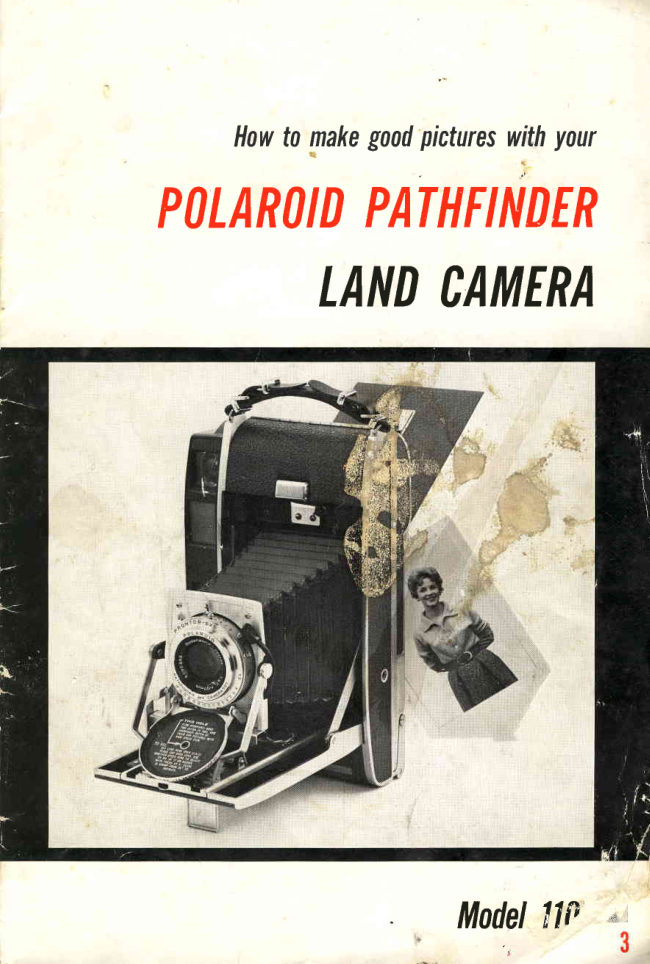
Polaroid Pathfinder 110B User manual
User manual for Polaroid Pathfinder 110B. 21 pages in English. Read the original PDF, download or print a copy without registration.
21 pagesEnglish3.8 MB PDF
Loading your manual…Open PDF directly
Document details
- Brand
- Polaroid
- Model / document
- Polaroid Pathfinder 110B
- Document type
- User manual
- Language
- English
- Pages
- 21
- File size
- 3.8 MB
- Category
- Film cameras
- Document date
- Not specified in catalog
Search available document text
Find a term, then jump to its page in the original PDF. Image-only pages may not be searchable; check the PDF for exact wording and diagrams.
Page 2 · Read text
Howtomakegoodpictureswithyour
Pr/LARr,IDPAINTIND
    LANDCATIIER


                              *              ModelllP
View original page 2Page 3 · Read text
-.j

  PTEASE                            ,,,.-*-
     Spend a few minutes rdading this book-
      let before you take your first picture.                                  ()J ,"1.,
      Because the Polaroid Land Camera is
    the only camera in the world that takes
    and developsits own pictures, it  is unlike
    any other camera you have ever owned.
   We urge you to read these instructions
     carefully -  not  because the  camera  is                                                                                                          '
     difficult to use, but becauseit is d,ifferent.                                                          {
      This brief instruction book (containing
    plenty of pictures) has been designed to
    acquaint you  with  the unique polaroid
    Land Camera and to be kept as a handy
    guide.
     A few minutes now with  this booklet.
    practicing the operation of the eu-"r".
     will help you take perfectpictureson you.
      first roll.


     Know the Camera            3
       Openingand Closing. . . . .     3
         Setting for Exposure         4
        Focusing and Aiming.        5
       The Shutter Release         5
      Loading the Camera          6
      Taking the Picture.                      I                                                                                                                 .  l
      Developing the Picture.                 I
      Coating the Print.                    tl
     More About Exposure_         t2
      Using the f7'90Aperture.  . . . . . .  14
      Taking Indoor Pictures          l5
      Making Time Exposures. . . . . .   l6
      Using the Self-Timer.           l6
      Selectingthe Film           11
      Correcting Pictures.            l8
      Care of the Camera.         20
       Print Care.               20
      .Copiesand Enlargements. . .    20
                                                                                                                                                                                                                                               .iI
                               www.orphancameras.com l"
\
View original page 3Page 4 · Read text
KNOWTHECAMERA
  Get acquainted with the camera without
any  film  in  it.   First,  try  opening and
closing the camera a few times.
Opening the Camera
  The knob on the  front  eover is the
focusing knob. Do not try to turn  it until
the camera is fully open.
  To open, just press the cover catch and
the cover will pop  up.  Open the eover
fully  until  the braces click and  lock  the
cover rigidly.


                                                                                                                                                                                                                                                                                               Digitally signed by mike butkus
                                                                                                                                                                                                                       cn=mike butkus,                                         mike          DN:o=orphancameras,                                                                                                                                                                                                                                                  ou=29,
                                                                                                                                                                                                                                         email=mike@butkus.org, c=US  Hook  your  fingertip  over  the  metal                                                                                                                    Date: 2017.10.31 15:05:45 -04'00'                                           butkusbracket (A) directly beneath the shutter
and pull the shutter slide all the way out
until  it locks firmly in place. Pictures will
be blurred   if  the  slide  is not  fully  €X-
tended and locked.


Closing  the Camera
  Always  turn  the focusing knob so that
the scale in the bed of the cover  is set to
 infinity  before closing the cover.
   Press the slide release (the,black  eenter
 piece on the metal  bracket)  and push the
 shutter  slide all the way back.


   To close the cover, hold as shown, press
 the  side braees  with  both  thumbs  and
 squeeze the eamera cover shut.


                                   3    i
View original page 4Page 5 · Read text
Setting for Exposure
    Flip down the Lens Cap (A) by the
 half-moon cutout on the left side of the
  rim.   If you're a camera neophyte and at
  first glance the  controls appear compli-
 cated, remember that you need master
 only the three simple steps below to get
 good pictures. A more detailed discussion
 of exposure setting  is given on pages 12
 and 13.
   For most pictures you can just eon-
 centrate on the EV  pointer  (B), which
 changeswhen the aperture control (C) and
 the shutter speedring (D) are moved. EV,
 by the way, means Exposure Value, and
 is discussedmore fully on page 12.

 Three Basic Steps for Setting Exposure
    fn making your "dry run", let's assume
 you are outdoors and the camera is loaded
 with 3000 speed film.  To set exposure,
 here is what you do:
    1. Set the red notch on the shutter
 speed ring  opposite the  l/725  setting.
 (In low light levels,or with low speedfilms,
 use lower shutter speeds.)
   2. Point  your  Polaroid  Model  GZ\    1. SetShutterSpeed
 Exposure Meter at your subject and read
 the EV number for the seene. If you do
 not have the meter, you  will  find  the
 proper EV number in the Picture Tips
 packed rvith each roll of film.
   3. Move the aperture control (C) until
 the EV pointer (B) is opposite the number
 you read on the meter or Picture Tips.

 Using the Full Range of EV Numbers
  When your shutter speedis set at 7/125,     2. ReadEVNumber0n Meter
 the range of EV numbers is from  lIrZ
 to  18. In  certain situations, higher or     3. SetNumber0n EVRing
 lower EV numbers will be called for.
  Lower EV numbers are required on dull
 days outdoors, on indoor pictures at night,
made with the wink-light, and on pictures
made indoors by light through windows.
By using lower shutter speeds, you can
set the camera to lower EV numbers. For
example,at 7/30, the range of EV settings
extendsfrom EY 8% to 16.
  Numbers higher than 18 are required
only  in  very  bright  scenes, when 9000
speed film is used. For these,use the Lens
Cap aperture as describedon page 14.
t+                            www.orphancameras.com
View original page 5Page 6 · Read text
Focusing and Aiming
  Your Model 1108 has a coupled range-
finder-viewfinder  system.   By  looking
through a single window, and turning the
focusing knob, you center your subject
and focus at the same time on any subject
from 3 feet to infinity.
  Hold the camera as shown and look
through the window in the back of the
camera. You  will see a triangular yellow
spot, and a rectangle of broken yellow
lines. The triangular spot is your focusing
guide, and the rectangular broken lines
are the viewfinding guide.


  Focusing: Try  aiming the camera at
a person,centering the yellow spot on the
nose or eyes. You will see a double image
within the yellow spot. Turn the focusing
knob until the two images blend into one
sharp image. When they coincide exactly,
the camera will be in focus.


  Aiming: When you turn  the focusing    Notln Focus
knob, note that the viewfinder field de-
fined by the yellow lines becomes larger
or  smailer, and  shifts  position  slightly.
The cioser the subject, the less area there
will be inside the lines.
  The  viewfinder  optical  system  auto-
matically corrects for parallax and field
size when you  focus the camera. This
means the area within  the yellow  lines
will always show exactly what will appear
in the finished print. You should always
frame your subject within these lines.

The Shutter Release                                                          ln FocusAndCentered
  The Pathfinder shutter must be cocked
before a picture can be taken. With  the
camera facing you, push the cocking lever
 (A) as far to your  left as it  will go. The
shutter is now cocked.
  Hold the camera firmly  against your
face (just as you did above when focusing),
and press gently on the shutter release
 (B). A light pressureis all that is needed
to releasethe shutter. Don't punch it -
use a steady squeezingpressure to avoid
camera motion. Practice cocking and re-
leasing the shutter several times -    it  will
pay dividends in sharp pictures.
View original page 6
Page 7 · Read text
LOADINGTHECAMERA
  Avoid opening the film or loading the
camera in  direct sunlight, because you
may fog the film. Find some shade, or  if
none is available, turn your back to the
sun and shield the fllm with your body.
  When you remove the  film  from  the
box, save the  print  coater and printed
 Picture Tips which come with   it.  (The
 Picture Tips contain up-to-date informa-
 tion about the film and an order blank for
copiesand enlargements.)


  To prepare the camera for loading, hold
 it  as shown  and  swing  the  latch  Iever
down.  The back will open slightly.


  Set the camera down on a flat surface,
then lift open the back cover and lay  it
flat.
   Lift up the inner panel and lay  it  flat.
This is the position in which the camera
 is loaded.


  Before  loading, examine  the  rollers
(arrows). The two  steel rollers are the
heart of 60-secondphotography. The pic-
ture  roll papers will pass between these
roliers, which squeeze the developer re-
agent evenly between the  positive and
negative sheets.
    It  is important  to keep these rollers
clean. Use a damp cloth to remove any
specksor depositsthat may appear on the
rollers as the camera is used.

                            www.orphancameras.comnu
View original page 7Page 8 · Read text
Remove  the  film  carefully  from   its
 foil wrapper. The film  actually contains
two rolls: a large white (positive) roll and
a spooled (negative) roll.  When you un-
wrap the film, be careful not to break the
 Scoteh Brand Tape sealson the top of the
spooledroll and the underside of the large
 roll (arrows).
  Drop the rolls into the wells on either
side of the bellows. as shown.


  Now close the inner panel, folding the
film leader over the steel roller on the edge
of the inner panel.


  Lay the leader flat between the guides
(arrows) at the outer edge of the panel.
Be sure the white paper lies smooth and
flat, not tucked into the well.


  Then close the back eover, squeeze it
tightly  shut, and swing the latch  all the
way to the left to engage the prongs, then
all the way to the  right  to  lock. There
will be a short tab of black paper extend-
ing beyond the cutter bar.
View original page 8
Page 9 · Read text
Important: Hold the camera as shown,
the  left hand under the strap, gripping
the top  of the camera securely. If you
hold the camera in any other way, you
are apt to pull the tab out at an angle'
which can iause  it to mistrack and tear.
  With  your  right  hand,  lift  the cutter
bar by  its plastic edge and grip the tab
firmly.


   Pull the tab straight out until  it comes
to a firm stop. Don't be surprised if you
seem to be pulling out a lot of paper on
this first pull. You must pull out the en-
tire leader (about 15 inches) before the
film stops, but  it will stop automatically.


   Close' the  cutter  bar by  pressing it
 all the way down.  It will latch closed,and
you can now tear off and discard the ex-
cesspaper. (NaturallY, You will discard it
 carefully -  don't be a litterbug!)


  The camera is now ready for the first
 picture. You can always tell what picture
 is ready to be taken by lifting the cutter
 bar and looking at the tab beneath it.


                            www.orphancameras.com
View original page 9Page 10 · Read text
TAKINGTHEPICTURE
  Now that the camera is loaded you are
 ready to take your first picture. Note that
 the following simple steps are also sum-
 marized on the back door card of your
eamera:
   Set Exposure: As described on page 4,
set the shutter speed you want. Find the
correct EV number on your meter or in
the Picture Tips. Set this same EV num-
ber on the camera. Then cock the shut-
 ter as shown at right.
  Focus the Camera: Center the triangu-
lar yellow spot on the most important part
of the picture and turn the knob until the
two images blend into one sharp image
 (seepage 5).
  Take  the  Picture:  Hold  the camera
firmly  against your cheek as shown for
vertical  or  hoizontal   pictures. Center
your  subject  within  the  broken yellow
Iines and  squeeze the  shutter  release
slowly. (Remember, don't  punch   it -
you will jar the eamera and get a blurred
picture.)
  You have now taken the picture. It  will
not  start developing  until you  pull  the
tab. (Some people have been known  to             HoldThisWayForVerticalPictures
snap the picture, wait a minute, then pull
the tab and immediately remove the print
-  a very faint underdevelopedone.)


                                                                 HorizontalPictures


DEVELOPINGTHEPICTURE
  Hold  the camera with  the  left hand
under the strap.  It  is important to hold
it  this way to assure correct advance of
the film.
  Throw the red switch (arrow) in  either
direction to releasethe fltm. (If you should
throw the switch accidentally at any time,
don't worry -  no harm is done.)
View original page 10Page 11 · Read text
Pulling the Tab
  Shield the camera from direct sunlight
when you pull the tab.
  Open the cutter bar by lifting the plas-
tic edge and take a firm grip on the paper
tab. You'll  find the best grip to use is
along the  length  of  the  forefinger and
thumb. as shown.


   Pull the tab straight out with a single
motion. PuIl it about as hard and rapidly
as you might pull down a window shade;
not hard enough to pull the shade off the
roll  (or the film  off the spool), but not
slowly and hesitantly  either. Remember,
the film will stop automatically.
  Note:   If  the tab  will not  pull easilY,
throw the red switch again.


   After you pull the tab, press down to
 latch the cutter bar; and tear off and dis-
 card the excesspaper.


WAITRECOMMENDED
DEVELOPMENTTIME
   Pulling the tab has started the develop-
ing process-  and advanced the film into
 position for the next picture. Follow the
 instructions  in  the Picture Tips  for de-
velopment times under various conditions.
                            www.orphancameras.comt0
View original page 11Page 12 · Read text
When the development time is up, slide
   back the latch on the print door and open
    the door.

IIr        Lift  the  print  out  earefully,  starting
    with  the cutout. Don't  let the print  fall
    back on the damp negative. Then close
   and relatch the print door.


  COATINGTHEPRINT
      Coat each print as soon after removal
    from the camera as possible. If you coat
    your print properly,  it  will last as Iong as
    any fine print.  First remove the curl by
    drawing the print face up over a straight
    edge, such as the camera edge, as shown.


      Appiy the print coater along the entire
     length of the print, including edges, bor-
                   For the last two or threeIfl  Iappingders andstrokes.corners, with 6 or 8 flrm  over-
$   pictures in  each roll,  press the  coater
Ittl   hard against the tab end of the print (not
     the image) for a moment to releaseextra
      liquid,  then spread the  liquid  smoothly
     acrossthe print.
       Note:  If a clean, flat coating surface is
     not available, flatten the fiIm box and store
     the prints within   it  until you get home.
        If  you have the  Model  310 Polaroid
    Deluxe Fitted Case, use the built-in  coat-
     ing platform to coat prints on the spot.
View original page 12Page 13 · Read text
MOREABOUTEXPOSURE
    Simplifiedinstructions for setting shutter
  and lens are given on page 4. Here are
  further  suggestions which  will  help you
  explore the full range of the camera.
     Start  with  the EV  (Exposure Value)  __
  Number:  No  matter  what  shutter-lens
  combination you finally select for a given
  picture, there is one EV number which is
  best for that scene.
    This EV number represents the exact
 amount of light which must pass through
  the camera lens to produce a picture that
  is neither too light nor too dark.
    This amount of light is governed by the
 size of the lens opening (aperture; and the
 length of time the shutter remains open
  (shutter speed).


   Before discussinghow to choosethe best
 shutter-lens combination, let,s look at the
 shutter and lens settings available.


   fn general, you will want to use as small

                                                SettingAperture


                                                SettingShutterSpeed


l2                         www.orphancameras.com
View original page 13Page 14 · Read text
Choosing Between Fast Shu-tter Speed
and Maximum   Depth-of-Field:  For  a
given EV  setting, the  faster the shut-
ter speed you use, the smaller will be
the  depth-of-field, and hence the rnore
critical  the   f ocusing requirements  (see
table below). This  is because the faster
shutter speeds must be offset by larger
lens openings.                r the lens
ing, the less
  The nature of the picture you wish to
take will govern whether to set for fast
shutter speed or maximum depth-of-field.
This is demonstrated by the two pictures    UseFastShutterSpeed         UseSmallAperture
at right. In the water-skiing picture, stop-
ping action is the main concern; in the
other, you wish to get everything in focus.
  EV  Interlock:  The shutter provides a
convenient locking lever that  ties shutter
and lens controls together for any particu-
 lar EV number. Here's how to use it: set
the EV pointer to the number indicated
 by the meter. Then push in on the locking
 lever (A) and movb it upward to the solid
 black circle. Aperture and shutter are now
 locked together.
  You can now turn  the shutter sPeed
 control ring as far as it  will go in either
 direction and still preserve the same EV
 setting. This will help you choose between
 faster shutter speedsand smaller apertures
 for any given EV number. Release the
 Iock to reset to another EV number.
   Gauging  Depth-of-Field:  When  You
 have focused your cameta, the arrow on
 the focusing scale in the camera bed (B)
 will point to the distance from lens to sub-
 ject. The guides on either side of the arrow
 indicate depth-of-field at apertures of.f-/16
 andf.l32. For example,with the camera fo-
 cused.at 6 feet with an aperture of. f /32,
 the depth-of-field is from  4rl  to 10 feet
 from the lens.


      TH I STA B L ES H O W SD E P T H . OF-FIELATDTHETHREEL ARGE S AT P E RTUR ESANDT HEF /90 APERT UREIN T HE LENSCAP
     DistanceFocusedon                f /4.7                                      f /5 .6                       f/8                                         I /90*
           3 ft            2tLIV4tl  lO  3t3/4tt            2tILtt   lO  3tLtl              2tI\1/4tt     to  3t]-3/4tt            LStt   to 30/
           31/zlt           3t5tl      tO  3t7tl              3t4il     to  3t7tl             3t3i/2il     to  3t8r/2tt             1,9tt  to 50/
           4 f L   .  .        3 t l l t l       to  4t2il             3ttOtt   to  4t2tl              3tL\il       4t4tt                   20tt   tO Inf.
           5 ft             4tL1tl      to  5t2il              4t9tt     lo  5t4tl             4t8il        to  5t6tt               22tt   to  Inf.
           6 ft               stIotl      to  6t4t              5t6tt    to  6./6/             5t6il        to  6/8//               24tt   to  Inf,
           8 ft              7t6tl       to  8t7il              7t4tt    to  8/11/              7tIlt        Io  9t4t.t               26tt   tO Inf.
         10 ft              gt1tl          t o 1 1 /              9t       to  ILtTtl            gt7il        Io  L2t4tt              27!t   to  Inf,
         15 ft             L3t2tl     to  L7tI1il            I2t7tt   to  l8t6tl            !2t         to  2tt                 29tt   to  lnf.
          25 lt           201      to 34/         19/   to 371             !7t         to  47t                    3I't    to  Inf.
         50 ft           33/      to 105/       30/   to 160r          26t         to  Inf.                 33//   to  Inf.
           lN F .           9 3 /      to Inf.        74t   to Inf.           52t         to  Inf.               35tt   to  Inf'
         *Distancesindicated lor  f /g0 are based on adequatesharpnessfor un-enlargedviewing (.008 inch circle of
           confusion). For critical sharpness(.005 inch), if enlargementis planned, decreasedepth approximalely25Vc.
                                  13
View original page 14Page 15 · Read text
USINGTHEf/goAPERTURE
   The lens cap on your camera has a tiny
  hole which serves as a very small (t/90)
 aperture for use with 3000 speed film in
  bright sunshine. This small aperture does
 two things:
    (1) It allows you to take outdoor pictures
 with 3000speedfiIm without using a filter.
  It also a..ddstwo more EV numbers (20 and
 27) to the normal range of the camera.
    (2)  It provides a tremendous range of
 sharpnessfrom foreground to background
  in your pictures (as shown at right). Focus-
 ing is unnecessary,although you'll be doing
  it automatically anyway in order to frame.
 your picture exactly.
   You can take extreme close-upswith the'
 Iens cap without  auxiliary lenses. Set the
 focus scale to 3 feet, and make portraits
 as close as 18" away in bright light. Do
 note, however, that the viewfi.nder frame
 doesnot correct its aiming angle closer than
 3 feet, which m'eans that  y-ou'll have to
 have your subject center himself in the leni.
   The f/90  aperture can be used when
 exposuresof EV 77 or higher are required,
 with 3000 speedfilm. Simply set the cam-
 era Iens aperture control wide open (f /4.7)
 and close the lens cap over the lens.
   Exposure is set by turning the shutter
 speed control ring to line up the red indi-
 cator mark on the  ring  with  the EV
 number (17 throueh 2l) engraved on the
 edgeof the lens cap. At EV 27, the shutter
 speed will be 7/300; at EV 17, speed is
 1/L5 -  the slowest speed you should use
 for hand-held pictures.
   Ifowever, if you use a tripod or rest the
 earr'era on some support (see page 16),
 you can use even lower shutter speedswith
 thelens cap (to aehievemaximum depth-of-
 field).
   Note: Be sure the EV fnterlock is dis-
 engagedwhen using the lens cap. You do
 not use the numbers on the camera lens
 EV ring when using the lens cap.


                       ApproximateEV settings for 3000 SpeedpolaroidLand picture Roll 0utdoors
                                                            Hazy               Cloudy
                                        Bright           Soft Shadows      No Shadows           DulI
    AVERAGE:       People,pets      20 or 19             1 8                                   L  I                1 6
    BRI GHT:         Beach,snow         2 L            20 or 19               1 8               L 7
    DARK:           Shady,spots        18                              t 7                  1 6              15
               (Note! Table in Type47 PictureTips is for 3000 speedfilm, with a 4-St0pFilter over the cameralens.)

                            www.orphancameras.com14
View original page 15Page 16 · Read text
TAKINGINDOORPICTURES
  At least half the fun of owning a Polaroid
Land Camera is in taking indoor pictures
of family and friends. The Model 1108,
when used with 3000 speed fikn, makes
possible a wide variety of indoor pictures.
They are as ebsy to take as snapping pic-
tures in sunshine. You can take fine day=
time pictures by  just  the  light  from a
window (like the picture of the boy blowing
bubbles).Use the Model 625 Meter or the
Pieture Tips for exposure settings.
  Wink-light   Pictures:  The  repeating
winkJight is the key to taking consistently
good indoor pictures without  flashbulbs.
Its gentle'wink of light erasesshadowsleft
by ordinary room lighting, as shown by the
two pictures of the girl. You may have
obtained the Model 250 winkJight  with
your  Pathfinder  Camera. Spend a  few
minutes reading the excellent instruction
booklet included with   it.  Set the  syn-                          'rM" chronization lever (A) at     when using
the wink-light. The "X"  setting is for elec-
tronic flash and the "V"  setting is for the
lO-secondself-timer (paee 16).


    If you do not have the winkJight, You
may wish to experiment in taking 3000
speed film  pictures with  available light.
You are apt to get strong shadowsin your
 picture from the uneven room lighting, as
 in the picture of the little  girl taken with-
out the winkJight. Use the film as a sort
 of exposuremeter, by taking test pictures
and then correcting errors in exposure on
succeedingpictures.Or usethe special3000
speed tungsten guide mark on the Model
625 Meter. The"Pathfinder's big lens and
slow shutter speeds allow you  to  take
unusual pictures in extremely dim light.                                             WithoutTheWink-light          WithTheWink-light
   Auxiliary Flasher: The auxiliary flasher,
 which comes with the winkJight,  lets you
usetinyAG-l  flashbulbs in situations where
room lighting is so dim, or distance to the
subject so great, that the winkJight can't
 fill  the  lighting  needs itself. Also,  this
 flasher will  let you take flash pictures in-
 doors with Type 42 (200 sPeed)film.

   Electronic Flash:   Set the  flash syn-
 chronization lever to "X".  Then detach
 the synchronization cord (B) and attach
 the cord from your electronic flash unit.
View original page 16Page 17 · Read text
MAKINGTIMEEXPOSURES
   For any time exposure (or at shutter
 speedsof.1/8 or slower), the camera must
 be held rigidly.  If you do not have a tripod,
 pull out the folding support on the front
 cover and stand  the  camera on a  flat
 surface.
  When the shutter speed ring  is set at
 "B"  (for "Bulb," a holdover from the days
 when photographers squeezed a rubber
 bulb to open and close the shutter), the
 shutter will stay open as long as the shutter
 releaseis held down.
   Exposures must be arrived at by  trial
 and error. If the picture is too dark, in-
 creaseexposuretime; if too light, decrease
 exposure time.
  Whether you use a tripod or a table for
 firm support, a cable release should also
 be used to eliminate any camera motion.
 Attach the cable release at  (A)  in  the
 picture at bottom. For vertical mounting of
 the camera on a tripod, the Model 261
 tripod adaptor is available.
  Time exposuresshould be used for pic-
 tures where light is too dim for snapshots,
 and where the  winkJight  or  flasher is
 impractical or not available (long-distance
 outdoor scenesat night, as in the skyline
 seene,for instance).
  Use the f /90 aperture with time exposure
 or shutter speedsof 7/8 or lesswhen maxi-
mum depth-of-field is required at low light
 Ievels. The picture at  right was taken
 with the f /90 aperture and a shutter speed
 of 1 second (EV  13). When settings of
EV L2 br  less are called for, use time
exposuresas directed above.


USINGTHESELF-TIMER
  Your shutter has a built-in 10-second
delay timer which lets you get into the
picture yourself after you have tripped
the shutter release.
  To use it, cock the shutter, move the
flash synchronization lever  (B)  to  "Y",
then pressthe shutter release.The shutter
 will buzz for about 10 seconds,then trip.
  Note: If you use the winkJight or auxili-
ary flasher with  the  self-timer, set the
shutter speed to L/L5 rather than 7/30.
                           www.orphancameras.coml0
View original page 17Page 18 · Read text
SELECTINGTHEFILM
  At  present, you  will probably use two
types  of  film  in  your  Pathfinder Land
Camera; the Type 47 Polaroid 3000 Speed
Land Picture Roll, or the Type 42 Polaroid
PolaPan 200 Land Picture Roll.
  The Pathfinder, with  its versatile lens,
is the perfect camera for Type 47, the
high speedfilm. When you use 3000 speed
film in bright sunshine you will be able to
usea fast shutter speed (to stop fast action
such as a baseball game) in combination
with a small lens opening  (for extreme
depth-of-field).
  The Pathfinder not only gives greater
range in  bright  sunlight;   it can also be
used at much lower light levels than any
other Polaroid Land Camera model.
  The lowest EV number you can use with
other Land Camera models is EV 10. You
can use the Pathfinder to take "hand-held"
pictures at settings as low as EV 8. That
means you can take pictures with  one-
fourth as much light as you need for the
other camera models. When working with
a tripod, you can take pictures at  light
Ievelsas low as EV 6.
  Thus, with the Pathfinder, you will be
taking many unusual and dramatic pic-
tures by firelight  or candlelight, such as
the picture of the little boy at right.
  When used with the Model 250 wink-
Iight (see page 15) 3000 speed film gives
the  Pathfinder  almost  unlimited  range
indoors. With  this combination you  will
be able to take perfect night-time pictures
virtually anywhere in your home without
flashbulbs.
  Type 42 is an all-purpose film with an
ASA equivalent daylight speed of 200. It
is somewhatlower in price than 3000 speed
film, and produces pictures just as sharp
and clear, outdoors and indoors. When
used indoors at night,  it requires the use
of flashbulbs.
   In  every Polaroid Land  Picture Roll
box, you will also find the Print Coater
and the Picture Tips. Save them both.
The Print Coater is essentialfor preserving
your pictures (see page 11). The Picture
Tips, to which we have referred through-
out this book, always has the latest infor-
mation about the film, both as to exposure
and development. It also contains a handy
form for ordering copiesand enlargements
 (seepage 20).
View original page 18
Page 19 · Read text
CORRECTINGPICTURES

  Here is how to spot some common errors
and how to correct them:
  Too Dark: The picture  is underexposed.
Set the camera  to a lower EV number  or
a slower shutter speed.


  Too Light: The picture is overexposed.
Set the camera to a higher EV number or
a faster shutter speed.


  Everything Blurred: The cameramoved.
Be sure to hold the camera securely, and
do not punch the shutter release-  squeeze
it slowly. Try holding your breath when
you press the shutter release.


   Subject Blurred:  The subject moved
as the picture was taken.


   Subject Fuzzy: When another part  of
 the picture is sharp while the subject is
 fuzzy, the camera is out of focus. Be sure
 the two images in the rangefinder guide
 (yellow spot) coincideexactly. Be surebel-
 Iows are pulled all the way out and locked.


                           www.orphancameras.com18
View original page 19Page 20 · Read text
White Areas: Light struck the negative
roll during loading. Do not load in direct
sunlight. Do not break the seals on the
positive and negative rolls when loading.


  Streaks at Print Edge: The tab slot was
not shielded from the sun while the tab
was being pulled. When taking  pictures
outdoors, turn your back to the sun when
you  pull  the tab, so that  your shadow
covers the camera.


  Streaks Aeross  Print:  The  tab was
pulled unevenly. Do not stop or hesitate
while pulling the tab. Pull the tab  fairly
rapidly until the film stops automatically.


  Spots on Print: Evenly-spacedspots on
the picture are caused by foreign matter
adhering to  the  steel rollers. Keep the
rollers clean (seepage 20).


   Dull or Faint Picture: The picture is
underdeveloped.Checkthe PictureTips for
developingtimes undervariousconditions.

                     l9
View original page 20Page 21 · Read text
CAREOFTHECAMERA
   Rollers: The two steel rollers must be
 kept  clean and  free  of  foreign  matter
 which can cause evenly spaced spots along
 the length of the picture.  Before loading
 each roll, turn  the rollers slowly and re-
 move foreign deposits with your fingernail
 or a moistened cloth.
   Plates: Foreign matter may also collect
 on the black interior  plates. Clean them
 carefully with a damp cloth.
   Shutter: Do not leave the shutter cocked
 when eamera is not in use. Do not leave
 the shutter set at  l/300  even when not                                                                                                                      :il
 cocked. The shutter is lifetime lubricated;
 do not oil or attempt to adjust the shutter.
   Keep  the lens  etrean: First  blnw  off
 loose lint  or dust  particles, then  polish
 gently with lens tissue or a soft, lint-free
 cloth.  Always leave the lens cap closed
 over the lens when not taking pictures.

PRINTCARE                                                                                                                                                             -'11
                                                                                          1
   The Print Cc .^er lG r.ilcsa  I rrd plastic
 coating on your  ,-lini.    If you    ,rd or
 creaseyour pictures,   r r'-iie on the bacl,
 of thc print, you can cra,ck this coating,
 which can lead to discoloration along the
 cracks.  Ur': the tab or back edges for
 notes.
  As with any pl,c iograph,  it  is wise n.,t
 to use paste or r":Jber ceme,-i to n,runt
 your  pi.ctures.  Inpurities   in 'many ad-
 hesivesmay causethe  ,ctu. es tr discolor.
 Polaroid Land prints r.ray be sate!1'slored                                                                                                                      a-
 in a Polaroid Picture z'rbum, or in albums                                                                                                                                          :j which have sepa.rate t &r.r,.)arent acetate
 pages.
                                                                                                                                                                                                **'
COPIESANDENLARGEMENTS
                                                                                                                                                                                                                                                                                                                                                                                                                                                                  ill
                                                                                                                                                                                    $  You  can make  exeellent on-the-spot
 eopies of your Land prints (and often im-
 prove on them)  with  the Model  240L
 Polaroid Print  Copier.  Or you can get
 quick,  inexpensive eopies and  enlarge-
 ments from  Polaroid Corporation.  See
 the Picture Tips for copy order blanks and
 further details.
 F1894F "Polaroid" & "PolaPan"@       Printed in U.S.A.
                                                                                                                                   {{
                           www.orphancameras.com b'                                           {                                            J
View original page 21Related documents and language editions
PolaroidPDF
POLAROID 220
User manual
37 pages · EnglishRead →
PolaroidPDF
POLAROID 350
User manual
53 pages · EnglishRead →

PolaroidPDF
Polaroid 108 film information
User manual
5 pages · EnglishRead →
PolaroidPDF
Polaroid 110A
User manual
30 pages · EnglishRead →

PolaroidPDF
Polaroid 125
User manual
23 pages · EnglishRead →

PolaroidPDF
Polaroid 135
User manual
25 pages · EnglishRead →

PolaroidPDF
Polaroid 210
User manual
27 pages · EnglishRead →

PolaroidPDF
Polaroid 215
User manual
25 pages · EnglishRead →

PolaroidPDF
Polaroid 225
User manual
29 pages · EnglishRead →

PolaroidPDF
Polaroid 230
User manual
28 pages · EnglishRead →

PolaroidPDF
Polaroid 240
User manual
27 pages · EnglishRead →
PolaroidPDF
Polaroid 3000 Wink Flash
User manual
13 pages · EnglishRead →
From the M. Butkus archive. Original publisher and archive notices are retained.
Check the model and edition against your equipment.
PDF verified 2026-10-10.